How to Make Short Videos: A Founder's Practical Guide

Learn how to make short videos with a practical workflow. Our guide covers planning, shooting, and editing for founders who need results without the overhead.

Apr 17, 2026

You’ve probably felt this already. You know short video matters, you have ideas worth sharing, and you can talk clearly about your product, market, or craft. But the moment you try to turn that into a polished Reel or Short, the process expands into script notes, camera setup, retakes, captions, cuts, b-roll, resizing, and posting. What should be a simple act of sharing expertise turns into a small production project.

That’s where most founders stall. Not because they lack insight, but because they’re trying to do three jobs at once: subject-matter expert, on-camera talent, and editor.

There’s a better way to think about how to make short videos. Treat it like an operating system, not a creative event. Record what you know. Keep the setup simple. Build a repeatable publishing rhythm. Then remove the one step that eats the most time and attention: editing.

Stop Chasing Viral Hits Start Building a System

A lot of bad advice about short video starts from the wrong assumption. It assumes your job is to make internet fireworks. It isn’t. Your job is to turn expertise into a steady stream of useful clips that help the right people trust you.

A person sitting at a desk and using a digital pen to design a video workflow diagram.

That shift matters because short-form videos drive real business outcomes. 73% of consumers prefer short-form video for product research, and short-form generates 2.5 times more engagement than long-form content, according to Firework’s short-form video statistics. The same source notes that best-in-class videos aim for 50% to 70% watch time, which tells you what matters: retention, not theatrics.

A founder who posts clear, useful videos every week usually beats a founder who disappears for a month while trying to craft one “perfect” clip.

What breaks most workflows

The bottleneck usually isn’t ideas. It’s friction.

  • Recording feels heavier than it should: You think you need a polished script, studio lighting, and multiple angles.

  • Editing becomes a second job: Every pause, mistake, and rough sentence feels like something you have to fix manually.

  • Publishing lacks rhythm: You post one video, wait for a big reaction, then stop when it doesn’t explode.

That pattern kills momentum. It also creates the false belief that short video only works for people with a media team.

Practical rule: Build for consistency first. Polish comes from repetition, not from overbuilding your first workflow.

The strongest approach is operational. Pick a small set of recurring topics. Record in batches. Use the same framing every time. Keep your videos direct. Review what holds attention. Improve one variable at a time.

That’s also why systems beat inspiration. A repeatable process compounds. A viral chase burns time.

If your current content process is too manual to sustain, this broader guide to scaling content creation is worth reading because the actual problem usually isn’t effort. It’s workflow design.

The Zero-Waste Video Planning Process

Most weak short videos are weak before the camera turns on. They wander, repeat themselves, and bury the useful point somewhere in the middle. Planning fixes that. Good planning also protects your time, which matters more than cinematic ambition when you’re running a company.

A tablet displaying a video content calendar alongside a notebook and pens on a brown surface.

There’s a clear market gap here. A research-backed overview of beginner video editing demand notes a 150% year-over-year spike in searches for “easy video editing for beginners no skills” and highlights that professionals who can speak well on camera still struggle to turn raw talking-head footage into finished clips.

Start with three content pillars

Don’t plan videos one by one. Build around a few themes you can return to repeatedly. For most founders, three pillars are enough:

  1. Problems your buyers keep running into
    These videos perform well because they start from pain, not self-promotion. If customers ask the same question in sales calls, that’s already a content prompt.

  2. Strong opinions about your category
    Short video rewards clarity. If you disagree with a common practice, say so. Contrarian takes create a natural hook when they’re grounded in experience.

  3. Proof from the work
    Share lessons from product decisions, customer conversations, failed experiments, onboarding friction, hiring mistakes, or feature rollouts. Keep it concrete and narrow.

A good pillar isn’t broad like “marketing.” It’s focused enough that you can produce ten angles without sounding repetitive.

Use a single-point structure

Founders often over-script because they’re afraid of rambling. The fix isn’t a full script. It’s a single-point outline.

Use this structure:

Part

What it does

Hook

Gives the audience a reason to stop scrolling

Point

States one clear idea

Proof

Adds a quick example, observation, or contrast

Takeaway

Ends with a useful conclusion or action

That’s enough for most talking-head shorts.

Here’s what that looks like in practice:

  • Hook: “Most startup videos fail before editing starts.”

  • Point: “They try to say three things in one clip.”

  • Proof: “The strongest shorts make one claim, support it, and stop.”

  • Takeaway: “If you want better retention, cut the second and third idea.”

That structure sounds natural because you’re not memorizing lines. You’re speaking from a map.

Write for speech, not for reading

Founders who write well often sound stiff on camera because written language is denser than spoken language. Short videos need breath and motion. Use shorter phrases. Leave room for emphasis. Say things the way you’d say them to a smart customer on a call.

If a sentence feels impressive on the page but awkward out loud, it’s wrong for video.

A simple test helps. Read your outline once, standing up, into your phone. Wherever your voice stumbles, simplify the wording.

Later in your planning cycle, it helps to watch a few examples of strong short-form scripting and pacing. This breakdown is useful for that stage:

Build a calendar you’ll actually follow

A complicated content calendar usually dies in a week. A simple one survives.

Try this lightweight structure:

  • Record once or twice a week: Batch several clips in one sitting.

  • Assign each recording block a pillar: Don’t decide topics in the moment.

  • Keep a running idea bank: Pull from customer calls, Slack threads, voice notes, and objection handling.

  • Leave room for reactive posts: When industry news breaks, add one timely clip without disrupting the rest of the schedule.

The point of planning isn’t to make content feel rigid. It’s to remove decision fatigue. When you know what you’re talking about before you record, your delivery gets sharper and your footage gets easier to turn into finished short videos.

Shooting Authentic Videos with Just Your Phone

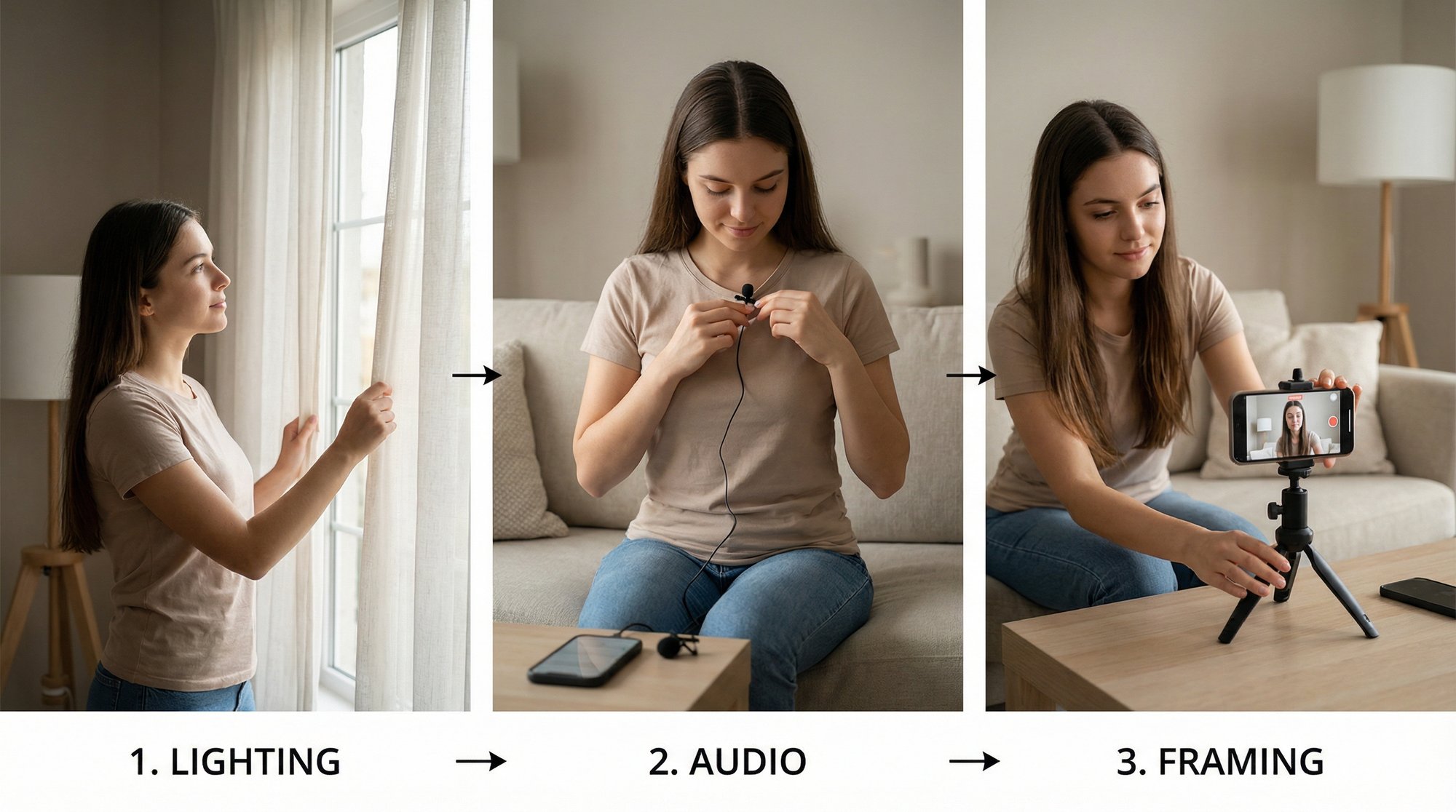
The best camera for short video is the one you’ll use consistently. For most founders, that’s your phone. Modern smartphones are more than capable of producing strong raw footage for Instagram Reels, TikTok, and YouTube Shorts. What separates usable footage from frustrating footage isn’t the device. It’s setup discipline.

A step-by-step infographic titled Phone Video Essentials, showing how to record high-quality smartphone video content.

One of the most useful production truths is that a better setup reduces cleanup later. A professional guide to concise technical video production says a strong pre-production setup can reduce post-production edits by 80%. It recommends 9:16 vertical framing with the rule of thirds, three-point lighting, and a lapel mic with a noise floor below -50dB, noting that this setup can boost shareability by 35%.

Frame for mobile first

Short-form video lives on a phone screen, so compose for that screen from the start.

Record in vertical 9:16. Put your eyes near the upper third of the frame rather than dead center. Leave a bit of space above your head, but not so much that you look distant. If captions will sit lower on the screen, avoid placing important gestures too close to the bottom edge.

A few practical framing rules help:

  • Use the rear camera if you can test framing first: It often produces cleaner footage.

  • Lock the phone at eye level: Looking down into a phone feels less direct and less credible.

  • Keep the background simple: Depth is helpful. Clutter isn’t.

  • Stay the same distance from the lens: Random shifts forward and back make edits harder.

Light the face, not the room

Founders tend to overcomplicate lighting. You don’t need a studio. You do need your face to be clearly visible and consistent from clip to clip.

The easiest move is to face a window. Let natural light hit you from the front or from a slight angle. If you record after dark, use a ring light or small LED panel positioned slightly above eye line.

If you want a more polished look, borrow the logic of three-point lighting without making it expensive:

Lighting element

What to do

Key light

Put your main light at roughly a 45-degree angle

Fill light

Use softer light on the opposite side to reduce harsh shadows

Back light

Add a small light behind you if you want separation from the background

You don’t need to obsess over gear brands. The habit matters more than the kit.

Good lighting doesn’t make you look fake. It makes you easier to watch.

Audio decides whether people stay

Founders usually worry about camera quality first. Viewers notice audio problems faster.

If your room echoes, if your voice sounds far away, or if an HVAC hum sits under every sentence, the video feels amateur even when the image is fine. A simple wired or wireless lapel mic solves most of this. If you don’t have one yet, record in the quietest room available and move closer to the phone than feels natural.

Pay attention to environment before pressing record:

  • Turn off obvious noise sources: Fans, loud AC, notifications, hallway chatter.

  • Use soft materials if the room echoes: Curtains, rugs, chairs, and shelves help.

  • Wear headphones during a test clip: You’ll catch noise you miss in the moment.

A short audio test can save an entire batch.

Deliver like you’re speaking to one person

Most founders become stiff on camera because they start performing. Don’t perform. Explain.

Speak as if you’re answering one smart prospect who asked a specific question. That changes your pacing, your tone, and your word choice. You stop sounding like a brand and start sounding useful.

A few delivery habits work well:

  • Lead with the sharpest sentence, not a warm-up

  • Pause between ideas, not inside them

  • Record extra silence at the beginning and end

  • Do two or three takes when a point matters

You also don’t need to hide every imperfection. Minor natural variation often makes a talking-head clip feel more believable. The footage just needs to be clean enough that editing can shape it without fighting technical problems.

The Modern Editing Workflow Manual vs Automated

Much short video advice proves unrealistic. Recording a useful talking-head clip is manageable. Editing it well, over and over, consumes a lot of time.

Manual editing has value. It teaches you what creates momentum, emphasis, and clarity. It also teaches you why most busy professionals shouldn’t be doing all of it themselves.

A focused woman editing video content on a computer at her wooden desk in a home office.

A detailed breakdown of manual short-form editing workflow describes a process built around constant engagement cuts right before silences, keyframed zooms from 100% to 120% on key statements, and 5 to 10 frame audio fades between cuts. The result can increase average view duration by 1.5 to 2 times on Reels because it removes dead air and keeps visual motion alive.

What manual editing actually involves

If you edit in CapCut, Premiere Pro, or Final Cut, you’re usually doing some version of the same work.

First, you cut aggressively. You remove pauses, stumbles, throat-clearing, repeated phrases, and any sentence that delays the point. Then you smooth the joins so the clip feels intentional instead of chopped up.

After that, you start adding motion and support:

  • Punch-ins on emphasis: Small zooms make a strong sentence feel stronger.

  • B-roll over abstract claims: If you say “our onboarding was messy,” show a dashboard, customer note, or product screen.

  • Captions for silent viewing: They’re not decoration. They help comprehension and scanning.

  • Audio cleanup: The viewer may not name it, but they feel the difference between rough and smooth transitions.

Good editors are shaping attention. They aren’t just trimming footage.

Why most founders quit at this step

Editing demands a different brain than recording. Recording rewards fluency and conviction. Editing rewards patience, repetition, and micro-decisions.

That mismatch creates a predictable pattern. A founder records six decent clips, opens the editing timeline, spends too long on the first one, and starts wondering whether video is worth it. The problem isn’t the format. The problem is that editing expands to fill whatever time you give it.

Here’s the trade-off in plain terms:

Approach

Upside

Cost

Manual editing

Full control over pacing, captions, zooms, and inserts

Slow, cognitively heavy, hard to sustain

Template-based apps

Faster than editing from scratch

Often rigid, generic, and limited

Done-for-you or assisted editing

Protects your time while keeping your face and voice at the center

Less direct timeline control

That’s why the smartest move for many founders is not “learn more editing.” It’s “learn enough editing to judge quality, then offload the execution.”

What good outsourced editing should preserve

A lot of people hesitate to outsource because they assume the result will feel synthetic or overproduced. That concern is valid. Some tools and services smooth the footage so heavily that the final video stops sounding like the person who recorded it.

The right editing workflow should preserve:

  • Your original voice and phrasing

  • Your talking-head footage as the core asset

  • Natural pacing, even when cuts are tightened

  • Visual support that clarifies, not distracts

That’s the key distinction. You want assistance, not replacement.

Outsourcing editing works when it removes friction without removing your point of view.

One practical option is Unfloppable’s guide to making video edits, which also reflects the broader service model: you upload yourself talking, and the footage gets turned into polished short-form videos with cuts, captions, and supporting visuals pulled from the web or your own media library. That model makes sense for founders who don’t want to become timeline specialists but still want authentic talking-head content.

When to edit yourself and when not to

You don’t need a religious rule here. Use judgment.

Edit yourself if:

  • you enjoy the process

  • you need tight creative control on a flagship clip

  • you’re still learning what pacing fits your style

Don’t edit yourself if:

  • you keep recording but never publishing

  • the backlog of raw footage keeps growing

  • your calendar makes deep work in an editing app unrealistic

  • every clip becomes a perfection trap

The practical system is simple. Learn what quality looks like. Record clean footage. Decide what deserves your direct attention. Then push the repetitive cutting, captioning, and b-roll matching out of your own workload.

That’s usually the moment short video stops feeling like a burden and starts behaving like a real content engine.

Publishing and Repurposing for Maximum Reach

A finished video sitting in your camera roll has no value. Distribution is where the return shows up. The useful mindset is to treat each short video as a core asset that can travel across platforms, not as a one-platform post with a short shelf life.

Platform fit matters. So does format fit. A clip can be strong and still underperform if the opening frame is weak, the caption is vague, or the runtime fights the platform’s behavior.

Match the video to the platform

If you’re deciding where to prioritize effort, YouTube Shorts deserves serious attention. YouTube Shorts has the highest engagement rate among major short-form platforms at 5.91%, ahead of TikTok’s 5.75% and Facebook Reels’ 2%, and Shorts in the 50 to 60 second range average 4.1 million views, according to short-form platform and retention data compiled here.

That doesn’t mean every video belongs on only one platform. It means your publishing choices should respect how each platform surfaces content.

A practical breakdown:

  • YouTube Shorts: Strong for discovery and searchable expertise. Clear spoken structure works well here.

  • Instagram Reels: Strong when your audience already follows your work or your niche overlaps with lifestyle, business, or creator culture.

  • TikTok: Strong when the edit feels immediate and native to fast-scrolling behavior.

Build the post around the first frame

On short-form platforms, the first frame does thumbnail duty whether you planned for it or not. If the opening visual is flat, people scroll before your point arrives.

Three publishing habits help:

  1. Start with a direct hook on screen or in speech
    Don’t ease in. Open with the strongest line.

  2. Write captions that extend the point
    The caption shouldn’t restate the video title. Add context, a sharper opinion, or a question that invites replies.

  3. Keep posting cadence predictable
    Audiences build familiarity through repetition. One strong video helps. A reliable stream helps more.

Turn one clip into multiple assets

Repurposing is where short video becomes efficient. One recorded insight can become a Short, a Reel, a LinkedIn post, an email snippet, a sales follow-up asset, and an embedded proof point inside a blog article.

A good repurposing pass might look like this:

Original asset

Repurposed version

60-second talking-head clip

Full post on Shorts, Reels, and TikTok

Strong sentence from the clip

Text post for LinkedIn or X

Key insight from the transcript

Newsletter paragraph

Product explanation segment

Sales enablement snippet

Embedded clip

Blog or landing page support

If you want a broader framework for doing this systematically, these proven content repurposing strategies are useful because they push you to think beyond social posting and into full-channel reuse.

For a founder-led workflow, this is also where a documented process for repurposing content for social media helps. The goal isn’t to squeeze every drop out of every clip. It’s to make sure one good recording session creates several usable outputs instead of one post and a pile of leftovers.

Your First 30 Days of Short Video Content

The first month shouldn’t be about mastering every nuance. It should be about proving you can sustain the process. That means lowering the bar in the right places.

Record ten short videos in thirty days. Keep them focused. Speak plainly. Use the same shooting setup every time. Don’t restart because one take felt awkward.

A simple challenge works well:

  • pick three repeatable topic pillars

  • batch record in short sessions

  • keep each clip centered on one idea

  • publish consistently, even when a video feels merely solid

That last point matters. Most founders overestimate how much polish the audience requires and underestimate how much consistency the audience notices.

Your main job is to become easy to hear from. People trust familiar voices. They also remember people who explain useful things clearly and often.

If editing has been the reason you’ve delayed posting, remove it from your plate. Keep your effort focused on what only you can do: think, speak, and show up on camera. The rest can run through a tighter workflow.

That’s how to make short videos without turning content into a second company.

Frequently Asked Questions About Short Videos

Short videos get easier once the workflow is stable, but a few practical questions come up repeatedly. The answers are usually less complicated than people expect.

FAQ Quick Answers

Question

Answer

How long should my short videos be?

Keep them only as long as the idea stays sharp. If the point supports it, a fuller short can work better than an ultra-short clip.

Do I need a script?

Usually no. A brief outline with a hook, point, proof, and takeaway is enough.

Is phone footage good enough?

Yes, if framing, lighting, and audio are handled properly. Weak setup causes more problems than the phone itself.

Should every video have captions?

In most cases, yes. Captions help viewers follow along quickly and make talking-head clips easier to consume.

How do I know if a topic is worth posting?

If buyers ask about it, prospects misunderstand it, or you have a strong point of view on it, it’s usually worth testing.

Should I reply to comments?

Yes. Replies deepen the relationship and often generate ideas for the next video.

A few judgment calls that matter

ROI usually comes from the system, not a single post. A video might not spike immediately and still be valuable if it sharpens your positioning, gives prospects context, or feeds other channels.

Negative comments don’t require an emotional response. If feedback is thoughtful, use it. If it’s empty or combative, move on. Protecting your attention is part of the job.

One more practical point. Don’t confuse authenticity with lack of structure. Strong short videos still need a clear opening, a focused message, and a clean finish. Natural delivery works best when the underlying process is disciplined.

If you want the benefits of founder-led short video without spending your week inside an editing timeline, Unfloppable is built for that workflow. You record yourself talking, upload the footage, and get polished short-form videos back that keep your voice and perspective intact while removing the production drag that usually stops consistency.

You’ve probably felt this already. You know short video matters, you have ideas worth sharing, and you can talk clearly about your product, market, or craft. But the moment you try to turn that into a polished Reel or Short, the process expands into script notes, camera setup, retakes, captions, cuts, b-roll, resizing, and posting. What should be a simple act of sharing expertise turns into a small production project.

That’s where most founders stall. Not because they lack insight, but because they’re trying to do three jobs at once: subject-matter expert, on-camera talent, and editor.

There’s a better way to think about how to make short videos. Treat it like an operating system, not a creative event. Record what you know. Keep the setup simple. Build a repeatable publishing rhythm. Then remove the one step that eats the most time and attention: editing.

Stop Chasing Viral Hits Start Building a System

A lot of bad advice about short video starts from the wrong assumption. It assumes your job is to make internet fireworks. It isn’t. Your job is to turn expertise into a steady stream of useful clips that help the right people trust you.

A person sitting at a desk and using a digital pen to design a video workflow diagram.

That shift matters because short-form videos drive real business outcomes. 73% of consumers prefer short-form video for product research, and short-form generates 2.5 times more engagement than long-form content, according to Firework’s short-form video statistics. The same source notes that best-in-class videos aim for 50% to 70% watch time, which tells you what matters: retention, not theatrics.

A founder who posts clear, useful videos every week usually beats a founder who disappears for a month while trying to craft one “perfect” clip.

What breaks most workflows

The bottleneck usually isn’t ideas. It’s friction.

  • Recording feels heavier than it should: You think you need a polished script, studio lighting, and multiple angles.

  • Editing becomes a second job: Every pause, mistake, and rough sentence feels like something you have to fix manually.

  • Publishing lacks rhythm: You post one video, wait for a big reaction, then stop when it doesn’t explode.

That pattern kills momentum. It also creates the false belief that short video only works for people with a media team.

Practical rule: Build for consistency first. Polish comes from repetition, not from overbuilding your first workflow.

The strongest approach is operational. Pick a small set of recurring topics. Record in batches. Use the same framing every time. Keep your videos direct. Review what holds attention. Improve one variable at a time.

That’s also why systems beat inspiration. A repeatable process compounds. A viral chase burns time.

If your current content process is too manual to sustain, this broader guide to scaling content creation is worth reading because the actual problem usually isn’t effort. It’s workflow design.

The Zero-Waste Video Planning Process

Most weak short videos are weak before the camera turns on. They wander, repeat themselves, and bury the useful point somewhere in the middle. Planning fixes that. Good planning also protects your time, which matters more than cinematic ambition when you’re running a company.

A tablet displaying a video content calendar alongside a notebook and pens on a brown surface.

There’s a clear market gap here. A research-backed overview of beginner video editing demand notes a 150% year-over-year spike in searches for “easy video editing for beginners no skills” and highlights that professionals who can speak well on camera still struggle to turn raw talking-head footage into finished clips.

Start with three content pillars

Don’t plan videos one by one. Build around a few themes you can return to repeatedly. For most founders, three pillars are enough:

  1. Problems your buyers keep running into
    These videos perform well because they start from pain, not self-promotion. If customers ask the same question in sales calls, that’s already a content prompt.

  2. Strong opinions about your category
    Short video rewards clarity. If you disagree with a common practice, say so. Contrarian takes create a natural hook when they’re grounded in experience.

  3. Proof from the work
    Share lessons from product decisions, customer conversations, failed experiments, onboarding friction, hiring mistakes, or feature rollouts. Keep it concrete and narrow.

A good pillar isn’t broad like “marketing.” It’s focused enough that you can produce ten angles without sounding repetitive.

Use a single-point structure

Founders often over-script because they’re afraid of rambling. The fix isn’t a full script. It’s a single-point outline.

Use this structure:

Part

What it does

Hook

Gives the audience a reason to stop scrolling

Point

States one clear idea

Proof

Adds a quick example, observation, or contrast

Takeaway

Ends with a useful conclusion or action

That’s enough for most talking-head shorts.

Here’s what that looks like in practice:

  • Hook: “Most startup videos fail before editing starts.”

  • Point: “They try to say three things in one clip.”

  • Proof: “The strongest shorts make one claim, support it, and stop.”

  • Takeaway: “If you want better retention, cut the second and third idea.”

That structure sounds natural because you’re not memorizing lines. You’re speaking from a map.

Write for speech, not for reading

Founders who write well often sound stiff on camera because written language is denser than spoken language. Short videos need breath and motion. Use shorter phrases. Leave room for emphasis. Say things the way you’d say them to a smart customer on a call.

If a sentence feels impressive on the page but awkward out loud, it’s wrong for video.

A simple test helps. Read your outline once, standing up, into your phone. Wherever your voice stumbles, simplify the wording.

Later in your planning cycle, it helps to watch a few examples of strong short-form scripting and pacing. This breakdown is useful for that stage:

Build a calendar you’ll actually follow

A complicated content calendar usually dies in a week. A simple one survives.

Try this lightweight structure:

  • Record once or twice a week: Batch several clips in one sitting.

  • Assign each recording block a pillar: Don’t decide topics in the moment.

  • Keep a running idea bank: Pull from customer calls, Slack threads, voice notes, and objection handling.

  • Leave room for reactive posts: When industry news breaks, add one timely clip without disrupting the rest of the schedule.

The point of planning isn’t to make content feel rigid. It’s to remove decision fatigue. When you know what you’re talking about before you record, your delivery gets sharper and your footage gets easier to turn into finished short videos.

Shooting Authentic Videos with Just Your Phone

The best camera for short video is the one you’ll use consistently. For most founders, that’s your phone. Modern smartphones are more than capable of producing strong raw footage for Instagram Reels, TikTok, and YouTube Shorts. What separates usable footage from frustrating footage isn’t the device. It’s setup discipline.

A step-by-step infographic titled Phone Video Essentials, showing how to record high-quality smartphone video content.

One of the most useful production truths is that a better setup reduces cleanup later. A professional guide to concise technical video production says a strong pre-production setup can reduce post-production edits by 80%. It recommends 9:16 vertical framing with the rule of thirds, three-point lighting, and a lapel mic with a noise floor below -50dB, noting that this setup can boost shareability by 35%.

Frame for mobile first

Short-form video lives on a phone screen, so compose for that screen from the start.

Record in vertical 9:16. Put your eyes near the upper third of the frame rather than dead center. Leave a bit of space above your head, but not so much that you look distant. If captions will sit lower on the screen, avoid placing important gestures too close to the bottom edge.

A few practical framing rules help:

  • Use the rear camera if you can test framing first: It often produces cleaner footage.

  • Lock the phone at eye level: Looking down into a phone feels less direct and less credible.

  • Keep the background simple: Depth is helpful. Clutter isn’t.

  • Stay the same distance from the lens: Random shifts forward and back make edits harder.

Light the face, not the room

Founders tend to overcomplicate lighting. You don’t need a studio. You do need your face to be clearly visible and consistent from clip to clip.

The easiest move is to face a window. Let natural light hit you from the front or from a slight angle. If you record after dark, use a ring light or small LED panel positioned slightly above eye line.

If you want a more polished look, borrow the logic of three-point lighting without making it expensive:

Lighting element

What to do

Key light

Put your main light at roughly a 45-degree angle

Fill light

Use softer light on the opposite side to reduce harsh shadows

Back light

Add a small light behind you if you want separation from the background

You don’t need to obsess over gear brands. The habit matters more than the kit.

Good lighting doesn’t make you look fake. It makes you easier to watch.

Audio decides whether people stay

Founders usually worry about camera quality first. Viewers notice audio problems faster.

If your room echoes, if your voice sounds far away, or if an HVAC hum sits under every sentence, the video feels amateur even when the image is fine. A simple wired or wireless lapel mic solves most of this. If you don’t have one yet, record in the quietest room available and move closer to the phone than feels natural.

Pay attention to environment before pressing record:

  • Turn off obvious noise sources: Fans, loud AC, notifications, hallway chatter.

  • Use soft materials if the room echoes: Curtains, rugs, chairs, and shelves help.

  • Wear headphones during a test clip: You’ll catch noise you miss in the moment.

A short audio test can save an entire batch.

Deliver like you’re speaking to one person

Most founders become stiff on camera because they start performing. Don’t perform. Explain.

Speak as if you’re answering one smart prospect who asked a specific question. That changes your pacing, your tone, and your word choice. You stop sounding like a brand and start sounding useful.

A few delivery habits work well:

  • Lead with the sharpest sentence, not a warm-up

  • Pause between ideas, not inside them

  • Record extra silence at the beginning and end

  • Do two or three takes when a point matters

You also don’t need to hide every imperfection. Minor natural variation often makes a talking-head clip feel more believable. The footage just needs to be clean enough that editing can shape it without fighting technical problems.

The Modern Editing Workflow Manual vs Automated

Much short video advice proves unrealistic. Recording a useful talking-head clip is manageable. Editing it well, over and over, consumes a lot of time.

Manual editing has value. It teaches you what creates momentum, emphasis, and clarity. It also teaches you why most busy professionals shouldn’t be doing all of it themselves.

A focused woman editing video content on a computer at her wooden desk in a home office.

A detailed breakdown of manual short-form editing workflow describes a process built around constant engagement cuts right before silences, keyframed zooms from 100% to 120% on key statements, and 5 to 10 frame audio fades between cuts. The result can increase average view duration by 1.5 to 2 times on Reels because it removes dead air and keeps visual motion alive.

What manual editing actually involves

If you edit in CapCut, Premiere Pro, or Final Cut, you’re usually doing some version of the same work.

First, you cut aggressively. You remove pauses, stumbles, throat-clearing, repeated phrases, and any sentence that delays the point. Then you smooth the joins so the clip feels intentional instead of chopped up.

After that, you start adding motion and support:

  • Punch-ins on emphasis: Small zooms make a strong sentence feel stronger.

  • B-roll over abstract claims: If you say “our onboarding was messy,” show a dashboard, customer note, or product screen.

  • Captions for silent viewing: They’re not decoration. They help comprehension and scanning.

  • Audio cleanup: The viewer may not name it, but they feel the difference between rough and smooth transitions.

Good editors are shaping attention. They aren’t just trimming footage.

Why most founders quit at this step

Editing demands a different brain than recording. Recording rewards fluency and conviction. Editing rewards patience, repetition, and micro-decisions.

That mismatch creates a predictable pattern. A founder records six decent clips, opens the editing timeline, spends too long on the first one, and starts wondering whether video is worth it. The problem isn’t the format. The problem is that editing expands to fill whatever time you give it.

Here’s the trade-off in plain terms:

Approach

Upside

Cost

Manual editing

Full control over pacing, captions, zooms, and inserts

Slow, cognitively heavy, hard to sustain

Template-based apps

Faster than editing from scratch

Often rigid, generic, and limited

Done-for-you or assisted editing

Protects your time while keeping your face and voice at the center

Less direct timeline control

That’s why the smartest move for many founders is not “learn more editing.” It’s “learn enough editing to judge quality, then offload the execution.”

What good outsourced editing should preserve

A lot of people hesitate to outsource because they assume the result will feel synthetic or overproduced. That concern is valid. Some tools and services smooth the footage so heavily that the final video stops sounding like the person who recorded it.

The right editing workflow should preserve:

  • Your original voice and phrasing

  • Your talking-head footage as the core asset

  • Natural pacing, even when cuts are tightened

  • Visual support that clarifies, not distracts

That’s the key distinction. You want assistance, not replacement.

Outsourcing editing works when it removes friction without removing your point of view.

One practical option is Unfloppable’s guide to making video edits, which also reflects the broader service model: you upload yourself talking, and the footage gets turned into polished short-form videos with cuts, captions, and supporting visuals pulled from the web or your own media library. That model makes sense for founders who don’t want to become timeline specialists but still want authentic talking-head content.

When to edit yourself and when not to

You don’t need a religious rule here. Use judgment.

Edit yourself if:

  • you enjoy the process

  • you need tight creative control on a flagship clip

  • you’re still learning what pacing fits your style

Don’t edit yourself if:

  • you keep recording but never publishing

  • the backlog of raw footage keeps growing

  • your calendar makes deep work in an editing app unrealistic

  • every clip becomes a perfection trap

The practical system is simple. Learn what quality looks like. Record clean footage. Decide what deserves your direct attention. Then push the repetitive cutting, captioning, and b-roll matching out of your own workload.

That’s usually the moment short video stops feeling like a burden and starts behaving like a real content engine.

Publishing and Repurposing for Maximum Reach

A finished video sitting in your camera roll has no value. Distribution is where the return shows up. The useful mindset is to treat each short video as a core asset that can travel across platforms, not as a one-platform post with a short shelf life.

Platform fit matters. So does format fit. A clip can be strong and still underperform if the opening frame is weak, the caption is vague, or the runtime fights the platform’s behavior.

Match the video to the platform

If you’re deciding where to prioritize effort, YouTube Shorts deserves serious attention. YouTube Shorts has the highest engagement rate among major short-form platforms at 5.91%, ahead of TikTok’s 5.75% and Facebook Reels’ 2%, and Shorts in the 50 to 60 second range average 4.1 million views, according to short-form platform and retention data compiled here.

That doesn’t mean every video belongs on only one platform. It means your publishing choices should respect how each platform surfaces content.

A practical breakdown:

  • YouTube Shorts: Strong for discovery and searchable expertise. Clear spoken structure works well here.

  • Instagram Reels: Strong when your audience already follows your work or your niche overlaps with lifestyle, business, or creator culture.

  • TikTok: Strong when the edit feels immediate and native to fast-scrolling behavior.

Build the post around the first frame

On short-form platforms, the first frame does thumbnail duty whether you planned for it or not. If the opening visual is flat, people scroll before your point arrives.

Three publishing habits help:

  1. Start with a direct hook on screen or in speech
    Don’t ease in. Open with the strongest line.

  2. Write captions that extend the point
    The caption shouldn’t restate the video title. Add context, a sharper opinion, or a question that invites replies.

  3. Keep posting cadence predictable
    Audiences build familiarity through repetition. One strong video helps. A reliable stream helps more.

Turn one clip into multiple assets

Repurposing is where short video becomes efficient. One recorded insight can become a Short, a Reel, a LinkedIn post, an email snippet, a sales follow-up asset, and an embedded proof point inside a blog article.

A good repurposing pass might look like this:

Original asset

Repurposed version

60-second talking-head clip

Full post on Shorts, Reels, and TikTok

Strong sentence from the clip

Text post for LinkedIn or X

Key insight from the transcript

Newsletter paragraph

Product explanation segment

Sales enablement snippet

Embedded clip

Blog or landing page support

If you want a broader framework for doing this systematically, these proven content repurposing strategies are useful because they push you to think beyond social posting and into full-channel reuse.

For a founder-led workflow, this is also where a documented process for repurposing content for social media helps. The goal isn’t to squeeze every drop out of every clip. It’s to make sure one good recording session creates several usable outputs instead of one post and a pile of leftovers.

Your First 30 Days of Short Video Content

The first month shouldn’t be about mastering every nuance. It should be about proving you can sustain the process. That means lowering the bar in the right places.

Record ten short videos in thirty days. Keep them focused. Speak plainly. Use the same shooting setup every time. Don’t restart because one take felt awkward.

A simple challenge works well:

  • pick three repeatable topic pillars

  • batch record in short sessions

  • keep each clip centered on one idea

  • publish consistently, even when a video feels merely solid

That last point matters. Most founders overestimate how much polish the audience requires and underestimate how much consistency the audience notices.

Your main job is to become easy to hear from. People trust familiar voices. They also remember people who explain useful things clearly and often.

If editing has been the reason you’ve delayed posting, remove it from your plate. Keep your effort focused on what only you can do: think, speak, and show up on camera. The rest can run through a tighter workflow.

That’s how to make short videos without turning content into a second company.

Frequently Asked Questions About Short Videos

Short videos get easier once the workflow is stable, but a few practical questions come up repeatedly. The answers are usually less complicated than people expect.

FAQ Quick Answers

Question

Answer

How long should my short videos be?

Keep them only as long as the idea stays sharp. If the point supports it, a fuller short can work better than an ultra-short clip.

Do I need a script?

Usually no. A brief outline with a hook, point, proof, and takeaway is enough.

Is phone footage good enough?

Yes, if framing, lighting, and audio are handled properly. Weak setup causes more problems than the phone itself.

Should every video have captions?

In most cases, yes. Captions help viewers follow along quickly and make talking-head clips easier to consume.

How do I know if a topic is worth posting?

If buyers ask about it, prospects misunderstand it, or you have a strong point of view on it, it’s usually worth testing.

Should I reply to comments?

Yes. Replies deepen the relationship and often generate ideas for the next video.

A few judgment calls that matter

ROI usually comes from the system, not a single post. A video might not spike immediately and still be valuable if it sharpens your positioning, gives prospects context, or feeds other channels.

Negative comments don’t require an emotional response. If feedback is thoughtful, use it. If it’s empty or combative, move on. Protecting your attention is part of the job.

One more practical point. Don’t confuse authenticity with lack of structure. Strong short videos still need a clear opening, a focused message, and a clean finish. Natural delivery works best when the underlying process is disciplined.

If you want the benefits of founder-led short video without spending your week inside an editing timeline, Unfloppable is built for that workflow. You record yourself talking, upload the footage, and get polished short-form videos back that keep your voice and perspective intact while removing the production drag that usually stops consistency.