How to Make Video Edits That Don't Flop A Founder's Guide
Learn how to make video edits for short-form content that captivates audiences. This founder's guide shares a proven workflow to save time and drive results.
Feb 13, 2026
Editing raw video footage into something polished and engaging is a real grind. You're not just clipping the beginning and end; you're hunting down every "um" and awkward pause, finding the right B-roll to keep things interesting, and adding captions so people can watch with the sound off. For a single one-minute video, that process can easily eat up a few hours—it's no wonder so many founders give up on video before they even get started.
Conquering the Video Editing Time Sink
Let's be honest. For most entrepreneurs, the biggest thing stopping them from creating consistent video content isn't a lack of ideas. It's the soul-crushing amount of time that post-production demands. The dream of building a real connection with your audience through authentic, talking-head videos often dies a slow death in a multi-hour editing session for a single clip.
This manual editing slog quickly becomes a massive bottleneck for the business. You’re not just trimming footage; you're meticulously syncing audio, wrestling with text overlays, and scouring stock sites for the perfect visual. Every one of these steps devours time that should be spent on strategy, talking to customers, or, you know, actually running your company.
The Real Cost of Manual Editing
Think about what it takes to produce a standard 60-second video for social media. You could easily spend 30 minutes just cleaning up the audio and cutting out filler words. Then, tack on another hour to find and splice in relevant visuals. By the time you’ve added captions and formatted it for different platforms, your "quick" video has torched an entire afternoon. This is a huge roadblock for anyone who needs to show up consistently to see results.
The scale of this problem is reflected in the global video editing market, which is projected to balloon to USD 4.99 billion by 2031. Even with this growth, professional tools still account for over 59% of the revenue, leaving most founders and creators facing a steep learning curve and a massive time commitment just to get competent. You can dig into more of these trends in the global video editing market report from Mordor Intelligence.
Shifting From Manual Labor to a Smarter Workflow
The old-school, hands-on editing process is a marathon of tedious, repetitive tasks. It's a reactive workflow where you're constantly fixing mistakes and piecing things together one by one. But what if you could stop being the technician and start being the director?
An automated approach completely flips the script. Instead of getting bogged down in the mechanical work, you can focus on your core message and let a smart system handle the heavy lifting. This isn't just about saving a few minutes; it's a strategic move to reclaim your time and sanity.
For a founder, every hour spent on repetitive editing is an hour not spent growing the business. The goal isn't just to make one video; it's to build a sustainable content engine that works for you, not against you.
Once you see the manual process for the time sink it truly is, a smarter, automated workflow starts to look less like a luxury and more like a core part of your growth strategy. It's how you produce high-quality, on-brand content consistently without sacrificing your most valuable asset: your time.
Manual vs Automated Video Editing Workflow
To put this in perspective, let's break down the time commitment for a typical video edit. The difference between the traditional method and an automated service like Unfloppable is stark.
Editing Task | Manual Workflow (Estimated Time) | Unfloppable Workflow |
|---|---|---|
Initial Rough Cut & Trimming | 30 - 60 minutes | 5 minutes (AI-powered transcription & editing) |
Removing Filler Words & Pauses | 20 - 45 minutes | 2 minutes (One-click removal) |
Sourcing & Adding B-roll | 45 - 90 minutes | 10 minutes (AI-suggested visuals & easy upload) |
Adding Captions & Subtitles | 20 - 30 minutes | 1 minute (Automatic transcription & styling) |
Creating Thumbnails & Titles | 15 - 25 minutes | 5 minutes (AI suggestions & templates) |
Resizing for Platforms | 10 - 20 minutes | 1 minute (One-click resizing) |
Total Estimated Time | 2.5 - 4.5 hours | ~25 minutes |
As the table shows, the time savings are massive. What used to take an entire afternoon can now be accomplished in less time than a lunch break, freeing you up to focus on what truly matters in your business.
A Founder's Workflow: From Raw Footage to a Polished Reel
Let’s be honest, staring at a raw video file can feel overwhelming. You’ve got the ideas, but turning that footage into an engaging reel that people actually watch seems like a job for a pro editor. The good news? It’s not.
You don't need a fancy studio to create killer short-form videos. What you do need is a founder-friendly workflow—a simple, repeatable process that focuses on what really matters: clarity, pacing, and impact. Let's walk through the exact playbook I use to turn rough takes into polished content that gets results.
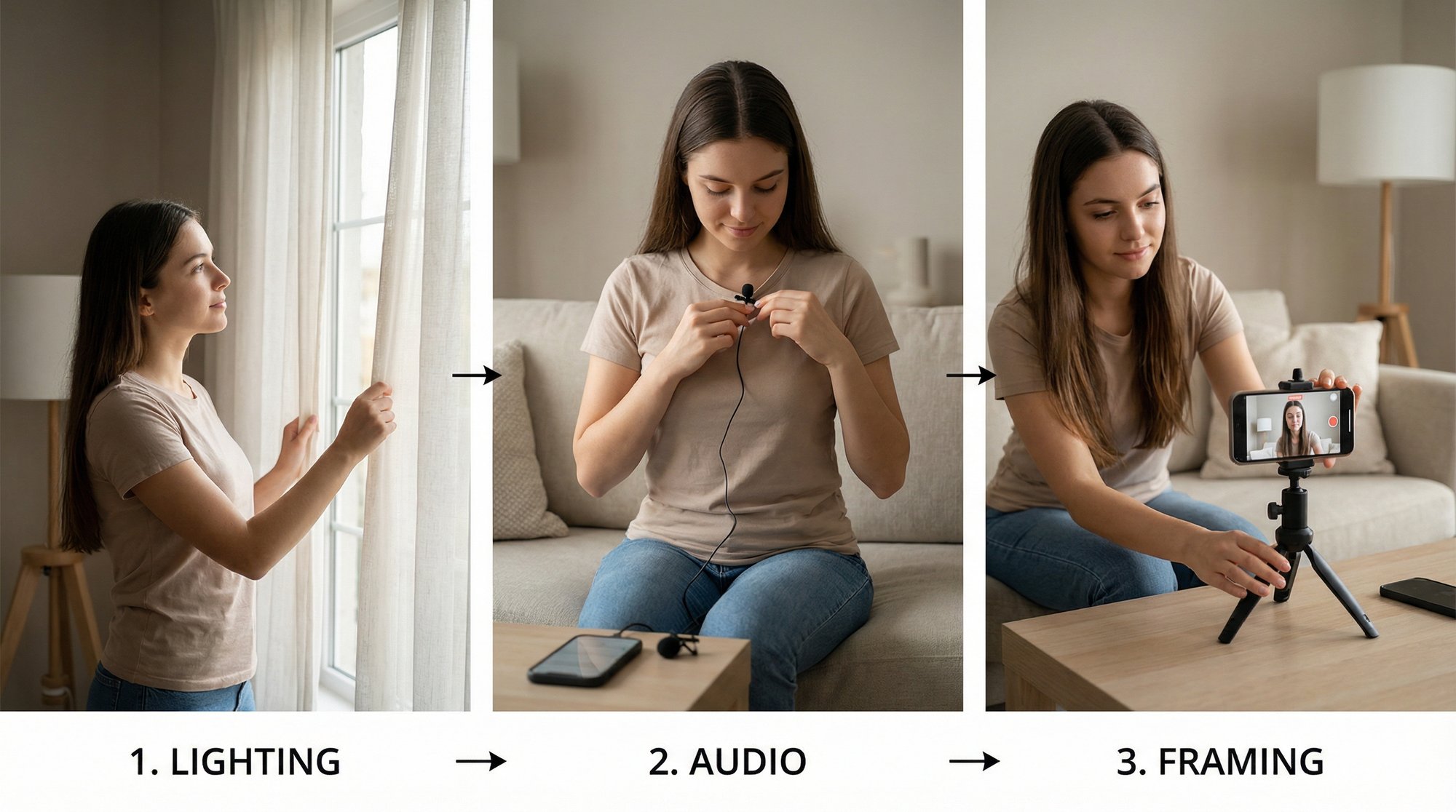
It all starts before you even hit the record button. Forget expensive cameras; focus on two things that make or break a video: audio and background. A cheap lavalier mic clipped to your shirt will sound a million times better than your phone’s microphone from ten feet away. And a clean, simple background keeps the attention on you, not the messy bookshelf behind you.
With your footage in hand, the real work begins. Your very first move is creating the rough cut. This is the brutal-but-necessary part where you chop off all the fat. Get rid of the long pause at the beginning where you're getting ready, the awkward silence at the end, and any obvious mistakes. Don't aim for perfection here—just get the core message down to a workable foundation.
The Art of the Dynamic Cut
Now, let's talk about pacing. This is where most DIY videos die a slow, boring death. On platforms like TikTok and Instagram, long, rambling monologues are engagement killers. The secret to keeping people hooked is cutting for both clarity and rhythm.
Start by hunting down and destroying all the filler words—the "ums," "ahs," and "you knows." These verbal tics absolutely kill your authority and make your edit feel sluggish. Tools like Descript have made this incredibly easy, letting you edit video just by deleting words from a transcript.
Don't be afraid to be ruthless with your cuts. A tight, fast-paced edit is a sign of respect for your viewer's time. You’re aiming for a seamless flow of ideas, not a literal transcript of every breath you took.
Of course, this creates "jump cuts," where your head seems to teleport from one position to another. While a few are fine, too many can be jarring. The classic trick to hide them is to "punch in"—just slightly zoom in on the shot after the cut. It's a simple move that makes the edit feel dynamic and intentional, not like a mistake.
This diagram shows just how different a modern, streamlined workflow is from the old, manual way of doing things.

As you can see, the right system handles the grunt work, freeing you up to focus on the creative side.
Weaving in Visuals and Text
A talking-head video is good, but a story supported by visuals is so much better. This is where B-roll and text overlays become your best friends. B-roll is simply any extra footage you lay over your main shot to illustrate what you're saying.
Here’s how to make it work for you:
Keep it relevant. Talking about Q4 revenue growth? Show a quick screen recording of a chart. Random, pretty stock footage of a forest won't help.
Mix it up. Use a combination of stock clips, screen recordings of your product, and simple graphic overlays to keep the viewer’s eyes moving.
Cover your tracks. B-roll is the perfect way to hide those jump cuts we just talked about, making your edits feel buttery smooth.
Text overlays are just as crucial. Use them to pop a key statistic on screen, ask a direct question, or just emphasize a point you really want to stick. Keep the text short, sweet, and on-brand with your fonts and colors.
Finally, every single video needs captions. With so many people scrolling with the sound off, they are absolutely non-negotiable. Captions guarantee your message gets across, no matter where or how someone is watching.
This entire process—from cutting out filler words to adding B-roll and perfectly timed captions—is exactly what services like Unfloppable are built to automate. We turn what used to be hours of tedious editing into a few clicks, so you can consistently pump out high-quality videos that actually build your brand.
Finding Visuals That Tell Your Story
Let's be honest. A straight talking-head video, even a great one, can get a little stale after 60 seconds. This is where B-roll—the supplemental footage you cut in—works its magic. It’s what turns a static monologue into a dynamic, engaging story.
The problem? Sourcing those visuals is often a miserable, time-sucking experience. We’ve all been there, tumbling down the rabbit hole of generic stock footage libraries, looking for that one perfect clip.
The goal isn't just to slap random images on the screen. It's about finding visuals that directly reinforce what you're saying. Every single clip, graphic, or image should act as a visual aid, making your point clearer and more memorable. Talk about a software feature? Show a screen recording. Mention a customer success story? Flash their logo and a key metric on screen. It’s that simple.
But finding the right asset at the right time is a massive bottleneck for most creators. You scroll for hours, worry about licensing fees, and often settle for a clip that’s just “good enough.” This is exactly the kind of tedious work that a smarter process—or service—can eliminate.

Beyond Generic Stock Footage
If your entire visual strategy is built on stock footage, your videos will feel impersonal and disconnected from your message. While platforms like Pexels or Storyblocks have their uses, the best video edits pull from a much deeper well to keep things fresh and authentic.
Your visual toolkit should really include a mix of sources:
Your Own Media: Photos of your team, product demo recordings, and clips from past events are pure gold. They add a layer of authenticity that no stock library can ever match.
Screen Recordings: For anyone in tech or SaaS, this is non-negotiable. It's infinitely more powerful to show your product in action than to just talk about it.
Simple Text Graphics: Never underestimate a clean text overlay. Use them to pop a key statistic on screen, list out benefits, or ask a direct question.
High-Quality Stock Clips: When you do dip into stock footage, be picky. Find clips that truly match your brand's aesthetic and feel genuine, not staged.
This is where a service like Unfloppable really changes the game. Instead of you manually hunting for all these assets, the system analyzes your script and intelligently pulls relevant visuals from the web or your own library. It instantly bridges the gap between your words and the visuals needed to support them, building an edit that feels cohesive and custom-made. It's especially powerful when you need to learn how to create Instagram Reels that stop the scroll.
The most effective B-roll doesn't just decorate your video—it clarifies it. A well-chosen visual can communicate a complex idea in a fraction of a second, making your message stickier and more impactful.
Finding Visuals That Feel Human
The biggest danger of using stock or AI-generated assets is ending up with a video that feels cold and robotic. Viewers can spot generic visuals from a mile away, and it instantly kills trust. The real skill is sourcing visuals that feel authentic and match the human element of your own on-camera presence.
A great way to do this is to prioritize context over cliché. Talking about teamwork? Skip the generic shot of diverse people high-fiving in a boardroom. A real photo of your actual team brainstorming—even a quick phone snap—will connect on a much deeper level.
Another pro tip is to find visuals that evoke an emotion rather than a literal idea. If your message is about overcoming a struggle, look for B-roll that conveys resilience or determination. This adds a subtle layer of storytelling that makes your content far more compelling.
As you learn how to make video edits, you'll find that mastering visual selection is just as critical as knowing how to cut clips. It’s the skill that elevates your content from a simple recording to a polished, professional piece of communication that actually builds your brand and gets results. The right tools just make that process a whole lot faster.
Connecting Video Edits To Real Business Goals

As a founder, learning to edit video isn't about becoming the next big filmmaker. It’s about growth. Every single editing choice you make—or pay someone else to make—should be a strategic move to push your business forward, not just a creative whim. Sure, views and likes feel good, but they don't keep the lights on.
The real goal is to shift the conversation from technical editing tweaks to actual business outcomes. We're talking about how a specific cut or caption choice directly impacts your bottom line through lead generation, sales conversations, and building a brand that people genuinely trust.
From Editing Tactics to Business Strategy
Let's break this down into real-world terms. That powerful hook you craft for the first three seconds? That’s not just a "good edit." It's a strategic weapon to stop a potential customer from scrolling right past the solution to their problem. A clear, well-placed call-to-action isn't just text on a screen; it's the direct bridge between a viewer and your sales funnel.
Even something as seemingly small as using your brand's fonts and colors consistently across all your videos serves a bigger business purpose. It builds instant recognition and signals a level of professionalism that makes people trust you. Every polished video becomes another touchpoint, educating your audience on why your solution is the only one they should be considering.
This isn't just a hunch; the numbers are overwhelming. A staggering 91% of businesses now rely on video as a core marketing tool, and 86% of marketers say it’s a powerhouse for generating leads. Even more telling, 94% agree that video helps customers actually understand their products. These aren't just stats; they're a clear signal you can't afford to miss. You can dig into more of this data on how video marketing drives results from Wyzowl.
The Power of Showing Up Consistently
Real, sustainable business growth isn't built on a single viral hit. It’s built by showing up, day in and day out, with valuable content that solves real problems for your ideal customer. That consistency builds an incredible amount of trust over time and solidifies your position as the go-to authority in your field.
The problem, of course, is that creating this constant stream of content is a massive drain if you're stuck doing all the manual editing yourself. You just can't keep up the pace when every 60-second clip costs you three hours of your time in post-production.
The most successful founders aren't the best video editors. They're the best strategists. They know their time is better spent on the high-level thinking that actually moves the business forward.
Getting the editing grind off your plate is one of the smartest strategic decisions you can make. It frees you up to focus on the things only you can do: talking to customers, refining your product, and steering the ship.
Tying Your Edits to What Really Matters: The Metrics
To truly connect your video efforts to business goals, you have to think about how each edit influences your key performance indicators (KPIs). Instead of just "making a video," frame your work around specific, measurable objectives.
Want higher-quality leads? Your edit needs to have crystal-clear messaging and a strong CTA that sends people to a dedicated landing page. Then, you track the conversion rate on that page.
Need to boost brand awareness? The edit has to prioritize a killer hook, consistent branding, and content that people actually want to share. You'll track reach, shares, and follower growth.
Trying to drive product sales? The edit should feature clear demos, customer testimonials, and a direct link to buy. From there, you measure click-through rates and sales attributed to that video.
When you start thinking this way, video stops being a creative chore and becomes what it truly is: a powerful engine for business growth. This mindset shift is the key to building a video strategy that delivers tangible results without burning you out.
The "No-Edit" Video Solution Built for Founders
Imagine getting all the time you spend wrestling with editing software back on your calendar. All those hours spent trimming clips, hunting for the right B-roll, and captioning videos could go back into actually growing your business. For most founders, that sounds like a pipe dream. It’s exactly why we built Unfloppable.
The whole idea is to make video creation ridiculously simple. You just record yourself talking—sharing an insight, breaking down an industry trend, or explaining your product—and upload the raw footage. Our system takes it from there, turning your raw thoughts into a polished, ready-to-share short video.

Human-Led Content, Not AI Avatars
What makes this different is our obsession with authenticity. We’re not talking about creating synthetic AI avatars or weirdly robotic voiceovers that create a barrier between you and your audience. The heart of every single video is still you. Your voice, your ideas, your personality—that's what leads the way.
Think of our system as an intelligent editor, not a content generator. It's there to elevate your message by finding visuals that feel real and relevant, creating something that looks professional but still feels deeply personal. It’s the best of both worlds: you get the polish of a professional edit without losing the genuine connection that comes from a founder speaking directly to their community.
A Smarter Way to Source Visuals
Let's be honest, one of the biggest time-sucks in editing is finding the right visuals. Unfloppable completely changes the game here by intelligently sourcing assets based on the words you're actually saying.
From the Web: The platform can pull high-quality, relevant images and video clips from all over the internet to perfectly illustrate your points.
From Your Library: It can also search your own media library to grab that specific product demo or team photo that matches what you're talking about.
This seamless approach means you get dynamic, visually engaging videos without ever having to mindlessly scroll through a stock photo site again. The result is a video where the visuals truly support what you're saying, making your message land with much more impact.
For a founder, time is the one asset you can't get back. The goal shouldn't be to just make one great video; it’s to build a sustainable system for creating quality content consistently, without the soul-crushing time commitment of doing it all by hand.
Escape the Software Trap
The demand for corporate video is exploding, with spending projected to hit over $30 billion by 2026. The problem? For solo founders and company leaders, professional edits are often out of reach, easily running $2,000-$5,000 for a simple project. The alternative is getting trapped in a cycle of learning complicated software, which is a massive productivity killer.
This is the exact frustration that sparked the idea for Unfloppable. We built it to turn your spoken ideas into shareable short videos by sourcing real assets from the web and your own media library. You get the quality you need without the complexity you hate.
Your Zero-Risk Opportunity
We know that seeing is believing. That’s why we’re offering a completely zero-risk way for busy founders to try out this effortless video workflow. You can get your first three videos made for free, with absolutely no commitment.
This isn't some watered-down trial, either. You get the full experience. You'll see your own raw footage transformed into a polished, engaging video that's ready to help you build your brand and connect with your audience. It’s the perfect way to test a "no-edit" workflow and see for yourself how much time it puts back in your day.
Just record your thoughts, upload the file, and let our system do the heavy lifting. See how Unfloppable can change your content strategy by visiting our site and claiming your three free videos today.
Got Questions About Editing Videos? Let's Get Them Answered.
When you're trying to create videos but "editor" isn't in your job title, you're bound to have questions. You need real answers that cut through the noise and help you get results, fast. Let's break down some of the most common things founders and marketers wonder about when they start editing.
What Is the Fastest Way to Edit Talking-Head Videos?
Honestly? The quickest route is to have someone—or something—else do it for you. A service that automates the entire post-production workflow is the hands-down winner. You just record your thoughts, upload the file, and all the tedious work of cutting, adding visuals, and captioning gets handled automatically.
If you're committed to doing it yourself, your next best bet is to lean on software with smart, AI-powered features. Tools like Descript have made a name for themselves by letting you edit video footage just like you'd edit a Word doc. This makes creating a rough cut way faster. They even have slick features for automatically zapping out silences and all those "ums" and "ahs."
But even with those tools, the real time-killer is almost always finding and placing good B-roll. Manually hunting for relevant clips to match what you're saying can eat up hours. This is where an intelligent service really pulls ahead, as it can analyze your script and find the right visuals for you.
How Long Should a Short-Form Video Actually Be?
For platforms like TikTok, Instagram Reels, and YouTube Shorts, you’re usually aiming for the 30 to 60-second sweet spot. That’s just enough time to deliver a solid, valuable point without testing your audience's notoriously short attention span.
The most important part of your video? The first 3 to 5 seconds. You absolutely have to hook them immediately, or they'll just keep scrolling. If you save your main point for the end, almost no one will be around to see it.
Keep an eye on what’s working on each platform, as the trends and best practices can change. Still, a punchy, value-first video that clocks in under a minute is a pretty safe bet.
Do I Need to Shell Out for Expensive Software?
Not anymore. The idea that you need a pricey subscription to Adobe Premiere Pro to create polished videos is a thing of the past. There are fantastic, accessible tools everywhere now.
Plenty of people are getting amazing results with free or low-cost software:
For Your Desktop: CapCut and the free version of DaVinci Resolve are packed with professional-grade features you wouldn't expect.
On Your Phone: Editing right on your phone with apps like CapCut or InShot is perfect when you need to get something out the door quickly.
For a business owner, though, the "cost" of software is about more than just the price. It's the hours you sink into learning and using it. This is why a "done-for-you" service often delivers a much better return. You skip the learning curve entirely, saving not just subscription fees but your most valuable asset: your time. This approach also helps founders avoid the common pitfall of accidentally creating what some are calling AI slop, ensuring you get quality content without the grind.
What Are the Biggest Editing Mistakes to Avoid?
Even if your message is brilliant, a few common slip-ups can make your video look amateurish. Watch out for these usual suspects:
Bad Audio: If your audio is muffled, full of background noise, or has weird volume jumps, people will click away in a heartbeat. Sound is everything.
Awkward Pacing: Long, dead-air pauses are just as bad as talking so fast no one can keep up. Both make your video hard to watch.
Generic B-Roll: Slapping in random stock footage that has nothing to do with what you're saying feels cheap and distracts from your point.
No Brand Consistency: Using a wild mix of fonts, colors, and styles makes your brand look messy and unprofessional.
Skipping Captions: A huge number of people watch social media videos with the sound off. If you don't have captions, your message is completely lost on them.
Ready to stop worrying about these mistakes and get your time back? Unfloppable transforms your raw talking-head footage into polished videos that are ready to post. No editing skills required. Get your first three videos for free and see how easy it can be.
Editing raw video footage into something polished and engaging is a real grind. You're not just clipping the beginning and end; you're hunting down every "um" and awkward pause, finding the right B-roll to keep things interesting, and adding captions so people can watch with the sound off. For a single one-minute video, that process can easily eat up a few hours—it's no wonder so many founders give up on video before they even get started.
Conquering the Video Editing Time Sink
Let's be honest. For most entrepreneurs, the biggest thing stopping them from creating consistent video content isn't a lack of ideas. It's the soul-crushing amount of time that post-production demands. The dream of building a real connection with your audience through authentic, talking-head videos often dies a slow death in a multi-hour editing session for a single clip.
This manual editing slog quickly becomes a massive bottleneck for the business. You’re not just trimming footage; you're meticulously syncing audio, wrestling with text overlays, and scouring stock sites for the perfect visual. Every one of these steps devours time that should be spent on strategy, talking to customers, or, you know, actually running your company.
The Real Cost of Manual Editing
Think about what it takes to produce a standard 60-second video for social media. You could easily spend 30 minutes just cleaning up the audio and cutting out filler words. Then, tack on another hour to find and splice in relevant visuals. By the time you’ve added captions and formatted it for different platforms, your "quick" video has torched an entire afternoon. This is a huge roadblock for anyone who needs to show up consistently to see results.
The scale of this problem is reflected in the global video editing market, which is projected to balloon to USD 4.99 billion by 2031. Even with this growth, professional tools still account for over 59% of the revenue, leaving most founders and creators facing a steep learning curve and a massive time commitment just to get competent. You can dig into more of these trends in the global video editing market report from Mordor Intelligence.
Shifting From Manual Labor to a Smarter Workflow
The old-school, hands-on editing process is a marathon of tedious, repetitive tasks. It's a reactive workflow where you're constantly fixing mistakes and piecing things together one by one. But what if you could stop being the technician and start being the director?
An automated approach completely flips the script. Instead of getting bogged down in the mechanical work, you can focus on your core message and let a smart system handle the heavy lifting. This isn't just about saving a few minutes; it's a strategic move to reclaim your time and sanity.
For a founder, every hour spent on repetitive editing is an hour not spent growing the business. The goal isn't just to make one video; it's to build a sustainable content engine that works for you, not against you.
Once you see the manual process for the time sink it truly is, a smarter, automated workflow starts to look less like a luxury and more like a core part of your growth strategy. It's how you produce high-quality, on-brand content consistently without sacrificing your most valuable asset: your time.
Manual vs Automated Video Editing Workflow
To put this in perspective, let's break down the time commitment for a typical video edit. The difference between the traditional method and an automated service like Unfloppable is stark.
Editing Task | Manual Workflow (Estimated Time) | Unfloppable Workflow |
|---|---|---|
Initial Rough Cut & Trimming | 30 - 60 minutes | 5 minutes (AI-powered transcription & editing) |
Removing Filler Words & Pauses | 20 - 45 minutes | 2 minutes (One-click removal) |
Sourcing & Adding B-roll | 45 - 90 minutes | 10 minutes (AI-suggested visuals & easy upload) |
Adding Captions & Subtitles | 20 - 30 minutes | 1 minute (Automatic transcription & styling) |
Creating Thumbnails & Titles | 15 - 25 minutes | 5 minutes (AI suggestions & templates) |
Resizing for Platforms | 10 - 20 minutes | 1 minute (One-click resizing) |
Total Estimated Time | 2.5 - 4.5 hours | ~25 minutes |
As the table shows, the time savings are massive. What used to take an entire afternoon can now be accomplished in less time than a lunch break, freeing you up to focus on what truly matters in your business.
A Founder's Workflow: From Raw Footage to a Polished Reel
Let’s be honest, staring at a raw video file can feel overwhelming. You’ve got the ideas, but turning that footage into an engaging reel that people actually watch seems like a job for a pro editor. The good news? It’s not.
You don't need a fancy studio to create killer short-form videos. What you do need is a founder-friendly workflow—a simple, repeatable process that focuses on what really matters: clarity, pacing, and impact. Let's walk through the exact playbook I use to turn rough takes into polished content that gets results.
It all starts before you even hit the record button. Forget expensive cameras; focus on two things that make or break a video: audio and background. A cheap lavalier mic clipped to your shirt will sound a million times better than your phone’s microphone from ten feet away. And a clean, simple background keeps the attention on you, not the messy bookshelf behind you.
With your footage in hand, the real work begins. Your very first move is creating the rough cut. This is the brutal-but-necessary part where you chop off all the fat. Get rid of the long pause at the beginning where you're getting ready, the awkward silence at the end, and any obvious mistakes. Don't aim for perfection here—just get the core message down to a workable foundation.
The Art of the Dynamic Cut
Now, let's talk about pacing. This is where most DIY videos die a slow, boring death. On platforms like TikTok and Instagram, long, rambling monologues are engagement killers. The secret to keeping people hooked is cutting for both clarity and rhythm.
Start by hunting down and destroying all the filler words—the "ums," "ahs," and "you knows." These verbal tics absolutely kill your authority and make your edit feel sluggish. Tools like Descript have made this incredibly easy, letting you edit video just by deleting words from a transcript.
Don't be afraid to be ruthless with your cuts. A tight, fast-paced edit is a sign of respect for your viewer's time. You’re aiming for a seamless flow of ideas, not a literal transcript of every breath you took.
Of course, this creates "jump cuts," where your head seems to teleport from one position to another. While a few are fine, too many can be jarring. The classic trick to hide them is to "punch in"—just slightly zoom in on the shot after the cut. It's a simple move that makes the edit feel dynamic and intentional, not like a mistake.
This diagram shows just how different a modern, streamlined workflow is from the old, manual way of doing things.

As you can see, the right system handles the grunt work, freeing you up to focus on the creative side.
Weaving in Visuals and Text
A talking-head video is good, but a story supported by visuals is so much better. This is where B-roll and text overlays become your best friends. B-roll is simply any extra footage you lay over your main shot to illustrate what you're saying.
Here’s how to make it work for you:
Keep it relevant. Talking about Q4 revenue growth? Show a quick screen recording of a chart. Random, pretty stock footage of a forest won't help.
Mix it up. Use a combination of stock clips, screen recordings of your product, and simple graphic overlays to keep the viewer’s eyes moving.
Cover your tracks. B-roll is the perfect way to hide those jump cuts we just talked about, making your edits feel buttery smooth.
Text overlays are just as crucial. Use them to pop a key statistic on screen, ask a direct question, or just emphasize a point you really want to stick. Keep the text short, sweet, and on-brand with your fonts and colors.
Finally, every single video needs captions. With so many people scrolling with the sound off, they are absolutely non-negotiable. Captions guarantee your message gets across, no matter where or how someone is watching.
This entire process—from cutting out filler words to adding B-roll and perfectly timed captions—is exactly what services like Unfloppable are built to automate. We turn what used to be hours of tedious editing into a few clicks, so you can consistently pump out high-quality videos that actually build your brand.
Finding Visuals That Tell Your Story
Let's be honest. A straight talking-head video, even a great one, can get a little stale after 60 seconds. This is where B-roll—the supplemental footage you cut in—works its magic. It’s what turns a static monologue into a dynamic, engaging story.
The problem? Sourcing those visuals is often a miserable, time-sucking experience. We’ve all been there, tumbling down the rabbit hole of generic stock footage libraries, looking for that one perfect clip.
The goal isn't just to slap random images on the screen. It's about finding visuals that directly reinforce what you're saying. Every single clip, graphic, or image should act as a visual aid, making your point clearer and more memorable. Talk about a software feature? Show a screen recording. Mention a customer success story? Flash their logo and a key metric on screen. It’s that simple.
But finding the right asset at the right time is a massive bottleneck for most creators. You scroll for hours, worry about licensing fees, and often settle for a clip that’s just “good enough.” This is exactly the kind of tedious work that a smarter process—or service—can eliminate.

Beyond Generic Stock Footage
If your entire visual strategy is built on stock footage, your videos will feel impersonal and disconnected from your message. While platforms like Pexels or Storyblocks have their uses, the best video edits pull from a much deeper well to keep things fresh and authentic.
Your visual toolkit should really include a mix of sources:
Your Own Media: Photos of your team, product demo recordings, and clips from past events are pure gold. They add a layer of authenticity that no stock library can ever match.
Screen Recordings: For anyone in tech or SaaS, this is non-negotiable. It's infinitely more powerful to show your product in action than to just talk about it.
Simple Text Graphics: Never underestimate a clean text overlay. Use them to pop a key statistic on screen, list out benefits, or ask a direct question.
High-Quality Stock Clips: When you do dip into stock footage, be picky. Find clips that truly match your brand's aesthetic and feel genuine, not staged.
This is where a service like Unfloppable really changes the game. Instead of you manually hunting for all these assets, the system analyzes your script and intelligently pulls relevant visuals from the web or your own library. It instantly bridges the gap between your words and the visuals needed to support them, building an edit that feels cohesive and custom-made. It's especially powerful when you need to learn how to create Instagram Reels that stop the scroll.
The most effective B-roll doesn't just decorate your video—it clarifies it. A well-chosen visual can communicate a complex idea in a fraction of a second, making your message stickier and more impactful.
Finding Visuals That Feel Human
The biggest danger of using stock or AI-generated assets is ending up with a video that feels cold and robotic. Viewers can spot generic visuals from a mile away, and it instantly kills trust. The real skill is sourcing visuals that feel authentic and match the human element of your own on-camera presence.
A great way to do this is to prioritize context over cliché. Talking about teamwork? Skip the generic shot of diverse people high-fiving in a boardroom. A real photo of your actual team brainstorming—even a quick phone snap—will connect on a much deeper level.
Another pro tip is to find visuals that evoke an emotion rather than a literal idea. If your message is about overcoming a struggle, look for B-roll that conveys resilience or determination. This adds a subtle layer of storytelling that makes your content far more compelling.
As you learn how to make video edits, you'll find that mastering visual selection is just as critical as knowing how to cut clips. It’s the skill that elevates your content from a simple recording to a polished, professional piece of communication that actually builds your brand and gets results. The right tools just make that process a whole lot faster.
Connecting Video Edits To Real Business Goals

As a founder, learning to edit video isn't about becoming the next big filmmaker. It’s about growth. Every single editing choice you make—or pay someone else to make—should be a strategic move to push your business forward, not just a creative whim. Sure, views and likes feel good, but they don't keep the lights on.
The real goal is to shift the conversation from technical editing tweaks to actual business outcomes. We're talking about how a specific cut or caption choice directly impacts your bottom line through lead generation, sales conversations, and building a brand that people genuinely trust.
From Editing Tactics to Business Strategy
Let's break this down into real-world terms. That powerful hook you craft for the first three seconds? That’s not just a "good edit." It's a strategic weapon to stop a potential customer from scrolling right past the solution to their problem. A clear, well-placed call-to-action isn't just text on a screen; it's the direct bridge between a viewer and your sales funnel.
Even something as seemingly small as using your brand's fonts and colors consistently across all your videos serves a bigger business purpose. It builds instant recognition and signals a level of professionalism that makes people trust you. Every polished video becomes another touchpoint, educating your audience on why your solution is the only one they should be considering.
This isn't just a hunch; the numbers are overwhelming. A staggering 91% of businesses now rely on video as a core marketing tool, and 86% of marketers say it’s a powerhouse for generating leads. Even more telling, 94% agree that video helps customers actually understand their products. These aren't just stats; they're a clear signal you can't afford to miss. You can dig into more of this data on how video marketing drives results from Wyzowl.
The Power of Showing Up Consistently
Real, sustainable business growth isn't built on a single viral hit. It’s built by showing up, day in and day out, with valuable content that solves real problems for your ideal customer. That consistency builds an incredible amount of trust over time and solidifies your position as the go-to authority in your field.
The problem, of course, is that creating this constant stream of content is a massive drain if you're stuck doing all the manual editing yourself. You just can't keep up the pace when every 60-second clip costs you three hours of your time in post-production.
The most successful founders aren't the best video editors. They're the best strategists. They know their time is better spent on the high-level thinking that actually moves the business forward.
Getting the editing grind off your plate is one of the smartest strategic decisions you can make. It frees you up to focus on the things only you can do: talking to customers, refining your product, and steering the ship.
Tying Your Edits to What Really Matters: The Metrics
To truly connect your video efforts to business goals, you have to think about how each edit influences your key performance indicators (KPIs). Instead of just "making a video," frame your work around specific, measurable objectives.
Want higher-quality leads? Your edit needs to have crystal-clear messaging and a strong CTA that sends people to a dedicated landing page. Then, you track the conversion rate on that page.
Need to boost brand awareness? The edit has to prioritize a killer hook, consistent branding, and content that people actually want to share. You'll track reach, shares, and follower growth.
Trying to drive product sales? The edit should feature clear demos, customer testimonials, and a direct link to buy. From there, you measure click-through rates and sales attributed to that video.
When you start thinking this way, video stops being a creative chore and becomes what it truly is: a powerful engine for business growth. This mindset shift is the key to building a video strategy that delivers tangible results without burning you out.
The "No-Edit" Video Solution Built for Founders
Imagine getting all the time you spend wrestling with editing software back on your calendar. All those hours spent trimming clips, hunting for the right B-roll, and captioning videos could go back into actually growing your business. For most founders, that sounds like a pipe dream. It’s exactly why we built Unfloppable.
The whole idea is to make video creation ridiculously simple. You just record yourself talking—sharing an insight, breaking down an industry trend, or explaining your product—and upload the raw footage. Our system takes it from there, turning your raw thoughts into a polished, ready-to-share short video.

Human-Led Content, Not AI Avatars
What makes this different is our obsession with authenticity. We’re not talking about creating synthetic AI avatars or weirdly robotic voiceovers that create a barrier between you and your audience. The heart of every single video is still you. Your voice, your ideas, your personality—that's what leads the way.
Think of our system as an intelligent editor, not a content generator. It's there to elevate your message by finding visuals that feel real and relevant, creating something that looks professional but still feels deeply personal. It’s the best of both worlds: you get the polish of a professional edit without losing the genuine connection that comes from a founder speaking directly to their community.
A Smarter Way to Source Visuals
Let's be honest, one of the biggest time-sucks in editing is finding the right visuals. Unfloppable completely changes the game here by intelligently sourcing assets based on the words you're actually saying.
From the Web: The platform can pull high-quality, relevant images and video clips from all over the internet to perfectly illustrate your points.
From Your Library: It can also search your own media library to grab that specific product demo or team photo that matches what you're talking about.
This seamless approach means you get dynamic, visually engaging videos without ever having to mindlessly scroll through a stock photo site again. The result is a video where the visuals truly support what you're saying, making your message land with much more impact.
For a founder, time is the one asset you can't get back. The goal shouldn't be to just make one great video; it’s to build a sustainable system for creating quality content consistently, without the soul-crushing time commitment of doing it all by hand.
Escape the Software Trap
The demand for corporate video is exploding, with spending projected to hit over $30 billion by 2026. The problem? For solo founders and company leaders, professional edits are often out of reach, easily running $2,000-$5,000 for a simple project. The alternative is getting trapped in a cycle of learning complicated software, which is a massive productivity killer.
This is the exact frustration that sparked the idea for Unfloppable. We built it to turn your spoken ideas into shareable short videos by sourcing real assets from the web and your own media library. You get the quality you need without the complexity you hate.
Your Zero-Risk Opportunity
We know that seeing is believing. That’s why we’re offering a completely zero-risk way for busy founders to try out this effortless video workflow. You can get your first three videos made for free, with absolutely no commitment.
This isn't some watered-down trial, either. You get the full experience. You'll see your own raw footage transformed into a polished, engaging video that's ready to help you build your brand and connect with your audience. It’s the perfect way to test a "no-edit" workflow and see for yourself how much time it puts back in your day.
Just record your thoughts, upload the file, and let our system do the heavy lifting. See how Unfloppable can change your content strategy by visiting our site and claiming your three free videos today.
Got Questions About Editing Videos? Let's Get Them Answered.
When you're trying to create videos but "editor" isn't in your job title, you're bound to have questions. You need real answers that cut through the noise and help you get results, fast. Let's break down some of the most common things founders and marketers wonder about when they start editing.
What Is the Fastest Way to Edit Talking-Head Videos?
Honestly? The quickest route is to have someone—or something—else do it for you. A service that automates the entire post-production workflow is the hands-down winner. You just record your thoughts, upload the file, and all the tedious work of cutting, adding visuals, and captioning gets handled automatically.
If you're committed to doing it yourself, your next best bet is to lean on software with smart, AI-powered features. Tools like Descript have made a name for themselves by letting you edit video footage just like you'd edit a Word doc. This makes creating a rough cut way faster. They even have slick features for automatically zapping out silences and all those "ums" and "ahs."
But even with those tools, the real time-killer is almost always finding and placing good B-roll. Manually hunting for relevant clips to match what you're saying can eat up hours. This is where an intelligent service really pulls ahead, as it can analyze your script and find the right visuals for you.
How Long Should a Short-Form Video Actually Be?
For platforms like TikTok, Instagram Reels, and YouTube Shorts, you’re usually aiming for the 30 to 60-second sweet spot. That’s just enough time to deliver a solid, valuable point without testing your audience's notoriously short attention span.
The most important part of your video? The first 3 to 5 seconds. You absolutely have to hook them immediately, or they'll just keep scrolling. If you save your main point for the end, almost no one will be around to see it.
Keep an eye on what’s working on each platform, as the trends and best practices can change. Still, a punchy, value-first video that clocks in under a minute is a pretty safe bet.
Do I Need to Shell Out for Expensive Software?
Not anymore. The idea that you need a pricey subscription to Adobe Premiere Pro to create polished videos is a thing of the past. There are fantastic, accessible tools everywhere now.
Plenty of people are getting amazing results with free or low-cost software:
For Your Desktop: CapCut and the free version of DaVinci Resolve are packed with professional-grade features you wouldn't expect.
On Your Phone: Editing right on your phone with apps like CapCut or InShot is perfect when you need to get something out the door quickly.
For a business owner, though, the "cost" of software is about more than just the price. It's the hours you sink into learning and using it. This is why a "done-for-you" service often delivers a much better return. You skip the learning curve entirely, saving not just subscription fees but your most valuable asset: your time. This approach also helps founders avoid the common pitfall of accidentally creating what some are calling AI slop, ensuring you get quality content without the grind.
What Are the Biggest Editing Mistakes to Avoid?
Even if your message is brilliant, a few common slip-ups can make your video look amateurish. Watch out for these usual suspects:
Bad Audio: If your audio is muffled, full of background noise, or has weird volume jumps, people will click away in a heartbeat. Sound is everything.
Awkward Pacing: Long, dead-air pauses are just as bad as talking so fast no one can keep up. Both make your video hard to watch.
Generic B-Roll: Slapping in random stock footage that has nothing to do with what you're saying feels cheap and distracts from your point.
No Brand Consistency: Using a wild mix of fonts, colors, and styles makes your brand look messy and unprofessional.
Skipping Captions: A huge number of people watch social media videos with the sound off. If you don't have captions, your message is completely lost on them.
Ready to stop worrying about these mistakes and get your time back? Unfloppable transforms your raw talking-head footage into polished videos that are ready to post. No editing skills required. Get your first three videos for free and see how easy it can be.