Master Video Editing With Effects for Impactful Short-Form Content

Discover pro-level video editing with effects for Reels, TikTok, and Shorts. A founder's guide to creating engaging short-form content that converts.

Mar 17, 2026

When we talk about “video editing with effects,” we’re not just talking about adding flashy animations or slapping on a filter. It’s the art of strategically weaving in motion, text, and overlays to transform a simple talking-head recording into a polished, persuasive piece of content.

It’s what separates a video that gets instantly scrolled past from one that stops a potential customer in their tracks.

Why Smart Video Editing With Effects Is a Must


A man watches a laptop displaying video editing software with 'SMART EFFECTS' title in a modern workspace.

Let's be honest: in the world of short-form video, just pointing a camera at yourself and talking isn't enough anymore. The difference between an amateur video and a professional one often comes down to the thoughtful post-production that happens after you hit stop.

This is where smart video editing with effects becomes a core business strategy, not just a nice-to-have.

The goal isn't to create a sensory overload with distracting trends. It's about using subtle, purposeful effects to guide your viewer. A gentle zoom-in can add weight to a key statement. An animated text callout can make a statistic impossible to forget. These small touches build a professional feel that signals authority and trustworthiness.

The Real Power of Purposeful Effects

Think of video effects as your digital body language. They add nuance and emphasis where a static shot can feel flat, keeping your audience locked in.

Here’s what these small additions actually do for your videos:

  • Grab and Hold Attention: Subtle motion and perfectly timed cuts are brain candy. They keep the viewer engaged and drastically reduce the odds they'll swipe away.

  • Boost Clarity and Recall: On-screen text, B-roll, and visual highlights make complex ideas digestible. When you show and tell, your message sticks.

  • Build a Stronger Brand: Using your brand’s fonts, colors, and animation style consistently makes your content instantly recognizable. It creates a cohesive identity.

  • Direct the Viewer's Focus: Good transitions and motion effects are like a tour guide, pointing the viewer's eye exactly where you want it to go.

This isn’t just a hunch; it’s a massive market shift. The global video editing software market was valued at $3.09 billion in 2023 and is on track to surpass $5 billion by 2032. Businesses are pouring money into these tools because they know professional video works.

By mastering a few key effects, you elevate your content from a simple recording to a powerful communication tool. You make your expertise not just heard, but felt.

Ultimately, spending the time to learn how to apply effects with purpose is a direct investment in your brand. It’s the firewall that keeps your content from becoming what's often called AI slop—generic, soulless media that makes zero human connection.

To get started, it helps to know which effects deliver the most bang for your buck.

This quick-reference table breaks down the most impactful effects for business-focused talking-head videos and their core purpose.

Strategic Effect Types for Talking-Head Videos

Effect Type

Primary Goal

Best Use Case

Subtle Motion

Maintain viewer engagement

A slow zoom-in on a key point; a slight pan to reset focus after a jump cut.

Animated Text

Emphasize and clarify

Highlighting a statistic, question, or key takeaway on-screen.

Transitions

Guide the narrative flow

Using a smooth cut or subtle wipe to move between topics or ideas.

Overlays/B-roll

Add context and visual interest

Showing a screen recording, product shot, or stock footage to illustrate a point.

Focusing on these core four will give you 80% of the impact with 20% of the effort, ensuring your edits are always strategic, not just decorative.

Setting the Stage for Effortless Editing

A home studio setup featuring a camera on a tripod, a softbox light, and a laptop displaying an image.

Here's a secret most new creators miss: the magic of great video editing with effects doesn't happen in the software. It starts long before you ever hit the record button. Think of it as the ‘mise en place’ of video production—a little prep work upfront that saves you from pulling your hair out later.

The quality of your raw footage sets the ceiling for what you can achieve in the edit. You simply can't fix everything in post. Dark, grainy footage or audio swimming in background noise will always look and sound amateur, no matter how many flashy effects you throw at it. Your goal is to hand your future self—or your editor—the cleanest possible material to work with.

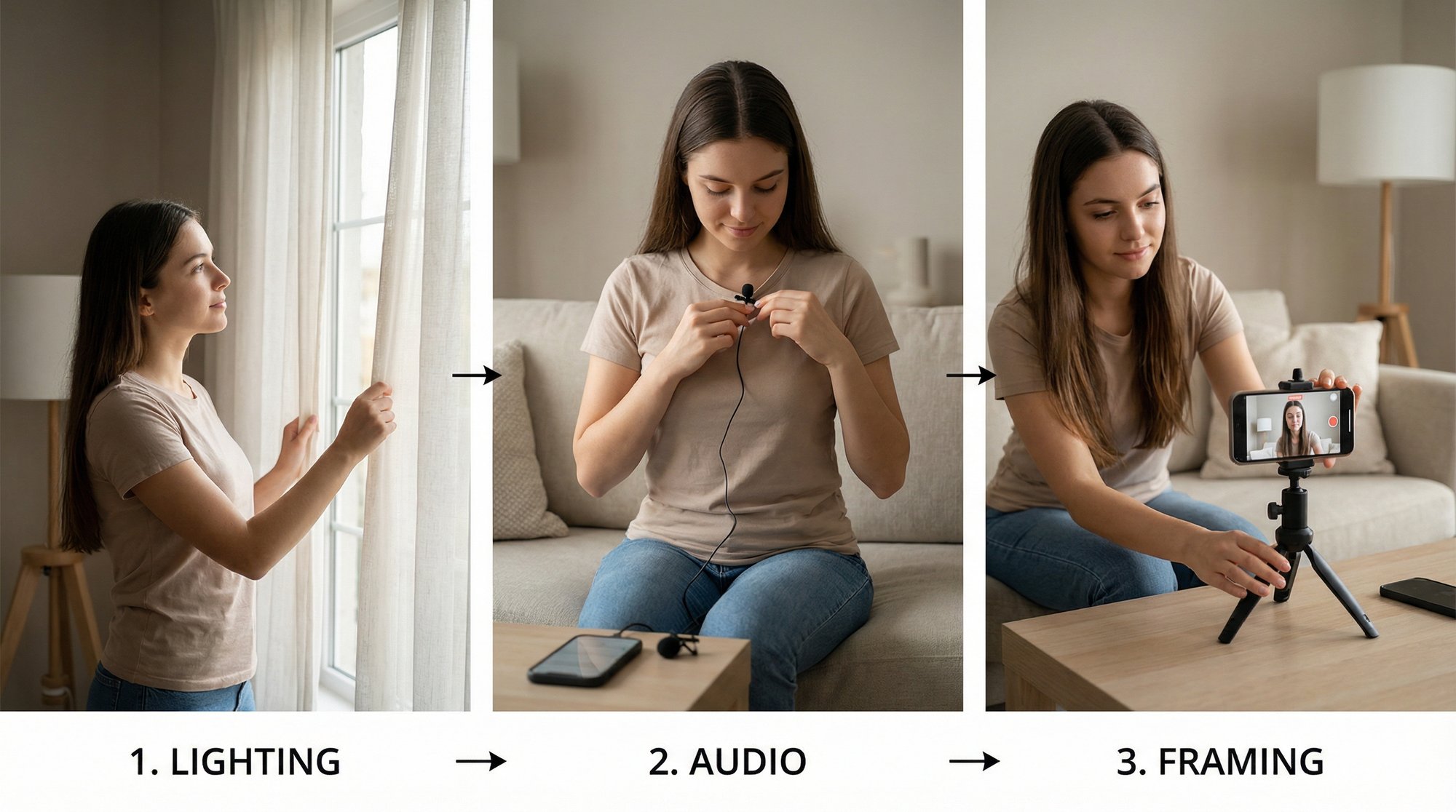
You don't need a massive budget for this. A decent three-point lighting setup (key, fill, and back light) is surprisingly achievable with a couple of affordable ring lights or even well-placed lamps. And for audio? A simple clip-on lavalier mic is a total game-changer. It isolates your voice, kills that awful room echo, and gives you that crisp, professional sound.

Structuring Your Content and Assets

Once your tech is sorted, the next hurdle is organizing your actual content. Before you even think about recording, map out what you're going to say. Having a clear outline is the difference between a concise, impactful video and a rambling mess that’s a nightmare to edit.

A solid recording plan can be as simple as this:

  • Key Points: Jot down the 3-5 main ideas you absolutely need to land.

  • Supporting Details: Add a quick note or two under each point to flesh them out.

  • Call to Action: Decide exactly what you want the viewer to do at the end.

Following a simple framework like this helps you speak with confidence. It also dramatically cuts down the time you’ll spend trimming out all the "ums," "ahs," and long pauses during the edit.

The most time-consuming part of video editing isn’t adding effects; it’s fixing preventable problems from the recording phase. A clean recording is a canvas, while a messy one is a rescue mission.

On the digital side, asset organization is just as vital. Create a master folder for every video project and stick to a consistent subfolder structure. If you really want to make life easier, look into a modern, innovative video editing application that’s built to help you manage assets and apply effects without the usual headaches.

Your Go-To Folder Structure

A repeatable folder system means you can instantly find what you need, whether you’re wrapping up an edit today or digging up a project six months from now.

Here’s the simple structure I use for every single project:

Folder Name

Contents

Purpose

01_RAW

Unedited video and audio files

The original, untouched source footage.

02_PROJECTS

Your video editor project files

Keeps your editing session files separate.

03_ASSETS

B-roll, logos, music, graphics

All supplementary media in one place.

04_EXPORTS

Final rendered video files

The finished videos ready for upload.

This kind of groundwork is the foundation for getting things done efficiently. It frees you up to focus on the fun stuff—the creative side of video editing with effects, like nailing the timing on a text animation or finding the perfect visual to drive your point home.

And speaking of visuals, if you need fresh ideas for B-roll, our guide on AI B-roll generation has some great tips. By setting the stage properly from the start, you’re giving yourself the power to create high-impact content without all the usual friction.

Alright, let's get into the fun part. Your footage is clean, your assets are lined up, and now it’s time to bring your video to life with effects. This is where the magic really happens.

But let’s be clear: the goal isn’t to throw every flashy transition and animation you have at the screen. That just creates noise. Instead, think of yourself as a storyteller. Every effect you add should serve a purpose—to land a point, clarify an idea, or simply keep your viewer from scrolling away. It’s all about making smart, deliberate choices.

I always recommend doing a "spotting" pass first. Watch your raw footage and just listen. Where do you drop a critical piece of advice? When do you mention a compelling number? Those are your cues. Mark those moments, because that's where an effect will do the most good.

Use Subtle Motion to Keep Their Eyes on You

You know what kills engagement? A static, locked-off shot. Even if you're delivering gold, a single, unmoving frame gets boring, fast. The easiest fix is to introduce just a hint of motion.

The classic move here is a slow, subtle zoom or pan—often called the "Ken Burns" effect. Imagine you’re making a bold claim. You can start a gentle zoom-in as you begin the sentence, timing it to land perfectly as you finish. It’s a tiny thing, but it adds a real sense of gravity to what you're saying.

Here are a few moments where this trick is a game-changer:

  • When you're about to drop the mic: As you lead into your main takeaway, start that slow push-in. It’s a subconscious signal to the viewer that says, "Listen up, this is the important part."

  • To smooth over awkward cuts: When you edit out an "um" or a long pause, you get a jarring "jump cut." A quick zoom or a slight reframe can completely hide that jump, making your edit feel impossibly smooth.

  • To break up the monotony: After holding on one shot for a bit too long, a slow pan or a slight shift in the frame is like a visual reset. It keeps the energy up without being distracting.

We're not talking about wild, shaky-cam stuff. The best motion effects are the ones your audience feels more than they consciously see.

The secret to professional editing is subtlety. The best effects serve the story so well that the viewer doesn't even notice them—they just feel more connected to what you're saying.

Make Your Message Unforgettable with Visuals

Motion keeps people watching, but text and graphic overlays are what make your message stick. Our brains process visuals 60,000 times faster than plain text, so if you can show your point instead of just saying it, you’ve already won.

This is where your video stops being a monologue and starts becoming a lesson.

Let's say you're explaining your three-step framework for success. As you introduce each step, a clean text animation can pop up on screen. This does two things: it reinforces what you're saying and gives your audience a visual anchor, making the concept much easier to digest and remember.

It’s a simple but powerful formula.

When You Say...

You Can Show...

The Impact

"We saw a 73% increase in sign-ups."

A big, bold "73%" animated overlay.

The number feels huge and becomes the hero of the sentence.

"Here’s a look at the new dashboard."

A clean B-roll overlay of a screen recording.

Your abstract idea suddenly becomes a tangible, real product.

"The process has three key phases."

A simple numbered list appearing on screen as you talk.

You bring structure and clarity to your spoken words.

When you edit this way, you transform from someone just talking on camera into an expert who is actively teaching. You're guiding your audience through your ideas with helpful visual cues. It’s a founder-friendly workflow that adds a layer of professional polish and authority, making sure your message lands with the impact it deserves.

And if you get to this point and feel like it's just too much to juggle, don't sweat it. This is exactly the kind of detail-oriented work we handle for founders every day at Unfloppable.

Tailoring Your Edits for Reels, TikTok, and Shorts

It’s tempting to create one "master" video and just blast it across every platform. It seems efficient, right? But in reality, it’s a fast track to mediocre results. The truth is, the cultures and technical quirks of Instagram Reels, TikTok, and YouTube Shorts are worlds apart.

An effect that crushes it on one platform can feel totally awkward and out of place on another, tanking your engagement. Adapting your editing for each channel is non-negotiable. This doesn't mean starting from scratch every time. It’s about making smart, strategic tweaks that make your content feel like it belongs there. It shows you get it.

The Nuances of Each Platform

TikTok is the undisputed king of fast-paced, trend-driven content. The algorithm loves videos that jump on trending sounds with quick, almost frantic cuts. Your effects here need to match that energy. Think dynamic text reveals, punch zooms, and visual gags that hit within the first 3 seconds. If you're using any of the best video editing apps for TikTok, you'll notice they're built for this kind of speed.

Instagram Reels, while sharing some of TikTok's DNA, has a more polished, aesthetic vibe. Trends are still important, but there’s a bigger appetite for storytelling and clean, branded visuals. Effects that add to the visual appeal—like subtle color grades and slick, branded text animations—tend to perform much better here.

YouTube Shorts is a whole different ballgame. It often leans more toward value-packed, educational content, acting as a bridge between short-form entertainment and YouTube's massive library of long-form videos. Here, you can get away with a slightly slower pace, more detailed on-screen text, and effects that help clarify complex ideas.

The goal is to match the energy of the platform. Think of it like dressing for an event—you wouldn't wear the same thing to a coffee shop, a business lunch, and a wedding. Your video's "outfit" is its editing style, and it needs to fit the occasion.

This simple process flow breaks down how effects should function in your edit.

A flowchart titled 'Video Effects Process Flow' with three steps: Emphasize, Illustrate, and Polish.

As you can see, effects aren’t just for decoration. They should first emphasize key points, then illustrate your ideas, and finally, add that crucial layer of polish that makes your work look pro.

A Practical Framework for Adaptation

Adapting your edits doesn’t have to feel like a ton of extra work. The trick is to create one solid "master" version and then apply targeted changes for each channel.

Here’s a simple workflow I use:

  • Mind the Safe Zones: Every app has a different UI, with buttons, captions, and profile info slapped right on top of your video. Before you export, always check the latest safe zone templates for each platform and move your text or key graphics so they don't get covered up. A quick search for "TikTok safe zones 2024" will save you a lot of grief.

  • Leverage Native Features: Don't just upload your perfectly edited video and call it a day. Use the platform’s own tools. Add a native poll sticker on Instagram or use a trending TikTok filter over your footage. This signals to the algorithm that you’re creating for the platform, not just on it, which can give you a nice visibility boost.

  • Check Your Aspect Ratio: All three platforms favor the vertical 9:16 format, but cropping can still vary slightly. Make sure your video is formatted correctly to avoid those ugly black bars or having your text cut off. If you need a refresher, we've got a simple guide on how to change aspect ratio that walks you through it.

This process is only getting easier. The market for AI in video editing is exploding at a 19.7% CAGR, and cloud-based tools are right there with it. This is exactly what powers a service like Unfloppable—we use AI to handle the time-consuming assembly cuts and cloud infrastructure to scale, turning raw footage into polished, effects-driven videos far more efficiently.

Knowing When to DIY and When to Delegate Your Editing

As a founder, your time is your single most valuable asset. Every hour you spend lost in a rabbit hole of keyframes or hunting for the perfect B-roll clip is an hour you're not spending on sales, product development, or actually talking to customers.

Deciding to handle your own video editing with effects isn't just about whether you have the skill; it’s a critical business calculation.

It’s way too easy to get sucked into the editing vortex. You open up your software for a "quick trim," then decide to add some animated text. Before you know it, three hours have vanished. You’re left with a polished 60-second video, but it came at a massive opportunity cost. What could you have accomplished for your business in that time?

This isn't about admitting defeat or feeling like you're not "good enough" at editing. Far from it. This is about making a strategic choice to put your most precious resource—your time—where it drives the highest return for your business.

The Tipping Point for Delegation

So, when does DIY editing cross the line from a useful skill to a genuine business bottleneck? I’ve seen this happen with countless founders, and the signs are always there. It’s the classic trap of working in your business instead of on it.

You just have to be honest with yourself enough to spot them.

See if any of these sound painfully familiar:

  • The Two-Hour Rule: If you’re consistently spending more than two hours editing a single short-form video, that's a huge red flag.

  • Analysis Paralysis: You find yourself endlessly tweaking colors, fonts, and the timing of an effect, chasing a "perfect" that never seems to arrive.

  • Inconsistent Output: You only manage to get one or two videos published a month because the editing process is just too draining.

  • Core Business Neglect: You find yourself pushing back sales calls or postponing important strategy work because you "just have to finish this video."

If you’re nodding along to any of these, you’ve probably hit the tipping point. The pain of doing it all yourself has officially started to outweigh the cost of letting it go.

Delegation isn't a cost; it's an investment in scale. Handing off your editing frees you to focus on the high-leverage activities that only a founder can do, allowing you to scale both your content and your company.

Making this shift can completely change the game. Imagine recording your thoughts for 15 minutes, uploading the raw file, and getting back several polished, ready-to-post videos a day or two later. That’s the reality for founders who learn to delegate effectively.

This is precisely why services like Unfloppable exist. We’re built to be your dedicated editing team. You send us your raw footage, and we handle all the time-consuming work of video editing with effects. You get to maintain a powerful, professional online presence without sacrificing the hours you need to actually run and grow your business.

For a busy founder, it’s the smartest trade you can make.

Answering Your Burning Questions About Video Effects

Even with a solid game plan, it's completely normal to feel a bit intimidated when you first open up your editing software. I've found that most founders and marketers run into the same handful of questions. Let's clear up those common hurdles so you can start editing with confidence instead of wasting time second-guessing yourself.

What are the only effects I really need to know as a beginner?

When it comes to talking-head videos, less is definitely more. You can create something that looks incredibly polished by just getting good at three basic types of effects. The goal here isn't to be flashy; it's to make your message clearer and keep your audience hooked.

Forget the thousand-and-one options in your software and just focus on these:

  • Subtle Motion: This is your secret weapon against static, boring shots. A slow, almost imperceptible zoom-in or a gentle pan (often called the "Ken Burns" effect) makes a world of difference.

  • Clean Text Overlays: Use these to hammer home key takeaways, statistics, or questions you pose to the audience. They make your most valuable points visually unmissable.

  • Simple Transitions: Stick to the basics. A clean cut or a quick fade is all you need to move between ideas or clips. Please, avoid the star wipes and dramatic dissolves—they just scream amateur.

How do I stop my effects from looking cheap or cheesy?

The line between professional and amateur often comes down to two things: subtlety and consistency. The best effects are the ones nobody consciously notices. They work in the background, guiding the viewer's attention or emphasizing a point without screaming, "Look at me, I'm an effect!"

To nail that professional look, start by choosing a very small set of animations and stick to them. These should align with your brand's overall feel. Are you sharp and modern? Or soft and approachable? Your effects should reflect that. And be ruthlessly consistent with your fonts, colors, and animation styles.

A professional effect serves the story so well that the audience doesn't even notice it's there. They just feel more engaged and understand your message better.

Most importantly, remember that you can't polish a turd. The most brilliant effects in the world can't save grainy, poorly-lit footage. It all starts with a clean recording.

Seriously, how long should editing one of these short videos take?

This is the question every busy founder asks. Honestly, when you're starting out, it's not at all unusual for a single 60-second video to take 2-4 hours to edit well. That includes adding your effects, cutting in B-roll, and getting the captions just right.

Once you get a rhythm down, you might be able to get that time down to an hour or two. But even then, that’s a massive chunk of your week. If you find that editing is consistently pulling you away from high-value tasks like making sales or talking to customers, that’s a blaring alarm bell. It’s time to think about delegating.

Can I just post the same video on Reels, TikTok, and Shorts?

You can, but you really shouldn't. It's a classic rookie mistake. Every platform has its own vibe and, more importantly, its own unique interface that can block parts of your video. There's nothing worse than spending an hour on a video only to realize the TikTok username is covering your most important line of text.

A much smarter strategy is to create one "master" version of your video. Then, spend a few extra minutes creating platform-specific versions. For TikTok, that might mean adding a trending sound. For Instagram Reels, that could mean shifting your text up a few pixels to avoid the caption overlay. It’s a small step that makes a huge difference in how well your content performs.

Feeling that time drain just reading this? Let the pros take editing off your plate. With Unfloppable, you just hit record, share your thoughts, and we handle the rest. You get back polished, ready-to-post videos with strategic, on-brand effects. Stop being an editor and get back to being a founder. Try Unfloppable for free.

When we talk about “video editing with effects,” we’re not just talking about adding flashy animations or slapping on a filter. It’s the art of strategically weaving in motion, text, and overlays to transform a simple talking-head recording into a polished, persuasive piece of content.

It’s what separates a video that gets instantly scrolled past from one that stops a potential customer in their tracks.

Why Smart Video Editing With Effects Is a Must


A man watches a laptop displaying video editing software with 'SMART EFFECTS' title in a modern workspace.

Let's be honest: in the world of short-form video, just pointing a camera at yourself and talking isn't enough anymore. The difference between an amateur video and a professional one often comes down to the thoughtful post-production that happens after you hit stop.

This is where smart video editing with effects becomes a core business strategy, not just a nice-to-have.

The goal isn't to create a sensory overload with distracting trends. It's about using subtle, purposeful effects to guide your viewer. A gentle zoom-in can add weight to a key statement. An animated text callout can make a statistic impossible to forget. These small touches build a professional feel that signals authority and trustworthiness.

The Real Power of Purposeful Effects

Think of video effects as your digital body language. They add nuance and emphasis where a static shot can feel flat, keeping your audience locked in.

Here’s what these small additions actually do for your videos:

  • Grab and Hold Attention: Subtle motion and perfectly timed cuts are brain candy. They keep the viewer engaged and drastically reduce the odds they'll swipe away.

  • Boost Clarity and Recall: On-screen text, B-roll, and visual highlights make complex ideas digestible. When you show and tell, your message sticks.

  • Build a Stronger Brand: Using your brand’s fonts, colors, and animation style consistently makes your content instantly recognizable. It creates a cohesive identity.

  • Direct the Viewer's Focus: Good transitions and motion effects are like a tour guide, pointing the viewer's eye exactly where you want it to go.

This isn’t just a hunch; it’s a massive market shift. The global video editing software market was valued at $3.09 billion in 2023 and is on track to surpass $5 billion by 2032. Businesses are pouring money into these tools because they know professional video works.

By mastering a few key effects, you elevate your content from a simple recording to a powerful communication tool. You make your expertise not just heard, but felt.

Ultimately, spending the time to learn how to apply effects with purpose is a direct investment in your brand. It’s the firewall that keeps your content from becoming what's often called AI slop—generic, soulless media that makes zero human connection.

To get started, it helps to know which effects deliver the most bang for your buck.

This quick-reference table breaks down the most impactful effects for business-focused talking-head videos and their core purpose.

Strategic Effect Types for Talking-Head Videos

Effect Type

Primary Goal

Best Use Case

Subtle Motion

Maintain viewer engagement

A slow zoom-in on a key point; a slight pan to reset focus after a jump cut.

Animated Text

Emphasize and clarify

Highlighting a statistic, question, or key takeaway on-screen.

Transitions

Guide the narrative flow

Using a smooth cut or subtle wipe to move between topics or ideas.

Overlays/B-roll

Add context and visual interest

Showing a screen recording, product shot, or stock footage to illustrate a point.

Focusing on these core four will give you 80% of the impact with 20% of the effort, ensuring your edits are always strategic, not just decorative.

Setting the Stage for Effortless Editing

A home studio setup featuring a camera on a tripod, a softbox light, and a laptop displaying an image.

Here's a secret most new creators miss: the magic of great video editing with effects doesn't happen in the software. It starts long before you ever hit the record button. Think of it as the ‘mise en place’ of video production—a little prep work upfront that saves you from pulling your hair out later.

The quality of your raw footage sets the ceiling for what you can achieve in the edit. You simply can't fix everything in post. Dark, grainy footage or audio swimming in background noise will always look and sound amateur, no matter how many flashy effects you throw at it. Your goal is to hand your future self—or your editor—the cleanest possible material to work with.

You don't need a massive budget for this. A decent three-point lighting setup (key, fill, and back light) is surprisingly achievable with a couple of affordable ring lights or even well-placed lamps. And for audio? A simple clip-on lavalier mic is a total game-changer. It isolates your voice, kills that awful room echo, and gives you that crisp, professional sound.

Structuring Your Content and Assets

Once your tech is sorted, the next hurdle is organizing your actual content. Before you even think about recording, map out what you're going to say. Having a clear outline is the difference between a concise, impactful video and a rambling mess that’s a nightmare to edit.

A solid recording plan can be as simple as this:

  • Key Points: Jot down the 3-5 main ideas you absolutely need to land.

  • Supporting Details: Add a quick note or two under each point to flesh them out.

  • Call to Action: Decide exactly what you want the viewer to do at the end.

Following a simple framework like this helps you speak with confidence. It also dramatically cuts down the time you’ll spend trimming out all the "ums," "ahs," and long pauses during the edit.

The most time-consuming part of video editing isn’t adding effects; it’s fixing preventable problems from the recording phase. A clean recording is a canvas, while a messy one is a rescue mission.

On the digital side, asset organization is just as vital. Create a master folder for every video project and stick to a consistent subfolder structure. If you really want to make life easier, look into a modern, innovative video editing application that’s built to help you manage assets and apply effects without the usual headaches.

Your Go-To Folder Structure

A repeatable folder system means you can instantly find what you need, whether you’re wrapping up an edit today or digging up a project six months from now.

Here’s the simple structure I use for every single project:

Folder Name

Contents

Purpose

01_RAW

Unedited video and audio files

The original, untouched source footage.

02_PROJECTS

Your video editor project files

Keeps your editing session files separate.

03_ASSETS

B-roll, logos, music, graphics

All supplementary media in one place.

04_EXPORTS

Final rendered video files

The finished videos ready for upload.

This kind of groundwork is the foundation for getting things done efficiently. It frees you up to focus on the fun stuff—the creative side of video editing with effects, like nailing the timing on a text animation or finding the perfect visual to drive your point home.

And speaking of visuals, if you need fresh ideas for B-roll, our guide on AI B-roll generation has some great tips. By setting the stage properly from the start, you’re giving yourself the power to create high-impact content without all the usual friction.

Alright, let's get into the fun part. Your footage is clean, your assets are lined up, and now it’s time to bring your video to life with effects. This is where the magic really happens.

But let’s be clear: the goal isn’t to throw every flashy transition and animation you have at the screen. That just creates noise. Instead, think of yourself as a storyteller. Every effect you add should serve a purpose—to land a point, clarify an idea, or simply keep your viewer from scrolling away. It’s all about making smart, deliberate choices.

I always recommend doing a "spotting" pass first. Watch your raw footage and just listen. Where do you drop a critical piece of advice? When do you mention a compelling number? Those are your cues. Mark those moments, because that's where an effect will do the most good.

Use Subtle Motion to Keep Their Eyes on You

You know what kills engagement? A static, locked-off shot. Even if you're delivering gold, a single, unmoving frame gets boring, fast. The easiest fix is to introduce just a hint of motion.

The classic move here is a slow, subtle zoom or pan—often called the "Ken Burns" effect. Imagine you’re making a bold claim. You can start a gentle zoom-in as you begin the sentence, timing it to land perfectly as you finish. It’s a tiny thing, but it adds a real sense of gravity to what you're saying.

Here are a few moments where this trick is a game-changer:

  • When you're about to drop the mic: As you lead into your main takeaway, start that slow push-in. It’s a subconscious signal to the viewer that says, "Listen up, this is the important part."

  • To smooth over awkward cuts: When you edit out an "um" or a long pause, you get a jarring "jump cut." A quick zoom or a slight reframe can completely hide that jump, making your edit feel impossibly smooth.

  • To break up the monotony: After holding on one shot for a bit too long, a slow pan or a slight shift in the frame is like a visual reset. It keeps the energy up without being distracting.

We're not talking about wild, shaky-cam stuff. The best motion effects are the ones your audience feels more than they consciously see.

The secret to professional editing is subtlety. The best effects serve the story so well that the viewer doesn't even notice them—they just feel more connected to what you're saying.

Make Your Message Unforgettable with Visuals

Motion keeps people watching, but text and graphic overlays are what make your message stick. Our brains process visuals 60,000 times faster than plain text, so if you can show your point instead of just saying it, you’ve already won.

This is where your video stops being a monologue and starts becoming a lesson.

Let's say you're explaining your three-step framework for success. As you introduce each step, a clean text animation can pop up on screen. This does two things: it reinforces what you're saying and gives your audience a visual anchor, making the concept much easier to digest and remember.

It’s a simple but powerful formula.

When You Say...

You Can Show...

The Impact

"We saw a 73% increase in sign-ups."

A big, bold "73%" animated overlay.

The number feels huge and becomes the hero of the sentence.

"Here’s a look at the new dashboard."

A clean B-roll overlay of a screen recording.

Your abstract idea suddenly becomes a tangible, real product.

"The process has three key phases."

A simple numbered list appearing on screen as you talk.

You bring structure and clarity to your spoken words.

When you edit this way, you transform from someone just talking on camera into an expert who is actively teaching. You're guiding your audience through your ideas with helpful visual cues. It’s a founder-friendly workflow that adds a layer of professional polish and authority, making sure your message lands with the impact it deserves.

And if you get to this point and feel like it's just too much to juggle, don't sweat it. This is exactly the kind of detail-oriented work we handle for founders every day at Unfloppable.

Tailoring Your Edits for Reels, TikTok, and Shorts

It’s tempting to create one "master" video and just blast it across every platform. It seems efficient, right? But in reality, it’s a fast track to mediocre results. The truth is, the cultures and technical quirks of Instagram Reels, TikTok, and YouTube Shorts are worlds apart.

An effect that crushes it on one platform can feel totally awkward and out of place on another, tanking your engagement. Adapting your editing for each channel is non-negotiable. This doesn't mean starting from scratch every time. It’s about making smart, strategic tweaks that make your content feel like it belongs there. It shows you get it.

The Nuances of Each Platform

TikTok is the undisputed king of fast-paced, trend-driven content. The algorithm loves videos that jump on trending sounds with quick, almost frantic cuts. Your effects here need to match that energy. Think dynamic text reveals, punch zooms, and visual gags that hit within the first 3 seconds. If you're using any of the best video editing apps for TikTok, you'll notice they're built for this kind of speed.

Instagram Reels, while sharing some of TikTok's DNA, has a more polished, aesthetic vibe. Trends are still important, but there’s a bigger appetite for storytelling and clean, branded visuals. Effects that add to the visual appeal—like subtle color grades and slick, branded text animations—tend to perform much better here.

YouTube Shorts is a whole different ballgame. It often leans more toward value-packed, educational content, acting as a bridge between short-form entertainment and YouTube's massive library of long-form videos. Here, you can get away with a slightly slower pace, more detailed on-screen text, and effects that help clarify complex ideas.

The goal is to match the energy of the platform. Think of it like dressing for an event—you wouldn't wear the same thing to a coffee shop, a business lunch, and a wedding. Your video's "outfit" is its editing style, and it needs to fit the occasion.

This simple process flow breaks down how effects should function in your edit.

A flowchart titled 'Video Effects Process Flow' with three steps: Emphasize, Illustrate, and Polish.

As you can see, effects aren’t just for decoration. They should first emphasize key points, then illustrate your ideas, and finally, add that crucial layer of polish that makes your work look pro.

A Practical Framework for Adaptation

Adapting your edits doesn’t have to feel like a ton of extra work. The trick is to create one solid "master" version and then apply targeted changes for each channel.

Here’s a simple workflow I use:

  • Mind the Safe Zones: Every app has a different UI, with buttons, captions, and profile info slapped right on top of your video. Before you export, always check the latest safe zone templates for each platform and move your text or key graphics so they don't get covered up. A quick search for "TikTok safe zones 2024" will save you a lot of grief.

  • Leverage Native Features: Don't just upload your perfectly edited video and call it a day. Use the platform’s own tools. Add a native poll sticker on Instagram or use a trending TikTok filter over your footage. This signals to the algorithm that you’re creating for the platform, not just on it, which can give you a nice visibility boost.

  • Check Your Aspect Ratio: All three platforms favor the vertical 9:16 format, but cropping can still vary slightly. Make sure your video is formatted correctly to avoid those ugly black bars or having your text cut off. If you need a refresher, we've got a simple guide on how to change aspect ratio that walks you through it.

This process is only getting easier. The market for AI in video editing is exploding at a 19.7% CAGR, and cloud-based tools are right there with it. This is exactly what powers a service like Unfloppable—we use AI to handle the time-consuming assembly cuts and cloud infrastructure to scale, turning raw footage into polished, effects-driven videos far more efficiently.

Knowing When to DIY and When to Delegate Your Editing

As a founder, your time is your single most valuable asset. Every hour you spend lost in a rabbit hole of keyframes or hunting for the perfect B-roll clip is an hour you're not spending on sales, product development, or actually talking to customers.

Deciding to handle your own video editing with effects isn't just about whether you have the skill; it’s a critical business calculation.

It’s way too easy to get sucked into the editing vortex. You open up your software for a "quick trim," then decide to add some animated text. Before you know it, three hours have vanished. You’re left with a polished 60-second video, but it came at a massive opportunity cost. What could you have accomplished for your business in that time?

This isn't about admitting defeat or feeling like you're not "good enough" at editing. Far from it. This is about making a strategic choice to put your most precious resource—your time—where it drives the highest return for your business.

The Tipping Point for Delegation

So, when does DIY editing cross the line from a useful skill to a genuine business bottleneck? I’ve seen this happen with countless founders, and the signs are always there. It’s the classic trap of working in your business instead of on it.

You just have to be honest with yourself enough to spot them.

See if any of these sound painfully familiar:

  • The Two-Hour Rule: If you’re consistently spending more than two hours editing a single short-form video, that's a huge red flag.

  • Analysis Paralysis: You find yourself endlessly tweaking colors, fonts, and the timing of an effect, chasing a "perfect" that never seems to arrive.

  • Inconsistent Output: You only manage to get one or two videos published a month because the editing process is just too draining.

  • Core Business Neglect: You find yourself pushing back sales calls or postponing important strategy work because you "just have to finish this video."

If you’re nodding along to any of these, you’ve probably hit the tipping point. The pain of doing it all yourself has officially started to outweigh the cost of letting it go.

Delegation isn't a cost; it's an investment in scale. Handing off your editing frees you to focus on the high-leverage activities that only a founder can do, allowing you to scale both your content and your company.

Making this shift can completely change the game. Imagine recording your thoughts for 15 minutes, uploading the raw file, and getting back several polished, ready-to-post videos a day or two later. That’s the reality for founders who learn to delegate effectively.

This is precisely why services like Unfloppable exist. We’re built to be your dedicated editing team. You send us your raw footage, and we handle all the time-consuming work of video editing with effects. You get to maintain a powerful, professional online presence without sacrificing the hours you need to actually run and grow your business.

For a busy founder, it’s the smartest trade you can make.

Answering Your Burning Questions About Video Effects

Even with a solid game plan, it's completely normal to feel a bit intimidated when you first open up your editing software. I've found that most founders and marketers run into the same handful of questions. Let's clear up those common hurdles so you can start editing with confidence instead of wasting time second-guessing yourself.

What are the only effects I really need to know as a beginner?

When it comes to talking-head videos, less is definitely more. You can create something that looks incredibly polished by just getting good at three basic types of effects. The goal here isn't to be flashy; it's to make your message clearer and keep your audience hooked.

Forget the thousand-and-one options in your software and just focus on these:

  • Subtle Motion: This is your secret weapon against static, boring shots. A slow, almost imperceptible zoom-in or a gentle pan (often called the "Ken Burns" effect) makes a world of difference.

  • Clean Text Overlays: Use these to hammer home key takeaways, statistics, or questions you pose to the audience. They make your most valuable points visually unmissable.

  • Simple Transitions: Stick to the basics. A clean cut or a quick fade is all you need to move between ideas or clips. Please, avoid the star wipes and dramatic dissolves—they just scream amateur.

How do I stop my effects from looking cheap or cheesy?

The line between professional and amateur often comes down to two things: subtlety and consistency. The best effects are the ones nobody consciously notices. They work in the background, guiding the viewer's attention or emphasizing a point without screaming, "Look at me, I'm an effect!"

To nail that professional look, start by choosing a very small set of animations and stick to them. These should align with your brand's overall feel. Are you sharp and modern? Or soft and approachable? Your effects should reflect that. And be ruthlessly consistent with your fonts, colors, and animation styles.

A professional effect serves the story so well that the audience doesn't even notice it's there. They just feel more engaged and understand your message better.

Most importantly, remember that you can't polish a turd. The most brilliant effects in the world can't save grainy, poorly-lit footage. It all starts with a clean recording.

Seriously, how long should editing one of these short videos take?

This is the question every busy founder asks. Honestly, when you're starting out, it's not at all unusual for a single 60-second video to take 2-4 hours to edit well. That includes adding your effects, cutting in B-roll, and getting the captions just right.

Once you get a rhythm down, you might be able to get that time down to an hour or two. But even then, that’s a massive chunk of your week. If you find that editing is consistently pulling you away from high-value tasks like making sales or talking to customers, that’s a blaring alarm bell. It’s time to think about delegating.

Can I just post the same video on Reels, TikTok, and Shorts?

You can, but you really shouldn't. It's a classic rookie mistake. Every platform has its own vibe and, more importantly, its own unique interface that can block parts of your video. There's nothing worse than spending an hour on a video only to realize the TikTok username is covering your most important line of text.

A much smarter strategy is to create one "master" version of your video. Then, spend a few extra minutes creating platform-specific versions. For TikTok, that might mean adding a trending sound. For Instagram Reels, that could mean shifting your text up a few pixels to avoid the caption overlay. It’s a small step that makes a huge difference in how well your content performs.

Feeling that time drain just reading this? Let the pros take editing off your plate. With Unfloppable, you just hit record, share your thoughts, and we handle the rest. You get back polished, ready-to-post videos with strategic, on-brand effects. Stop being an editor and get back to being a founder. Try Unfloppable for free.