Noise Reduction for Video: Clean Footage for Founders

Learn professional noise reduction for video, from shooting to post-production fixes. A practical guide for founders creating short-form content.

May 3, 2026

You record a strong take on your phone between meetings. The idea is sharp. Your delivery feels natural. You upload the clip, watch it back, and immediately spot the problems. The image looks gritty. The room sounds hollow. The air conditioner sits under every sentence like a low drone.

That’s the moment a lot of founders stop posting.

Not because they lack ideas, but because the raw footage makes a good message feel small. Noise does that. It strips away clarity, and once clarity drops, authority drops with it. What should feel direct and human starts to look rushed, amateur, or oddly artificial after a bad cleanup pass.

Most advice online doesn’t help much. It’s built for filmmakers, plugin hobbyists, or editors with time to spare. It doesn’t reflect how founders work in practice. They’re filming short talking-head clips on phones, in offices, homes, coworking spaces, and cars. They need clean results fast, and they need those results to still sound like them.

The Hidden Problem with Your Best Ideas

A founder usually doesn’t miss a posting window because of strategy. They miss it because the footage feels too rough to publish.

The pattern is familiar. A good thought arrives after a customer call, during a walk back from lunch, or right after a team meeting. You open the camera, record a quick Reel, and say exactly what your audience needs to hear. Later, when you review it, the video is speckled from bad indoor light, your voice is fighting HVAC hum, and the whole thing feels less credible than it did in the moment.

That is the problem with noise reduction for video. It isn’t just about cosmetics. It’s about whether your message survives the recording process.

A lot of pro tutorials miss this completely. They focus on cinema workflows, heavy color grading, and tool-specific tricks. Meanwhile, founders are asking a much simpler question: how do I make a phone-recorded talking video under a minute look clean without spending half my day in an editor? Data highlighted by Neat Video’s overview of common user pain points notes that 70% of searches on Reddit and YouTube ask for the "best for phone-recorded talking videos under 1 min," yet top results often push complex plugins instead of one-click AI options.

User frustration often comes down to one thing: cleanup that removes the noise but also removes the person.

That’s why bad denoising can be as damaging as no denoising. Founders don’t need glossy. They need credible. They need a clip that feels clear, confident, and real enough to post without hesitation.

What Is Video Noise and Where Does It Come From

Video noise is any unwanted visual or audio interference that distracts from the message. In a founder video, it usually shows up as grain in the image, color speckles, hiss, hum, wind, or room echo.

The simplest way to think about it is this. Visual noise is a digital blizzard over your face and background. Audio noise is static or interference sitting under your voice. Neither has to be extreme to hurt a short-form clip. In a thirty-second talking-head video, even small distractions feel bigger because there’s nowhere to hide.

An infographic titled Understanding Video Noise, illustrating causes of visual noise and common audio problems.

Visual noise in real founder footage

Visual noise usually comes from your camera struggling to gather enough light. Phones handle bright scenes well, but once the room gets dim, the sensor starts amplifying the signal. That’s when grain and muddy detail show up.

Common causes include:

  • Low light: Your camera boosts sensitivity to compensate, which introduces grain.

  • Small phone sensors: They’re convenient, but they’re less forgiving in weak light.

  • Auto exposure choices: Your phone may make the shot brighter in ways that also make it noisier.

  • Compression artifacts: Uploading, exporting, and re-encoding can add blockiness or banding.

Visual noise doesn’t stay politely in the background. It eats into skin detail, softens facial features, and makes motion look less clean. On a talking-head video, your face is the product. If the image around your eyes, mouth, and hairline starts breaking apart, the clip loses trust fast.

Audio noise in ordinary rooms

Audio noise is even more damaging because people will tolerate imperfect video longer than they’ll tolerate unpleasant sound.

Here are the usual offenders:

Problem

What it sounds like

Typical cause

Hiss

a steady light shhh

weak preamps, electronics, poor mic signal

Hum

low buzz underneath speech

HVAC, power interference, appliances

Wind noise

rumble and blasts

outdoor recording or air moving across the mic

Room echo

hollow, distant speech

hard walls, bare floors, glass, empty rooms

A founder often records in spaces designed for work, not sound. Glass-walled offices, kitchens, conference rooms, and home desks all reflect audio. That reflection makes speech feel farther away, even when the camera is close.

Why modern denoisers work better than older ones

Older cleanup methods often softened everything. Newer systems do a better job separating what matters from what doesn’t. In video, advanced 3D temporal-spatial denoising analyzes both what’s happening inside a frame and what stays consistent across nearby frames. According to Morpho’s explanation of 3D noise reduction, this allows up to 80% more aggressive suppression in still areas, with PSNR gains of up to 7.6 dB and compression efficiency improvements of 20-30%.

Practical rule: Still backgrounds can usually take stronger cleanup. Faces, hands, and mouth movement usually can’t.

That’s the core idea behind noise reduction for video that still looks believable. Clean the wall harder than the face. Clean the room tone harder than the voice texture. The best results come from knowing what the viewer can lose and what they can’t.

Preventing Noise Before You Hit Record

The fastest edit is the one you don’t need to rescue later.

Most founders think of denoising as a post-production task. In practice, the strongest move is prevention. A few small decisions before you hit record can save you from the classic cycle of over-fixing grain, flattening your voice, and wasting time on clips that never quite recover.

A professional video studio setup featuring a camera, a green chair, and bright studio lighting.

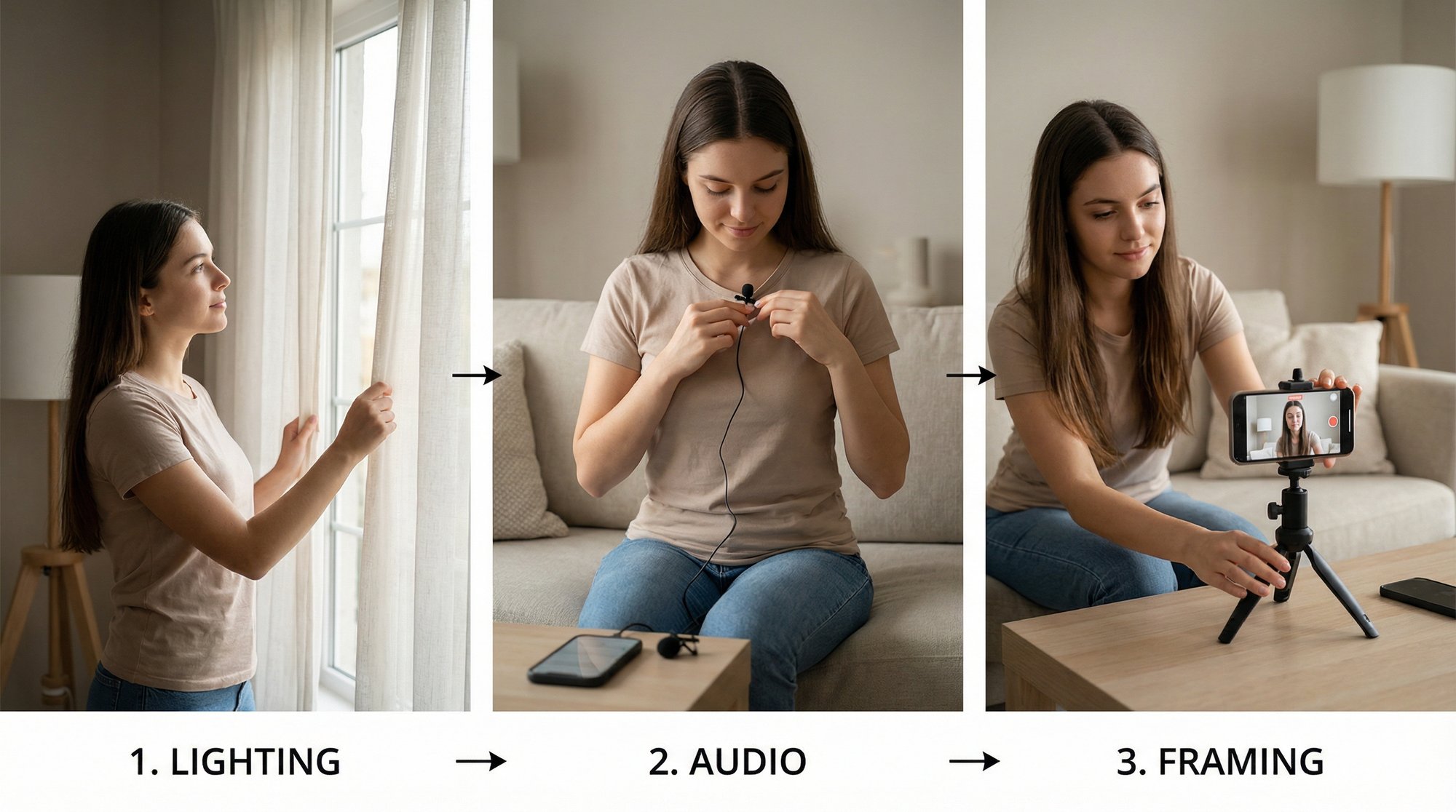
Start with light, not software

Bad light creates most visual noise problems. If your face is dim, your phone starts guessing. Those guesses show up as grain, soft detail, and unstable color.

The easiest fix is simple. Face a window. Don’t put the window behind you. Put it in front of you or slightly off to one side so your face gets even light. That one change often improves your footage more than any plugin.

If you want a practical setup for phone shooting, this guide to lighting for video recording covers the kind of low-friction arrangements that make short-form clips easier to clean and easier to publish.

Control your phone before it controls you

Most phones are decent cameras and unreliable camera operators. Left on full auto, they’ll keep changing exposure and focus during your take. That creates subtle pulsing and inconsistency that becomes much harder to correct later.

Use a short pre-record routine:

  • Clean the lens: Pocket smudges reduce contrast and make footage feel soft.

  • Lock focus on your face: Don’t let the camera hunt while you talk.

  • Lock exposure if your app allows it: You want consistency more than dramatic brightness shifts.

  • Avoid digital zoom: Move the phone instead.

  • Use the rear camera when practical: It usually gives you cleaner image quality.

These aren’t cinematic tricks. They’re stability moves. Stable footage takes noise reduction better because the editor isn’t fighting preventable changes.

Treat audio like the main event

Founders often obsess over image sharpness and ignore the room. That’s backwards for talking-head content. If people can hear you clearly, they’ll forgive a lot. If your voice is distant or noisy, they’ll scroll.

A better setup usually comes from subtraction, not equipment shopping. Turn off the loud fan. Step away from the fridge. Don’t record beside a window facing traffic. If a room sounds bright and echoey when you clap, it’ll probably sound hollow on camera too.

Useful habits:

  • Get closer to the mic: Distance is the enemy. Even a phone mic sounds better when it’s closer.

  • Choose softer rooms: Curtains, rugs, couches, and bookshelves help.

  • Record at quieter times: Fewer interruptions means less repair later.

  • Do a five-second test clip: Listen before committing to the full take.

For founders building a repeatable setup, this round-up of expert B2B podcast equipment advice is useful because it stays grounded in practical gear choices instead of studio fantasy shopping lists.

After you’ve got the basics in place, watch this for a simple visual reminder of how much setup affects the final result:

The founder checklist that actually matters

You don’t need a full production routine. You need a reliable one.

  1. Face the light
    Natural light from a window gives your phone more information and less noise to invent.

  2. Reduce room problems before software tries to
    Echo and hum are easier to prevent than remove cleanly.

  3. Keep framing simple
    A stable, medium-close talking shot is easier to clean than a wide shot in poor light.

  4. Use a basic external mic if you record often
    A lav or small USB mic can make a meaningful difference, especially if your room is only moderately controlled.

The best denoise setting is often the one you never have to touch because the raw clip already sounds usable.

That’s the advantage of prevention. It protects authenticity. The less repair your footage needs, the less likely it is to come out looking polished in the wrong way.

A Practical Guide to Visual Noise Reduction

Sometimes prevention isn’t enough. You filmed a strong take in a dim office, on a train platform, or in a hotel room after a conference. The idea is too good to throw away. That’s when visual cleanup has to work.

The key is to reduce distraction without sanding off the human details that make the clip believable.

A professional video editor working on noise reduction for video editing on a desktop computer screen.

What visual denoisers are actually doing

Most visual tools work in one of two ways.

Spatial denoising looks inside a single frame and smooths noise by comparing nearby pixels.
Temporal denoising looks across multiple frames and tries to identify what stays consistent versus what’s random noise.

Temporal cleanup usually preserves more believable detail in talking-head videos because your background and head position don’t change radically from frame to frame. Spatial cleanup is useful too, but it gets dangerous faster. Push it too hard and skin turns waxy, hair loses texture, and the whole clip starts to feel synthetic.

A landmark 2015 adaptive spatial-temporal denoising study reported a 7.6 dB PSNR gain over previous algorithms, with a strong focus on preserving edge details such as facial features. That idea still matters now. In short-form founder videos, edge detail is where trust lives.

A simple order of operations

Before touching sliders, duplicate the clip or adjustment layer and compare constantly. Your eye adapts quickly. Ten minutes into cleanup, you can start thinking a plastic-looking image is normal.

Use this order:

  • Start with temporal reduction: It usually gives you the cleanest win first.

  • Add spatial reduction only if needed: Treat it like seasoning, not the main ingredient.

  • Check the face at full size: Don’t judge only from a tiny preview.

  • Watch motion around the mouth and eyes: That’s where overprocessing shows up first.

  • Stop early: A slightly textured image is often better than an over-smoothed one.

If the viewer notices the denoising before they notice the idea, the edit missed.

How to approach common editors

Different editors label things differently, but the principles stay consistent.

Adobe Premiere Pro

Premiere users often rely on built-in effects, third-party plugins, or a round-trip to After Effects. If you’re using a denoise effect with strength, radius, or detail controls, keep the first pass modest. Raise noise reduction until the background settles, then back off slightly.

If there’s a separate luminance and chroma option, target chroma noise more confidently. Color speckles often look uglier than basic grain, and reducing them usually harms detail less than heavy luminance smoothing.

DaVinci Resolve

Resolve gives you stronger built-in options, especially if you’re using Studio. Start with Temporal NR before touching Spatial NR. For talking-head clips, a conservative temporal setting often removes most of the ugly shimmer in walls and shadows without wrecking skin.

When you move to spatial controls, use a lighter hand. The temptation is to chase a perfectly clean frame. That’s rarely the right target. A founder video should look polished enough to trust, not processed enough to feel fake.

Final Cut Pro

Final Cut users often depend on built-in cleanup plus selective sharpening or third-party tools. The same rule applies. Reduce noise first, then decide whether the image needs a tiny bit of crispness back. Don’t sharpen a noisy image before you denoise it. You’ll only emphasize the mess.

The settings that matter most

Here’s a quick reference that works across most software:

Setting

What it affects

Practical move

Temporal

frame-to-frame noise

start here for talking heads

Spatial

within-frame grain

add lightly after temporal

Luminance

brightness noise

increase slowly to avoid waxy skin

Chroma

color speckles

usually safer to push a bit more

Detail

retained texture

use it to bring realism back, carefully

Blend

original versus cleaned image

useful when the result looks too polished

If your clip also needs resizing after cleanup, a separate tool can help. This guide to a free video enhancer for 4K upscaling is worth reviewing when you’re deciding whether to denoise first, upscale first, or keep the job split across tools. For most founder content, denoise first, then evaluate whether upscaling adds anything useful.

If you’re still deciding what editor you’ll stick with, this comparison of beginner-friendly video editing software helps narrow the field without assuming you want a full-time editor’s workflow.

What works and what usually fails

The clips that clean up best have one thing in common. They were noisy, not broken. There’s enough face detail and stable motion for the software to make good choices.

The clips that fail usually have one of these traits:

  • Very low light with mushy detail

  • Heavy compression from multiple exports

  • Fast camera movement mixed with grain

  • Strong denoise plus strong sharpening

  • Attempts to make old phone footage look cinema-clean

That last one causes the most disappointment. Noise reduction for video can improve a weak clip. It can’t turn every weak clip into premium footage. The win is often making the video publishable and trustworthy, not making it perfect.

Creating Crystal-Clear Audio for Your Videos

If your content is built around your ideas, audio matters more than almost anything else. Founders can get away with ordinary visuals for a few seconds. They can’t get away with speech that sounds buried, buzzing, or cavernous.

That’s why audio cleanup gives the biggest return for short-form talking-head content.

Know the problem before you pick the tool

Not all bad audio is the same.

Hiss is usually a steady high background noise.
Hum sits lower and often comes from building systems or electronics.
Reverb makes your voice bounce and smear.
Broad ambient noise includes traffic, fans, keyboard clicks, and office chatter.

These problems respond differently to cleanup. Hiss and hum are often easier to suppress. Reverb is harder because it’s mixed into the shape of your speech. That’s why some clips sound “cleaner” after processing but still don’t sound close or intimate.

Why one-click AI tools changed the workflow

For founder content, the biggest shift has been AI speech isolation. Modern systems are built to identify the human voice and separate it from noisy environments with far less manual work than older EQ-and-gate workflows.

According to Lemonfox’s analysis of AI noise reduction, modern AI-driven audio cleanup can achieve 92-97% accuracy in isolating human speech, can reduce post-production time by up to 70%, and clear narration in denoised content can drive engagement rates up to 25% higher. That combination explains why AI cleanup is now the default choice for busy teams.

What this means in practice is simple. A founder can record a usable take on a phone in a less-than-perfect room and still end up with audio that sounds intentional instead of accidental.

Clean audio doesn’t need to sound expensive. It needs to sound close, clear, and human.

A practical audio cleanup workflow

For most short-form videos, this order works well:

  1. Remove obvious background noise first
    Use an AI speech enhancer or noise suppression tool to reduce fans, HVAC, traffic, or general room wash.

  2. Listen for artifacts
    If the voice starts sounding metallic, phasey, or too thin, dial the effect back.

  3. Tame hum or hiss if needed
    A light secondary pass can help, but stacking aggressive cleanup usually causes trouble.

  4. Adjust loudness and clarity
    Small EQ or leveling changes can make the result feel more finished.

  5. Check with headphones and speakers
    Some artifacts hide on laptop speakers and become obvious on headphones.

AI tools are strong because they deliver most of the value with very little setup. That’s ideal for founders. You don’t need to become an audio engineer. You need to know when the tool helped and when it started inventing a fake studio voice.

When to use editor tools or Audacity

Built-in editor tools still have a place. If the issue is narrow and predictable, like a light hum or gentle hiss, manual controls can preserve more of your natural tone than a full AI transformation.

Audacity is still useful for quick cleanup when you want direct control over noise profiles and basic processing. Video editors also offer simple dialogue cleanup modules that are good enough for many business clips. The trade-off is speed versus precision. AI is faster. Manual tools can be gentler when the raw audio is already close.

For a broader look at the mechanics behind speech recognition and voice processing, this overview of Python voice AI techniques gives helpful context on how systems separate and interpret spoken audio, even if your main goal is practical cleanup rather than coding.

If audio quality is the part of your workflow you fight most often, this guide to software that removes noise from audio is a useful next read because it compares options through the lens that matters most to non-engineers: what gets you to publishable speech the fastest.

What to avoid

A few moves consistently make founder audio worse:

  • Over-cleaning reverb: It often leaves the voice sounding swirly or robotic.

  • Stacking multiple speech enhancers: One aggressive pass is usually safer than several moderate ones.

  • Using hard noise gates on speech with pauses: The room tone disappears and reappears unnaturally.

  • Ignoring mic distance: No software fully fixes a mic that was too far away.

The best audio cleanup doesn’t announce itself. It just removes reasons to stop listening.

The Unfloppable Method An Intelligent Editor for Your Ideas

Manual cleanup works. It just asks for time, judgment, and repetition that most founders don’t want to spend.

That's the main bottleneck. Not whether noise reduction for video is possible, but whether it fits the way business leaders create. They record in bursts. They post in batches. They need an editing process that can clean up audio and visuals while keeping the original delivery intact.

The hardest part is restraint. Aggressive AI can remove noise well, but it can also flatten the person speaking. The trade-off is real. As discussed in Weet’s review of speech noise removal trade-offs, deep learning systems can introduce a 20-30% loss in vocal prosody in non-studio recordings when processing gets too aggressive. That’s exactly why some polished founder clips feel strangely lifeless.

What an intelligent workflow should do

A useful editor for founder content should make smart decisions in context, not apply maximum cleanup everywhere.

That means it should:

  • Clean backgrounds harder than faces

  • Prioritize speech intelligibility without flattening tone

  • Handle short-form pacing, not long-film assumptions

  • Preserve texture where texture helps credibility

  • Fit a repeatable upload-to-publish workflow

A modern service approach makes more sense than a tool-first approach. The goal isn’t to turn every founder into a colorist, mixer, and motion editor. The goal is to turn raw spoken ideas into finished, credible short-form videos.

Why authenticity is the real quality standard

Founders don’t win on technical perfection. They win when people believe them.

That changes how cleanup should be judged. A successful denoise pass doesn’t mean the image is spotless and the voice sounds studio-manufactured. It means the distractions are gone and the person still feels present. You can hear conviction. You can see expression. The clip feels polished enough to represent the brand, but not so processed that it stops feeling human.

The best edit protects the original intent of the speaker while removing the reasons a viewer would scroll away.

That standard matters more in business content than in almost any other video category. A founder’s tone, timing, and facial nuance are part of the message. Good editing supports that. Bad editing overwrites it.

Frequently Asked Questions About Noise Reduction

Can noise reduction fix a badly recorded video

Sometimes. It can often rescue a good idea from a weak environment. It usually can’t fully save footage that is both extremely dark and heavily compressed, or audio that was recorded too far from the microphone in a very echoey room. The better expectation is improvement, not magic.

Which matters more for talking-head videos, audio or visuals

Audio. If viewers struggle to understand you, they leave. Visual cleanup matters, especially when grain makes the clip feel low trust, but poor sound kills watchability faster.

Should I denoise before or after color correction

Usually before heavy color work. Color adjustments can exaggerate noise, especially in shadows. A light cleanup pass first gives you a more stable image to grade. Then you can decide whether a second tiny pass is needed.

Why does denoised video sometimes look fake

Because the settings were pushed past the point where they were only removing noise. Once a tool starts erasing skin texture, hair detail, edge definition, or natural motion, viewers notice the processing itself.

Is it better to use one strong tool or several lighter tools

Usually one primary tool with restraint. Stacking too many effects often compounds artifacts. The same is true for audio. One well-judged pass is often more natural than multiple half-fixes.

Can phone footage look professional enough for brand content

Yes, if the message is strong and the recording basics are handled well. Good light, better mic placement, lower room noise, and light cleanup go a long way. Most founder clips don’t fail because they were shot on a phone. They fail because the recording conditions forced too much repair.

How do I know when to stop adjusting

When the distractions are gone and your attention returns to the message. If you’re zooming in hunting for microscopic noise while the overall video already feels clean and trustworthy, you’ve probably gone far enough.

What’s the fastest route for a busy founder

Prevent what you can. Keep the setup simple. Use AI cleanup where it saves time. Avoid the temptation to polish until the clip loses personality.

If you want your raw talking-head videos turned into polished short-form content without losing the human feel, Unfloppable is built for exactly that. You upload yourself talking, and it turns those ideas into ready-to-post videos that feel real, clear, and brand-worthy, without forcing you to become your own editor.

You record a strong take on your phone between meetings. The idea is sharp. Your delivery feels natural. You upload the clip, watch it back, and immediately spot the problems. The image looks gritty. The room sounds hollow. The air conditioner sits under every sentence like a low drone.

That’s the moment a lot of founders stop posting.

Not because they lack ideas, but because the raw footage makes a good message feel small. Noise does that. It strips away clarity, and once clarity drops, authority drops with it. What should feel direct and human starts to look rushed, amateur, or oddly artificial after a bad cleanup pass.

Most advice online doesn’t help much. It’s built for filmmakers, plugin hobbyists, or editors with time to spare. It doesn’t reflect how founders work in practice. They’re filming short talking-head clips on phones, in offices, homes, coworking spaces, and cars. They need clean results fast, and they need those results to still sound like them.

The Hidden Problem with Your Best Ideas

A founder usually doesn’t miss a posting window because of strategy. They miss it because the footage feels too rough to publish.

The pattern is familiar. A good thought arrives after a customer call, during a walk back from lunch, or right after a team meeting. You open the camera, record a quick Reel, and say exactly what your audience needs to hear. Later, when you review it, the video is speckled from bad indoor light, your voice is fighting HVAC hum, and the whole thing feels less credible than it did in the moment.

That is the problem with noise reduction for video. It isn’t just about cosmetics. It’s about whether your message survives the recording process.

A lot of pro tutorials miss this completely. They focus on cinema workflows, heavy color grading, and tool-specific tricks. Meanwhile, founders are asking a much simpler question: how do I make a phone-recorded talking video under a minute look clean without spending half my day in an editor? Data highlighted by Neat Video’s overview of common user pain points notes that 70% of searches on Reddit and YouTube ask for the "best for phone-recorded talking videos under 1 min," yet top results often push complex plugins instead of one-click AI options.

User frustration often comes down to one thing: cleanup that removes the noise but also removes the person.

That’s why bad denoising can be as damaging as no denoising. Founders don’t need glossy. They need credible. They need a clip that feels clear, confident, and real enough to post without hesitation.

What Is Video Noise and Where Does It Come From

Video noise is any unwanted visual or audio interference that distracts from the message. In a founder video, it usually shows up as grain in the image, color speckles, hiss, hum, wind, or room echo.

The simplest way to think about it is this. Visual noise is a digital blizzard over your face and background. Audio noise is static or interference sitting under your voice. Neither has to be extreme to hurt a short-form clip. In a thirty-second talking-head video, even small distractions feel bigger because there’s nowhere to hide.

An infographic titled Understanding Video Noise, illustrating causes of visual noise and common audio problems.

Visual noise in real founder footage

Visual noise usually comes from your camera struggling to gather enough light. Phones handle bright scenes well, but once the room gets dim, the sensor starts amplifying the signal. That’s when grain and muddy detail show up.

Common causes include:

  • Low light: Your camera boosts sensitivity to compensate, which introduces grain.

  • Small phone sensors: They’re convenient, but they’re less forgiving in weak light.

  • Auto exposure choices: Your phone may make the shot brighter in ways that also make it noisier.

  • Compression artifacts: Uploading, exporting, and re-encoding can add blockiness or banding.

Visual noise doesn’t stay politely in the background. It eats into skin detail, softens facial features, and makes motion look less clean. On a talking-head video, your face is the product. If the image around your eyes, mouth, and hairline starts breaking apart, the clip loses trust fast.

Audio noise in ordinary rooms

Audio noise is even more damaging because people will tolerate imperfect video longer than they’ll tolerate unpleasant sound.

Here are the usual offenders:

Problem

What it sounds like

Typical cause

Hiss

a steady light shhh

weak preamps, electronics, poor mic signal

Hum

low buzz underneath speech

HVAC, power interference, appliances

Wind noise

rumble and blasts

outdoor recording or air moving across the mic

Room echo

hollow, distant speech

hard walls, bare floors, glass, empty rooms

A founder often records in spaces designed for work, not sound. Glass-walled offices, kitchens, conference rooms, and home desks all reflect audio. That reflection makes speech feel farther away, even when the camera is close.

Why modern denoisers work better than older ones

Older cleanup methods often softened everything. Newer systems do a better job separating what matters from what doesn’t. In video, advanced 3D temporal-spatial denoising analyzes both what’s happening inside a frame and what stays consistent across nearby frames. According to Morpho’s explanation of 3D noise reduction, this allows up to 80% more aggressive suppression in still areas, with PSNR gains of up to 7.6 dB and compression efficiency improvements of 20-30%.

Practical rule: Still backgrounds can usually take stronger cleanup. Faces, hands, and mouth movement usually can’t.

That’s the core idea behind noise reduction for video that still looks believable. Clean the wall harder than the face. Clean the room tone harder than the voice texture. The best results come from knowing what the viewer can lose and what they can’t.

Preventing Noise Before You Hit Record

The fastest edit is the one you don’t need to rescue later.

Most founders think of denoising as a post-production task. In practice, the strongest move is prevention. A few small decisions before you hit record can save you from the classic cycle of over-fixing grain, flattening your voice, and wasting time on clips that never quite recover.

A professional video studio setup featuring a camera, a green chair, and bright studio lighting.

Start with light, not software

Bad light creates most visual noise problems. If your face is dim, your phone starts guessing. Those guesses show up as grain, soft detail, and unstable color.

The easiest fix is simple. Face a window. Don’t put the window behind you. Put it in front of you or slightly off to one side so your face gets even light. That one change often improves your footage more than any plugin.

If you want a practical setup for phone shooting, this guide to lighting for video recording covers the kind of low-friction arrangements that make short-form clips easier to clean and easier to publish.

Control your phone before it controls you

Most phones are decent cameras and unreliable camera operators. Left on full auto, they’ll keep changing exposure and focus during your take. That creates subtle pulsing and inconsistency that becomes much harder to correct later.

Use a short pre-record routine:

  • Clean the lens: Pocket smudges reduce contrast and make footage feel soft.

  • Lock focus on your face: Don’t let the camera hunt while you talk.

  • Lock exposure if your app allows it: You want consistency more than dramatic brightness shifts.

  • Avoid digital zoom: Move the phone instead.

  • Use the rear camera when practical: It usually gives you cleaner image quality.

These aren’t cinematic tricks. They’re stability moves. Stable footage takes noise reduction better because the editor isn’t fighting preventable changes.

Treat audio like the main event

Founders often obsess over image sharpness and ignore the room. That’s backwards for talking-head content. If people can hear you clearly, they’ll forgive a lot. If your voice is distant or noisy, they’ll scroll.

A better setup usually comes from subtraction, not equipment shopping. Turn off the loud fan. Step away from the fridge. Don’t record beside a window facing traffic. If a room sounds bright and echoey when you clap, it’ll probably sound hollow on camera too.

Useful habits:

  • Get closer to the mic: Distance is the enemy. Even a phone mic sounds better when it’s closer.

  • Choose softer rooms: Curtains, rugs, couches, and bookshelves help.

  • Record at quieter times: Fewer interruptions means less repair later.

  • Do a five-second test clip: Listen before committing to the full take.

For founders building a repeatable setup, this round-up of expert B2B podcast equipment advice is useful because it stays grounded in practical gear choices instead of studio fantasy shopping lists.

After you’ve got the basics in place, watch this for a simple visual reminder of how much setup affects the final result:

The founder checklist that actually matters

You don’t need a full production routine. You need a reliable one.

  1. Face the light
    Natural light from a window gives your phone more information and less noise to invent.

  2. Reduce room problems before software tries to
    Echo and hum are easier to prevent than remove cleanly.

  3. Keep framing simple
    A stable, medium-close talking shot is easier to clean than a wide shot in poor light.

  4. Use a basic external mic if you record often
    A lav or small USB mic can make a meaningful difference, especially if your room is only moderately controlled.

The best denoise setting is often the one you never have to touch because the raw clip already sounds usable.

That’s the advantage of prevention. It protects authenticity. The less repair your footage needs, the less likely it is to come out looking polished in the wrong way.

A Practical Guide to Visual Noise Reduction

Sometimes prevention isn’t enough. You filmed a strong take in a dim office, on a train platform, or in a hotel room after a conference. The idea is too good to throw away. That’s when visual cleanup has to work.

The key is to reduce distraction without sanding off the human details that make the clip believable.

A professional video editor working on noise reduction for video editing on a desktop computer screen.

What visual denoisers are actually doing

Most visual tools work in one of two ways.

Spatial denoising looks inside a single frame and smooths noise by comparing nearby pixels.
Temporal denoising looks across multiple frames and tries to identify what stays consistent versus what’s random noise.

Temporal cleanup usually preserves more believable detail in talking-head videos because your background and head position don’t change radically from frame to frame. Spatial cleanup is useful too, but it gets dangerous faster. Push it too hard and skin turns waxy, hair loses texture, and the whole clip starts to feel synthetic.

A landmark 2015 adaptive spatial-temporal denoising study reported a 7.6 dB PSNR gain over previous algorithms, with a strong focus on preserving edge details such as facial features. That idea still matters now. In short-form founder videos, edge detail is where trust lives.

A simple order of operations

Before touching sliders, duplicate the clip or adjustment layer and compare constantly. Your eye adapts quickly. Ten minutes into cleanup, you can start thinking a plastic-looking image is normal.

Use this order:

  • Start with temporal reduction: It usually gives you the cleanest win first.

  • Add spatial reduction only if needed: Treat it like seasoning, not the main ingredient.

  • Check the face at full size: Don’t judge only from a tiny preview.

  • Watch motion around the mouth and eyes: That’s where overprocessing shows up first.

  • Stop early: A slightly textured image is often better than an over-smoothed one.

If the viewer notices the denoising before they notice the idea, the edit missed.

How to approach common editors

Different editors label things differently, but the principles stay consistent.

Adobe Premiere Pro

Premiere users often rely on built-in effects, third-party plugins, or a round-trip to After Effects. If you’re using a denoise effect with strength, radius, or detail controls, keep the first pass modest. Raise noise reduction until the background settles, then back off slightly.

If there’s a separate luminance and chroma option, target chroma noise more confidently. Color speckles often look uglier than basic grain, and reducing them usually harms detail less than heavy luminance smoothing.

DaVinci Resolve

Resolve gives you stronger built-in options, especially if you’re using Studio. Start with Temporal NR before touching Spatial NR. For talking-head clips, a conservative temporal setting often removes most of the ugly shimmer in walls and shadows without wrecking skin.

When you move to spatial controls, use a lighter hand. The temptation is to chase a perfectly clean frame. That’s rarely the right target. A founder video should look polished enough to trust, not processed enough to feel fake.

Final Cut Pro

Final Cut users often depend on built-in cleanup plus selective sharpening or third-party tools. The same rule applies. Reduce noise first, then decide whether the image needs a tiny bit of crispness back. Don’t sharpen a noisy image before you denoise it. You’ll only emphasize the mess.

The settings that matter most

Here’s a quick reference that works across most software:

Setting

What it affects

Practical move

Temporal

frame-to-frame noise

start here for talking heads

Spatial

within-frame grain

add lightly after temporal

Luminance

brightness noise

increase slowly to avoid waxy skin

Chroma

color speckles

usually safer to push a bit more

Detail

retained texture

use it to bring realism back, carefully

Blend

original versus cleaned image

useful when the result looks too polished

If your clip also needs resizing after cleanup, a separate tool can help. This guide to a free video enhancer for 4K upscaling is worth reviewing when you’re deciding whether to denoise first, upscale first, or keep the job split across tools. For most founder content, denoise first, then evaluate whether upscaling adds anything useful.

If you’re still deciding what editor you’ll stick with, this comparison of beginner-friendly video editing software helps narrow the field without assuming you want a full-time editor’s workflow.

What works and what usually fails

The clips that clean up best have one thing in common. They were noisy, not broken. There’s enough face detail and stable motion for the software to make good choices.

The clips that fail usually have one of these traits:

  • Very low light with mushy detail

  • Heavy compression from multiple exports

  • Fast camera movement mixed with grain

  • Strong denoise plus strong sharpening

  • Attempts to make old phone footage look cinema-clean

That last one causes the most disappointment. Noise reduction for video can improve a weak clip. It can’t turn every weak clip into premium footage. The win is often making the video publishable and trustworthy, not making it perfect.

Creating Crystal-Clear Audio for Your Videos

If your content is built around your ideas, audio matters more than almost anything else. Founders can get away with ordinary visuals for a few seconds. They can’t get away with speech that sounds buried, buzzing, or cavernous.

That’s why audio cleanup gives the biggest return for short-form talking-head content.

Know the problem before you pick the tool

Not all bad audio is the same.

Hiss is usually a steady high background noise.
Hum sits lower and often comes from building systems or electronics.
Reverb makes your voice bounce and smear.
Broad ambient noise includes traffic, fans, keyboard clicks, and office chatter.

These problems respond differently to cleanup. Hiss and hum are often easier to suppress. Reverb is harder because it’s mixed into the shape of your speech. That’s why some clips sound “cleaner” after processing but still don’t sound close or intimate.

Why one-click AI tools changed the workflow

For founder content, the biggest shift has been AI speech isolation. Modern systems are built to identify the human voice and separate it from noisy environments with far less manual work than older EQ-and-gate workflows.

According to Lemonfox’s analysis of AI noise reduction, modern AI-driven audio cleanup can achieve 92-97% accuracy in isolating human speech, can reduce post-production time by up to 70%, and clear narration in denoised content can drive engagement rates up to 25% higher. That combination explains why AI cleanup is now the default choice for busy teams.

What this means in practice is simple. A founder can record a usable take on a phone in a less-than-perfect room and still end up with audio that sounds intentional instead of accidental.

Clean audio doesn’t need to sound expensive. It needs to sound close, clear, and human.

A practical audio cleanup workflow

For most short-form videos, this order works well:

  1. Remove obvious background noise first
    Use an AI speech enhancer or noise suppression tool to reduce fans, HVAC, traffic, or general room wash.

  2. Listen for artifacts
    If the voice starts sounding metallic, phasey, or too thin, dial the effect back.

  3. Tame hum or hiss if needed
    A light secondary pass can help, but stacking aggressive cleanup usually causes trouble.

  4. Adjust loudness and clarity
    Small EQ or leveling changes can make the result feel more finished.

  5. Check with headphones and speakers
    Some artifacts hide on laptop speakers and become obvious on headphones.

AI tools are strong because they deliver most of the value with very little setup. That’s ideal for founders. You don’t need to become an audio engineer. You need to know when the tool helped and when it started inventing a fake studio voice.

When to use editor tools or Audacity

Built-in editor tools still have a place. If the issue is narrow and predictable, like a light hum or gentle hiss, manual controls can preserve more of your natural tone than a full AI transformation.

Audacity is still useful for quick cleanup when you want direct control over noise profiles and basic processing. Video editors also offer simple dialogue cleanup modules that are good enough for many business clips. The trade-off is speed versus precision. AI is faster. Manual tools can be gentler when the raw audio is already close.

For a broader look at the mechanics behind speech recognition and voice processing, this overview of Python voice AI techniques gives helpful context on how systems separate and interpret spoken audio, even if your main goal is practical cleanup rather than coding.

If audio quality is the part of your workflow you fight most often, this guide to software that removes noise from audio is a useful next read because it compares options through the lens that matters most to non-engineers: what gets you to publishable speech the fastest.

What to avoid

A few moves consistently make founder audio worse:

  • Over-cleaning reverb: It often leaves the voice sounding swirly or robotic.

  • Stacking multiple speech enhancers: One aggressive pass is usually safer than several moderate ones.

  • Using hard noise gates on speech with pauses: The room tone disappears and reappears unnaturally.

  • Ignoring mic distance: No software fully fixes a mic that was too far away.

The best audio cleanup doesn’t announce itself. It just removes reasons to stop listening.

The Unfloppable Method An Intelligent Editor for Your Ideas

Manual cleanup works. It just asks for time, judgment, and repetition that most founders don’t want to spend.

That's the main bottleneck. Not whether noise reduction for video is possible, but whether it fits the way business leaders create. They record in bursts. They post in batches. They need an editing process that can clean up audio and visuals while keeping the original delivery intact.

The hardest part is restraint. Aggressive AI can remove noise well, but it can also flatten the person speaking. The trade-off is real. As discussed in Weet’s review of speech noise removal trade-offs, deep learning systems can introduce a 20-30% loss in vocal prosody in non-studio recordings when processing gets too aggressive. That’s exactly why some polished founder clips feel strangely lifeless.

What an intelligent workflow should do

A useful editor for founder content should make smart decisions in context, not apply maximum cleanup everywhere.

That means it should:

  • Clean backgrounds harder than faces

  • Prioritize speech intelligibility without flattening tone

  • Handle short-form pacing, not long-film assumptions

  • Preserve texture where texture helps credibility

  • Fit a repeatable upload-to-publish workflow

A modern service approach makes more sense than a tool-first approach. The goal isn’t to turn every founder into a colorist, mixer, and motion editor. The goal is to turn raw spoken ideas into finished, credible short-form videos.

Why authenticity is the real quality standard

Founders don’t win on technical perfection. They win when people believe them.

That changes how cleanup should be judged. A successful denoise pass doesn’t mean the image is spotless and the voice sounds studio-manufactured. It means the distractions are gone and the person still feels present. You can hear conviction. You can see expression. The clip feels polished enough to represent the brand, but not so processed that it stops feeling human.

The best edit protects the original intent of the speaker while removing the reasons a viewer would scroll away.

That standard matters more in business content than in almost any other video category. A founder’s tone, timing, and facial nuance are part of the message. Good editing supports that. Bad editing overwrites it.

Frequently Asked Questions About Noise Reduction

Can noise reduction fix a badly recorded video

Sometimes. It can often rescue a good idea from a weak environment. It usually can’t fully save footage that is both extremely dark and heavily compressed, or audio that was recorded too far from the microphone in a very echoey room. The better expectation is improvement, not magic.

Which matters more for talking-head videos, audio or visuals

Audio. If viewers struggle to understand you, they leave. Visual cleanup matters, especially when grain makes the clip feel low trust, but poor sound kills watchability faster.

Should I denoise before or after color correction

Usually before heavy color work. Color adjustments can exaggerate noise, especially in shadows. A light cleanup pass first gives you a more stable image to grade. Then you can decide whether a second tiny pass is needed.

Why does denoised video sometimes look fake

Because the settings were pushed past the point where they were only removing noise. Once a tool starts erasing skin texture, hair detail, edge definition, or natural motion, viewers notice the processing itself.

Is it better to use one strong tool or several lighter tools

Usually one primary tool with restraint. Stacking too many effects often compounds artifacts. The same is true for audio. One well-judged pass is often more natural than multiple half-fixes.

Can phone footage look professional enough for brand content

Yes, if the message is strong and the recording basics are handled well. Good light, better mic placement, lower room noise, and light cleanup go a long way. Most founder clips don’t fail because they were shot on a phone. They fail because the recording conditions forced too much repair.

How do I know when to stop adjusting

When the distractions are gone and your attention returns to the message. If you’re zooming in hunting for microscopic noise while the overall video already feels clean and trustworthy, you’ve probably gone far enough.

What’s the fastest route for a busy founder

Prevent what you can. Keep the setup simple. Use AI cleanup where it saves time. Avoid the temptation to polish until the clip loses personality.

If you want your raw talking-head videos turned into polished short-form content without losing the human feel, Unfloppable is built for exactly that. You upload yourself talking, and it turns those ideas into ready-to-post videos that feel real, clear, and brand-worthy, without forcing you to become your own editor.