How to Make Highlights Video: how to make highlights video that gets more views
Discover how to make highlights video from start to finish, with planning, editing, and distribution tips to boost views.
Feb 2, 2026
Learning how to make highlights video is actually pretty straightforward. You find the best, most impactful moments from your longer recordings, snip them into short, punchy clips, and get them out on social media. It's hands-down the smartest way to turn one big piece of content into a dozen little assets that grab attention and get people talking.
Why Highlights Videos Are Your Secret Weapon for Growth
Let's get real for a second. Attention is the currency of the internet, and nothing prints it faster than short, compelling highlight videos. This isn't just another passing trend; it's a massive shift in how people want to consume information, making it an essential play for anyone who's serious about building a brand. You're not just chasing views—you're building genuine authority and creating a direct connection with your audience.
The whole game is about finding the "gold nuggets" already buried in your content. Think about that webinar you hosted, that podcast interview you gave, or even a simple talking-head video you shot. Inside that longer recording are killer soundbites, actionable tips, and great stories just waiting for an audience. When you pull those moments out, you're making your best stuff accessible to thousands of people who might never sit through the full hour.
The Power of Short-Form Content
Back around 2018, when platforms like Instagram Reels and TikTok were just starting to blow up, the sharpest entrepreneurs saw the writing on the wall. They realized that manually clipping out highlights was a game-changer.
Fast forward to today, and the numbers are staggering. Short-form videos under a minute are pulling in a 50% average engagement rate, completely dwarfing longer formats. And with video projected to account for 82% of all internet traffic, turning your best ideas into shareable clips is no longer optional. You can dig into more of these stats over on SproutSocial.com.
Here's a quick look at why this shift is so important for businesses.
Short-Form Vs. Long-Form Video Engagement at a Glance
This table breaks down why short, focused highlights videos often deliver a much better return on your time and effort compared to traditional long-form content.
Metric | Highlights Videos (Under 1 Minute) | Long-Form Videos (10+ Minutes) |
|---|---|---|
Attention Span | Designed for quick, immediate value. | Requires significant viewer commitment. |
Engagement Rate | High (around 50%). Likes, comments, shares. | Lower. Viewers often drop off quickly. |
Shareability | Extremely high. Easy to send and reshare. | Low. Rarely shared outside of niche communities. |
Content Repurposing | Excellent. One long video = many clips. | Difficult. It is the source material. |
Platform Algorithm | Highly favored by platforms like TikTok, Reels, Shorts. | Prioritized on platforms like YouTube for deep dives. |
The takeaway is clear: for driving broad awareness and consistent engagement, short-form highlights are incredibly effective.
The real beauty of this whole approach is how efficient it is. A single 30-minute recording can easily become a full week's worth of high-impact social media posts. This creates a sustainable rhythm, allowing founders and creators to stay top-of-mind without the burnout of constantly trying to invent something new. It’s all about working smarter.
Key Takeaway: The goal isn't just to randomly chop up your video. It's about strategically isolating the single most valuable idea in a 30-60 second clip that can stand on its own and give someone instant value.
Highlights Videos Drive Real Business Results
This strategy delivers more than just likes and shares; it leads to tangible outcomes. For founders, experts, and marketers, these clips are workhorses that do several jobs at once:
Building Authority: When you consistently share valuable insights, you become the go-to expert in your space. People start to trust what you have to say.
Driving Leads: Every clip is a subtle invitation. It can guide interested viewers to sign up for a webinar, subscribe to a newsletter, or check out a product page.
Increasing Brand Recall: Short, memorable videos have a way of sticking in people's minds, keeping your brand front and center when they're ready to buy.
And here’s the best part: you don't need a Hollywood budget or a film degree to make this happen. Services like Unfloppable were built to handle this exact process for you, turning your raw footage into polished, post-ready assets. It lets you stay in your zone of genius—sharing your message—while the system handles all the technical heavy lifting. It truly makes a professional video strategy accessible to anyone.
Planning and Filming Your Raw Footage

The best highlight videos are made long before you hit "record" or open up your editing software. Seriously. The magic happens in the pre-production phase, where you lay the groundwork for content that actually resonates and makes every second of footage count.
This isn’t about scripting yourself into a corner. It’s about being strategic and thinking in a "clip-friendly" way from the jump. The whole point is to capture powerful, self-contained moments right from the source, which will make your life a million times easier when it’s time to edit.
Find Your Core Topics First
Before you even glance at a camera, stop and ask yourself the most important question: "What does my audience really care about?" A killer highlights video isn't about what you feel like saying; it’s about giving them something they genuinely need to hear.
Start by brainstorming topics that solve a real problem, answer a question you get all the time, or bust a common myth in your industry.
Once you land on a solid topic, break it down into bite-sized sub-points. Think of each of these as a potential highlight clip just waiting to happen. For example, if your main video is about "Boosting Team Productivity," your sub-points could be:
The biggest productivity myth most managers fall for.
One simple trick for running meetings that don't drag on forever.
Why "deep work" blocks are the secret to your team’s best work.
See? Now you have a clear roadmap for your recording session. You know exactly what points to hit, which keeps the filming process tight and efficient.
How to Record for Easy Editing
Here’s a secret that will save you so much frustration: speak in soundbites. Think of it as leaving breadcrumbs for your future self. After you deliver a powerful idea or a punchy statement, just pause for a few seconds. That clean break makes it incredibly easy to spot and snip out that exact clip later on.
This simple technique is a total game-changer. Instead of scrubbing through a long, rambling monologue, you’ll have a collection of distinct, quotable moments ready to go. It’s a small habit that cuts down editing time and is the key to learning how to make a highlights video that looks polished and professional.
Pro Tip: Don't be afraid to repeat a key point a couple of times, maybe phrasing it slightly differently. This gives you options in the edit, so you can pick the take that sounds the most clear and confident.
Another pro move is to batch record. Instead of filming one video here and there, block off a couple of hours and knock out several topics at once. This gets you into a creative rhythm and can generate enough raw footage for weeks—or even a month—of highlight clips. It's the most efficient way to build a real content engine.
Keep Your Filming Setup Simple
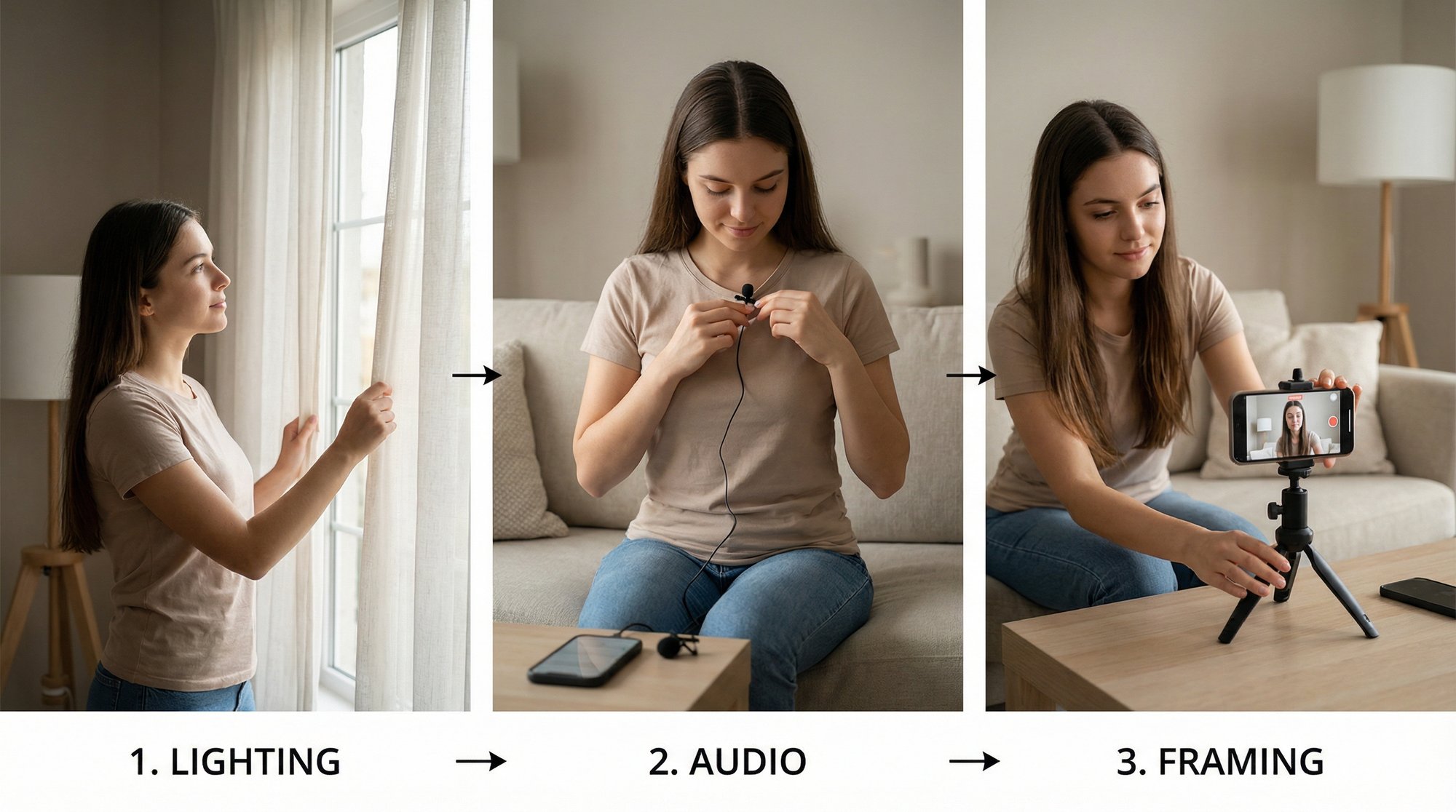
Let me be clear: you do not need a fancy studio to create great video. In fact, an overly produced look can feel sterile and less authentic. You really only need three things to get started.
A Modern Smartphone: The camera in your pocket is more than powerful enough to shoot sharp, clean video. Just pop it on a cheap tripod to keep the shot from getting shaky.
Good Lighting: This one is non-negotiable. Natural light is your best friend, so try to face a window. If that’s not an option, a simple ring light is an affordable investment that makes a world of difference.
Clear Audio: Bad audio is the fastest way to get someone to scroll away. Find a quiet room with no echo or background noise. Honestly, the microphone on a pair of wired headphones is usually a big step up from your phone’s built-in mic.
At the end of the day, authenticity will always win over perfection. People connect with real people, not flawless productions. Just focus on delivering your message with passion and clarity, and let your simple setup handle the rest. This whole process shows how a single, focused recording session can fuel a powerful and consistent video strategy.
Cut for Impact: Editing Clips That Capture Attention

Alright, this is where the magic really happens. All that planning you did? It's about to pay off. Editing is where you take a pile of raw footage and sculpt it into a story that can stop someone dead in their scroll.
Forget about needing the fanciest software. Great editing is about making smart, strategic choices that respect your viewer's incredibly short attention span.
Your first job is to become a gold miner. You need to sift through all that footage to find the “gold nuggets”—those powerful statements, surprising insights, or game-changing tips that deliver instant value.
Finding Your Hero Clip
Before you even think about making a cut, grab a notepad and watch your entire recording. Every single time you hear yourself say something with energy, clarity, or a genuine "aha!" moment, jot down the timestamp. This list is now your treasure map.
What are you looking for? You want clips that can stand on their own. A great highlight doesn't need a ton of backstory; it answers a specific question, presents a strong opinion, or offers a single, easy-to-digest takeaway. These are the self-contained gems that thrive in the fast-paced world of social media.
With your timestamps in hand, it's time to get ruthless. Start trimming away everything that isn’t absolutely essential to the core message. That means long pauses, filler words like "um" and "ah," and any rambling intros. Get to the point. Fast.
The Art of Dynamic Pacing
Pacing is the rhythm of your video, and it's what keeps people hooked. A highlight reel needs to feel energetic and move quickly, but that doesn't just mean chopping things up randomly. It’s about creating an intentional flow that feels compelling.
One of the easiest ways to inject energy is with jump cuts. This is a simple trick where you snip out a small piece from the middle of a continuous shot. It creates a subtle "jump" that wakes up the viewer's brain and makes the whole video feel more dynamic. It’s the perfect tool for eliminating those awkward pauses between sentences.
Variety is also your best friend. Staring at the same static shot of a talking head is a recipe for boredom. You have to break things up. Try these moves:
Punch In: Briefly zoom in on your face to emphasize a key point. It’s like leaning in to share a secret.
Add Text Overlays: Make important words pop up on screen as you say them.
Incorporate B-Roll: Use relevant stock footage, screen recordings, or images to visually explain what you're talking about.
Think of these techniques as visual punctuation. They keep the viewer engaged and prevent their thumb from reflexively swiping away.
Your editing style is your brand's personality. Are you fast and punchy with lots of quick cuts and sound effects? Or are you clean and professional with smooth transitions and minimalist text? Figure it out, then stick with it to build a recognizable identity.
Why Captions Are Non-Negotiable
Let's get real for a second: a huge chunk of social media video is watched with the sound off. If your video doesn't have captions, most people will just see a mouth moving and keep on scrolling.
Captions aren't an optional extra; they're essential.
Thankfully, most modern editing tools have made this incredibly simple. Many can auto-generate captions from your audio, which you can then style to match your brand. Just make sure they're big and bold enough to be read on a tiny phone screen.
This isn’t just about accessibility—it’s about survival. The fight for attention online is brutal. Consider this: in a single year, Instagram's median engagement nosedived from 2.94% to just 0.61% as algorithms began favoring hyper-engaging short-form content. But here's the opportunity: 73% of consumers find videos between 30 seconds and two minutes most effective, which is the sweet spot for these platforms. You can dig into more stats like this over on Dreamgrow.com.
Streamlining Your Editing Workflow
Manually hunting for clips, sourcing B-roll, creating captions, and animating text for every single video is a massive time sink. If you're trying to post consistently, it can quickly lead to burnout. This is where you need a smarter system.
A service like Unfloppable is built to take this entire headache off your plate. Instead of wrestling with a timeline for hours, you just upload your raw footage. Their system is designed to intelligently pinpoint the best moments, find relevant visuals to illustrate your points, and add dynamic, on-brand captions automatically.
This is how you stop letting the technical details of video production become a bottleneck. By automating the most tedious parts of the process, you're free to focus on what you actually do best: creating great content and sharing your expertise with the world.
Getting Your Video Seen: Publishing for Maximum Reach
You’ve put in the work and created a fantastic highlights video. That’s a huge win, but it’s only half the job. A video that just sits on your hard drive isn't doing anything for your business. The final, crucial step is getting that clip out into the world and in front of the right eyeballs.
This isn’t about just hitting “publish” and hoping for the best. It’s a strategic game of fitting your content to each platform, writing copy that makes people stop scrolling, and learning how to get every ounce of value from the video you worked so hard to create. This is where your video becomes a real asset.
One Video, Many Platforms: Tailor Your Cut
Every social media platform is its own little world. Each has its own rules, audience expectations, and quirks. A one-size-fits-all approach is a recipe for getting ignored. To really make an impact, you have to adapt your highlights video for the native feel of each channel.
Think of it like this: your core message is the same, but you’re delivering it slightly differently depending on who you're talking to. Here’s what you need to know:
Instagram Reels & TikTok: This is vertical video territory. You absolutely need a 9:16 aspect ratio. Keep it short and punchy—somewhere between 15 and 60 seconds is the sweet spot. A huge tip here is to jump on trending audio; it can give your video an incredible boost in visibility.
YouTube Shorts: Just like Reels and TikTok, Shorts are all about the 9:16 vertical format. The hard limit is 60 seconds, but from what I’ve seen, the algorithm really seems to favor clips in that 15-30 second range. Your title is also super important here for search and discovery.
LinkedIn: While vertical is making its way here, the tried-and-true formats are still landscape (16:9) or a simple square (1:1). These work especially well for content that’s a bit more professional or educational. The vibe should be more focused on industry insights and solid, actionable advice.
My Two Cents: Seriously, don't just upload the exact same file everywhere. It only takes a few extra minutes to crop a video for a vertical format or add a trending sound for Reels. That small effort can be the difference between 100 views and 10,000.
Writing a Post That Stops the Scroll
Once your video is formatted perfectly, you need to package it in a way that makes people want to click. The video is the main event, sure, but your headline, description, and thumbnail are what sell the tickets.
Your only goal here is to make people curious. The headline should ask a question, make a bold claim, or promise a valuable insight. For instance, instead of a boring title like "My Thoughts on Marketing," try something like, "The #1 Marketing Mistake I See Founders Make." See the difference? The second one is impossible not to click.
In the description, add some context and a clear call-to-action (CTA). Use a mix of broad and niche hashtags so new people can find you. And don’t be shy—tell people exactly what you want them to do next. Want comments? Ask a question. Want them to visit your site? Give them the link. Be direct.
Squeeze Every Drop of Value From Your Content
The most successful creators I know aren't just content machines churning out new stuff 24/7. They're smart. They get more out of the content they already have. That 60-second highlights video is a goldmine you can repurpose over and over again to extend its life and reach.
Here are a few simple ways to do it:
Build a Carousel Post: Pull 3-5 of the best quotes or stats from the video and turn them into a simple graphic carousel for Instagram or LinkedIn.
Expand into a Blog Post: Embed the video in a quick blog post and write a few paragraphs expanding on the main idea.
Share it in Your Newsletter: Drop the video into your next email to subscribers. It’s a great way to provide value and pull them back to your social media.
Create a Quote Graphic: Find the single most powerful line from the video and make a clean, shareable image out of it for places like Twitter or Facebook.
This is the secret to staying consistent without burning yourself out. If you want to go deeper on a specific platform, our guide on how to create Instagram Reels is a great place to start.
This is also where a service like Unfloppable can be a total game-changer. By letting us handle the heavy lifting of editing, you get your time back to focus on these high-impact strategies. You can put your energy into the smart distribution and repurposing that actually grows your brand, knowing your video assets are professionally polished and ready to go.
Building a Sustainable Highlights Video Workflow
Let's be honest: consistency is the secret sauce to growth, but it's also the biggest pain point for most of us. Anyone can make one great highlights video. The real challenge—and where the magic happens—is creating them week after week. This is where you need to stop thinking about one-off projects and start building a smart, repeatable system that works for you, not against you.
The goal is to make content creation feel less like a frantic chore and more like a natural part of your routine. Without a system, you're just spinning your wheels on the content treadmill, always scrambling. With a system, you’re in the driver's seat, building a powerful presence without letting video production hijack your entire schedule.
The Power of Batching Your Content
If you take away just one thing, let it be this: batch recording. Instead of trying to squeeze in filming whenever you find a spare moment, you block off a dedicated chunk of time—maybe two hours every other Tuesday—and record an entire series of videos in one go.
This approach is a total game-changer for a couple of reasons. First, it helps you find your flow. Your first take might feel a little clunky, but by the third or fourth video, you'll be speaking more confidently and naturally. Second, it's just plain efficient. The time it takes to set up your lights, mic, and camera is the same whether you film for 15 minutes or two hours. Batching ensures you get a massive return on that initial setup effort.
Seriously, a single recording session can easily give you enough raw material for a whole month's worth of highlights videos. This flips the script entirely, taking the pressure off daily creation so you can focus on running your business.
Adopting the Hub-and-Spoke Model
Another pillar of a sustainable workflow is the hub-and-spoke model. This is a brilliant content strategy where one large piece of "pillar" content—the hub—is mined for dozens of smaller, bite-sized clips, or "spokes."
Your pillar content is likely something you're already creating. Think about long-form assets like:
A webinar you hosted
A podcast interview you were on
A keynote speech you gave
A detailed product demo you recorded
Instead of stressing about ten new ideas for short videos, you only need one great idea for a webinar. Once that's recorded, the heavy lifting is done. You're now sitting on a goldmine of clips just waiting to be pulled out.
This model is how you create content at scale without burning out. I've seen a single 45-minute webinar produce 15-20 fantastic highlight clips. It’s the ultimate "work smarter, not harder" approach to video.
Organize Your Efforts with a Content Calendar
A content calendar is your roadmap. It doesn't have to be some fancy, expensive software; a simple spreadsheet is often all you need to plan, track, and schedule your video posts. This one simple tool gives you a bird's-eye view of your content pipeline and saves you from that last-minute panic of "what do I post today?"
Track the essentials: post date, the core message of the clip, the platform it's for, and its status (e.g., "needs editing," "scheduled," "published"). This little bit of organization removes all the guesswork and turns your content strategy into a well-oiled machine.
This simple flow chart breaks down the repeatable cycle from creation to distribution.

The key takeaway here is that a good process is cyclical. Every clip you publish gives you data that helps you optimize the next round of content.
Building this workflow is so critical because of the incredible power of video. Even years ago, data showed that social videos generate 1200% more shares than text and images combined. Today, that effect is even stronger. Native LinkedIn videos can hit engagement rates as high as 6.6%.
Clipping key moments from your long-form content into vertical, captioned shorts is your direct line to that engagement. On TikTok, captions alone can boost brand affinity by 95% and increase message recall by 58%. You can discover more insights about how video marketing continues to evolve.
When you combine batching, the hub-and-spoke model, and a content calendar, you're not just creating videos—you're building a system. It's how you stop being a sporadic creator and start becoming a consistent, authoritative voice in your field.
Got Questions About Highlights Videos? Let's Clear Them Up.

Even with the best workflow laid out, a few questions always pop up when you're diving into making highlights videos. That's completely normal. Nailing these details can be what separates a clip that gets all the views from one that just disappears into the noise.
Let's tackle some of the most common sticking points I see people run into. These are the straightforward, practical answers you need to get unstuck and start creating with confidence.
How Long Should a Highlights Video Actually Be?
This is a classic "it depends" question, but there's a definite sweet spot. Aim for somewhere between 15 and 60 seconds. This length is basically custom-built for the algorithms and short attention spans on platforms like Instagram Reels, TikTok, and YouTube Shorts.
Why does it work so well? It's just enough time to land a single, punchy idea or a killer tip. More importantly, it's short enough that people are highly likely to watch the entire thing, which is a massive signal to the algorithm that your content is engaging.
My Take: I always shoot for under 30 seconds if I can. If you can't get your main point across in that time, your clip is probably trying to do too much. Isolate that one "gold nugget" and save the rest for another video.
What Equipment Do I Really Need to Start?
You're going to love this answer: you can get started with just your smartphone. Seriously, that's it. Fancy cameras are nice to have, but they are not what makes a video compelling.
The two things that matter way more than your camera are lighting and audio. Good lighting makes your video look sharp and professional. Clear audio ensures your message actually gets through to your audience.
Here’s a dead-simple setup that costs nothing:
For Lighting: Just sit facing a window. That soft, natural light is more flattering than most expensive setups.
For Audio: Record in a quiet room with soft surfaces to kill echo. A closet full of clothes works surprisingly well as a makeshift sound booth.
Down the road, you can always grab a cheap ring light or a lavalier mic. But for now, just focus on nailing these two fundamentals with what you've already got.
How Do I Find the Best Clips in a Super Long Video?
Think of it like prospecting for gold. You have to sift through a lot of material to find the shiny bits. The key is to listen for energy and impact, not just information.
Scrub through your raw footage and jot down the timestamps for any moment that:
Makes you react emotionally (a laugh, a surprising insight, a vulnerable moment).
Delivers a crystal-clear "aha!" moment that simplifies a complex topic.
Gives one single, actionable piece of advice someone can use right away.
Presents a strong, maybe even slightly controversial, take that gets people talking.
These are your hero moments. They're self-contained, powerful, and the perfect foundation for a killer highlights video.
Do I Have to Be a Video Editing Whiz?
Not at all. This is probably the biggest myth that holds people back. The idea that you need to be a technical guru is completely outdated.
Modern, user-friendly apps like CapCut were designed from the ground up for people with zero editing experience. And if you want to bypass the learning curve completely, a dedicated service can handle the entire workflow for you. The goal isn't to create a cinematic masterpiece; it's to communicate clearly. Focus on clean cuts, easy-to-read captions, and a message that connects.
Ready to stop fighting with editing software and start publishing great content consistently? Unfloppable transforms your raw footage into polished, post-ready highlights videos, so you can focus on your message, not the timeline. Claim your first three videos for free and see how it works.
Learning how to make highlights video is actually pretty straightforward. You find the best, most impactful moments from your longer recordings, snip them into short, punchy clips, and get them out on social media. It's hands-down the smartest way to turn one big piece of content into a dozen little assets that grab attention and get people talking.
Why Highlights Videos Are Your Secret Weapon for Growth
Let's get real for a second. Attention is the currency of the internet, and nothing prints it faster than short, compelling highlight videos. This isn't just another passing trend; it's a massive shift in how people want to consume information, making it an essential play for anyone who's serious about building a brand. You're not just chasing views—you're building genuine authority and creating a direct connection with your audience.
The whole game is about finding the "gold nuggets" already buried in your content. Think about that webinar you hosted, that podcast interview you gave, or even a simple talking-head video you shot. Inside that longer recording are killer soundbites, actionable tips, and great stories just waiting for an audience. When you pull those moments out, you're making your best stuff accessible to thousands of people who might never sit through the full hour.
The Power of Short-Form Content
Back around 2018, when platforms like Instagram Reels and TikTok were just starting to blow up, the sharpest entrepreneurs saw the writing on the wall. They realized that manually clipping out highlights was a game-changer.
Fast forward to today, and the numbers are staggering. Short-form videos under a minute are pulling in a 50% average engagement rate, completely dwarfing longer formats. And with video projected to account for 82% of all internet traffic, turning your best ideas into shareable clips is no longer optional. You can dig into more of these stats over on SproutSocial.com.
Here's a quick look at why this shift is so important for businesses.
Short-Form Vs. Long-Form Video Engagement at a Glance
This table breaks down why short, focused highlights videos often deliver a much better return on your time and effort compared to traditional long-form content.
Metric | Highlights Videos (Under 1 Minute) | Long-Form Videos (10+ Minutes) |
|---|---|---|
Attention Span | Designed for quick, immediate value. | Requires significant viewer commitment. |
Engagement Rate | High (around 50%). Likes, comments, shares. | Lower. Viewers often drop off quickly. |
Shareability | Extremely high. Easy to send and reshare. | Low. Rarely shared outside of niche communities. |
Content Repurposing | Excellent. One long video = many clips. | Difficult. It is the source material. |
Platform Algorithm | Highly favored by platforms like TikTok, Reels, Shorts. | Prioritized on platforms like YouTube for deep dives. |
The takeaway is clear: for driving broad awareness and consistent engagement, short-form highlights are incredibly effective.
The real beauty of this whole approach is how efficient it is. A single 30-minute recording can easily become a full week's worth of high-impact social media posts. This creates a sustainable rhythm, allowing founders and creators to stay top-of-mind without the burnout of constantly trying to invent something new. It’s all about working smarter.
Key Takeaway: The goal isn't just to randomly chop up your video. It's about strategically isolating the single most valuable idea in a 30-60 second clip that can stand on its own and give someone instant value.
Highlights Videos Drive Real Business Results
This strategy delivers more than just likes and shares; it leads to tangible outcomes. For founders, experts, and marketers, these clips are workhorses that do several jobs at once:
Building Authority: When you consistently share valuable insights, you become the go-to expert in your space. People start to trust what you have to say.
Driving Leads: Every clip is a subtle invitation. It can guide interested viewers to sign up for a webinar, subscribe to a newsletter, or check out a product page.
Increasing Brand Recall: Short, memorable videos have a way of sticking in people's minds, keeping your brand front and center when they're ready to buy.
And here’s the best part: you don't need a Hollywood budget or a film degree to make this happen. Services like Unfloppable were built to handle this exact process for you, turning your raw footage into polished, post-ready assets. It lets you stay in your zone of genius—sharing your message—while the system handles all the technical heavy lifting. It truly makes a professional video strategy accessible to anyone.
Planning and Filming Your Raw Footage

The best highlight videos are made long before you hit "record" or open up your editing software. Seriously. The magic happens in the pre-production phase, where you lay the groundwork for content that actually resonates and makes every second of footage count.
This isn’t about scripting yourself into a corner. It’s about being strategic and thinking in a "clip-friendly" way from the jump. The whole point is to capture powerful, self-contained moments right from the source, which will make your life a million times easier when it’s time to edit.
Find Your Core Topics First
Before you even glance at a camera, stop and ask yourself the most important question: "What does my audience really care about?" A killer highlights video isn't about what you feel like saying; it’s about giving them something they genuinely need to hear.
Start by brainstorming topics that solve a real problem, answer a question you get all the time, or bust a common myth in your industry.
Once you land on a solid topic, break it down into bite-sized sub-points. Think of each of these as a potential highlight clip just waiting to happen. For example, if your main video is about "Boosting Team Productivity," your sub-points could be:
The biggest productivity myth most managers fall for.
One simple trick for running meetings that don't drag on forever.
Why "deep work" blocks are the secret to your team’s best work.
See? Now you have a clear roadmap for your recording session. You know exactly what points to hit, which keeps the filming process tight and efficient.
How to Record for Easy Editing
Here’s a secret that will save you so much frustration: speak in soundbites. Think of it as leaving breadcrumbs for your future self. After you deliver a powerful idea or a punchy statement, just pause for a few seconds. That clean break makes it incredibly easy to spot and snip out that exact clip later on.
This simple technique is a total game-changer. Instead of scrubbing through a long, rambling monologue, you’ll have a collection of distinct, quotable moments ready to go. It’s a small habit that cuts down editing time and is the key to learning how to make a highlights video that looks polished and professional.
Pro Tip: Don't be afraid to repeat a key point a couple of times, maybe phrasing it slightly differently. This gives you options in the edit, so you can pick the take that sounds the most clear and confident.
Another pro move is to batch record. Instead of filming one video here and there, block off a couple of hours and knock out several topics at once. This gets you into a creative rhythm and can generate enough raw footage for weeks—or even a month—of highlight clips. It's the most efficient way to build a real content engine.
Keep Your Filming Setup Simple
Let me be clear: you do not need a fancy studio to create great video. In fact, an overly produced look can feel sterile and less authentic. You really only need three things to get started.
A Modern Smartphone: The camera in your pocket is more than powerful enough to shoot sharp, clean video. Just pop it on a cheap tripod to keep the shot from getting shaky.
Good Lighting: This one is non-negotiable. Natural light is your best friend, so try to face a window. If that’s not an option, a simple ring light is an affordable investment that makes a world of difference.
Clear Audio: Bad audio is the fastest way to get someone to scroll away. Find a quiet room with no echo or background noise. Honestly, the microphone on a pair of wired headphones is usually a big step up from your phone’s built-in mic.
At the end of the day, authenticity will always win over perfection. People connect with real people, not flawless productions. Just focus on delivering your message with passion and clarity, and let your simple setup handle the rest. This whole process shows how a single, focused recording session can fuel a powerful and consistent video strategy.
Cut for Impact: Editing Clips That Capture Attention

Alright, this is where the magic really happens. All that planning you did? It's about to pay off. Editing is where you take a pile of raw footage and sculpt it into a story that can stop someone dead in their scroll.
Forget about needing the fanciest software. Great editing is about making smart, strategic choices that respect your viewer's incredibly short attention span.
Your first job is to become a gold miner. You need to sift through all that footage to find the “gold nuggets”—those powerful statements, surprising insights, or game-changing tips that deliver instant value.
Finding Your Hero Clip
Before you even think about making a cut, grab a notepad and watch your entire recording. Every single time you hear yourself say something with energy, clarity, or a genuine "aha!" moment, jot down the timestamp. This list is now your treasure map.
What are you looking for? You want clips that can stand on their own. A great highlight doesn't need a ton of backstory; it answers a specific question, presents a strong opinion, or offers a single, easy-to-digest takeaway. These are the self-contained gems that thrive in the fast-paced world of social media.
With your timestamps in hand, it's time to get ruthless. Start trimming away everything that isn’t absolutely essential to the core message. That means long pauses, filler words like "um" and "ah," and any rambling intros. Get to the point. Fast.
The Art of Dynamic Pacing
Pacing is the rhythm of your video, and it's what keeps people hooked. A highlight reel needs to feel energetic and move quickly, but that doesn't just mean chopping things up randomly. It’s about creating an intentional flow that feels compelling.
One of the easiest ways to inject energy is with jump cuts. This is a simple trick where you snip out a small piece from the middle of a continuous shot. It creates a subtle "jump" that wakes up the viewer's brain and makes the whole video feel more dynamic. It’s the perfect tool for eliminating those awkward pauses between sentences.
Variety is also your best friend. Staring at the same static shot of a talking head is a recipe for boredom. You have to break things up. Try these moves:
Punch In: Briefly zoom in on your face to emphasize a key point. It’s like leaning in to share a secret.
Add Text Overlays: Make important words pop up on screen as you say them.
Incorporate B-Roll: Use relevant stock footage, screen recordings, or images to visually explain what you're talking about.
Think of these techniques as visual punctuation. They keep the viewer engaged and prevent their thumb from reflexively swiping away.
Your editing style is your brand's personality. Are you fast and punchy with lots of quick cuts and sound effects? Or are you clean and professional with smooth transitions and minimalist text? Figure it out, then stick with it to build a recognizable identity.
Why Captions Are Non-Negotiable
Let's get real for a second: a huge chunk of social media video is watched with the sound off. If your video doesn't have captions, most people will just see a mouth moving and keep on scrolling.
Captions aren't an optional extra; they're essential.
Thankfully, most modern editing tools have made this incredibly simple. Many can auto-generate captions from your audio, which you can then style to match your brand. Just make sure they're big and bold enough to be read on a tiny phone screen.
This isn’t just about accessibility—it’s about survival. The fight for attention online is brutal. Consider this: in a single year, Instagram's median engagement nosedived from 2.94% to just 0.61% as algorithms began favoring hyper-engaging short-form content. But here's the opportunity: 73% of consumers find videos between 30 seconds and two minutes most effective, which is the sweet spot for these platforms. You can dig into more stats like this over on Dreamgrow.com.
Streamlining Your Editing Workflow
Manually hunting for clips, sourcing B-roll, creating captions, and animating text for every single video is a massive time sink. If you're trying to post consistently, it can quickly lead to burnout. This is where you need a smarter system.
A service like Unfloppable is built to take this entire headache off your plate. Instead of wrestling with a timeline for hours, you just upload your raw footage. Their system is designed to intelligently pinpoint the best moments, find relevant visuals to illustrate your points, and add dynamic, on-brand captions automatically.
This is how you stop letting the technical details of video production become a bottleneck. By automating the most tedious parts of the process, you're free to focus on what you actually do best: creating great content and sharing your expertise with the world.
Getting Your Video Seen: Publishing for Maximum Reach
You’ve put in the work and created a fantastic highlights video. That’s a huge win, but it’s only half the job. A video that just sits on your hard drive isn't doing anything for your business. The final, crucial step is getting that clip out into the world and in front of the right eyeballs.
This isn’t about just hitting “publish” and hoping for the best. It’s a strategic game of fitting your content to each platform, writing copy that makes people stop scrolling, and learning how to get every ounce of value from the video you worked so hard to create. This is where your video becomes a real asset.
One Video, Many Platforms: Tailor Your Cut
Every social media platform is its own little world. Each has its own rules, audience expectations, and quirks. A one-size-fits-all approach is a recipe for getting ignored. To really make an impact, you have to adapt your highlights video for the native feel of each channel.
Think of it like this: your core message is the same, but you’re delivering it slightly differently depending on who you're talking to. Here’s what you need to know:
Instagram Reels & TikTok: This is vertical video territory. You absolutely need a 9:16 aspect ratio. Keep it short and punchy—somewhere between 15 and 60 seconds is the sweet spot. A huge tip here is to jump on trending audio; it can give your video an incredible boost in visibility.
YouTube Shorts: Just like Reels and TikTok, Shorts are all about the 9:16 vertical format. The hard limit is 60 seconds, but from what I’ve seen, the algorithm really seems to favor clips in that 15-30 second range. Your title is also super important here for search and discovery.
LinkedIn: While vertical is making its way here, the tried-and-true formats are still landscape (16:9) or a simple square (1:1). These work especially well for content that’s a bit more professional or educational. The vibe should be more focused on industry insights and solid, actionable advice.
My Two Cents: Seriously, don't just upload the exact same file everywhere. It only takes a few extra minutes to crop a video for a vertical format or add a trending sound for Reels. That small effort can be the difference between 100 views and 10,000.
Writing a Post That Stops the Scroll
Once your video is formatted perfectly, you need to package it in a way that makes people want to click. The video is the main event, sure, but your headline, description, and thumbnail are what sell the tickets.
Your only goal here is to make people curious. The headline should ask a question, make a bold claim, or promise a valuable insight. For instance, instead of a boring title like "My Thoughts on Marketing," try something like, "The #1 Marketing Mistake I See Founders Make." See the difference? The second one is impossible not to click.
In the description, add some context and a clear call-to-action (CTA). Use a mix of broad and niche hashtags so new people can find you. And don’t be shy—tell people exactly what you want them to do next. Want comments? Ask a question. Want them to visit your site? Give them the link. Be direct.
Squeeze Every Drop of Value From Your Content
The most successful creators I know aren't just content machines churning out new stuff 24/7. They're smart. They get more out of the content they already have. That 60-second highlights video is a goldmine you can repurpose over and over again to extend its life and reach.
Here are a few simple ways to do it:
Build a Carousel Post: Pull 3-5 of the best quotes or stats from the video and turn them into a simple graphic carousel for Instagram or LinkedIn.
Expand into a Blog Post: Embed the video in a quick blog post and write a few paragraphs expanding on the main idea.
Share it in Your Newsletter: Drop the video into your next email to subscribers. It’s a great way to provide value and pull them back to your social media.
Create a Quote Graphic: Find the single most powerful line from the video and make a clean, shareable image out of it for places like Twitter or Facebook.
This is the secret to staying consistent without burning yourself out. If you want to go deeper on a specific platform, our guide on how to create Instagram Reels is a great place to start.
This is also where a service like Unfloppable can be a total game-changer. By letting us handle the heavy lifting of editing, you get your time back to focus on these high-impact strategies. You can put your energy into the smart distribution and repurposing that actually grows your brand, knowing your video assets are professionally polished and ready to go.
Building a Sustainable Highlights Video Workflow
Let's be honest: consistency is the secret sauce to growth, but it's also the biggest pain point for most of us. Anyone can make one great highlights video. The real challenge—and where the magic happens—is creating them week after week. This is where you need to stop thinking about one-off projects and start building a smart, repeatable system that works for you, not against you.
The goal is to make content creation feel less like a frantic chore and more like a natural part of your routine. Without a system, you're just spinning your wheels on the content treadmill, always scrambling. With a system, you’re in the driver's seat, building a powerful presence without letting video production hijack your entire schedule.
The Power of Batching Your Content
If you take away just one thing, let it be this: batch recording. Instead of trying to squeeze in filming whenever you find a spare moment, you block off a dedicated chunk of time—maybe two hours every other Tuesday—and record an entire series of videos in one go.
This approach is a total game-changer for a couple of reasons. First, it helps you find your flow. Your first take might feel a little clunky, but by the third or fourth video, you'll be speaking more confidently and naturally. Second, it's just plain efficient. The time it takes to set up your lights, mic, and camera is the same whether you film for 15 minutes or two hours. Batching ensures you get a massive return on that initial setup effort.
Seriously, a single recording session can easily give you enough raw material for a whole month's worth of highlights videos. This flips the script entirely, taking the pressure off daily creation so you can focus on running your business.
Adopting the Hub-and-Spoke Model
Another pillar of a sustainable workflow is the hub-and-spoke model. This is a brilliant content strategy where one large piece of "pillar" content—the hub—is mined for dozens of smaller, bite-sized clips, or "spokes."
Your pillar content is likely something you're already creating. Think about long-form assets like:
A webinar you hosted
A podcast interview you were on
A keynote speech you gave
A detailed product demo you recorded
Instead of stressing about ten new ideas for short videos, you only need one great idea for a webinar. Once that's recorded, the heavy lifting is done. You're now sitting on a goldmine of clips just waiting to be pulled out.
This model is how you create content at scale without burning out. I've seen a single 45-minute webinar produce 15-20 fantastic highlight clips. It’s the ultimate "work smarter, not harder" approach to video.
Organize Your Efforts with a Content Calendar
A content calendar is your roadmap. It doesn't have to be some fancy, expensive software; a simple spreadsheet is often all you need to plan, track, and schedule your video posts. This one simple tool gives you a bird's-eye view of your content pipeline and saves you from that last-minute panic of "what do I post today?"
Track the essentials: post date, the core message of the clip, the platform it's for, and its status (e.g., "needs editing," "scheduled," "published"). This little bit of organization removes all the guesswork and turns your content strategy into a well-oiled machine.
This simple flow chart breaks down the repeatable cycle from creation to distribution.

The key takeaway here is that a good process is cyclical. Every clip you publish gives you data that helps you optimize the next round of content.
Building this workflow is so critical because of the incredible power of video. Even years ago, data showed that social videos generate 1200% more shares than text and images combined. Today, that effect is even stronger. Native LinkedIn videos can hit engagement rates as high as 6.6%.
Clipping key moments from your long-form content into vertical, captioned shorts is your direct line to that engagement. On TikTok, captions alone can boost brand affinity by 95% and increase message recall by 58%. You can discover more insights about how video marketing continues to evolve.
When you combine batching, the hub-and-spoke model, and a content calendar, you're not just creating videos—you're building a system. It's how you stop being a sporadic creator and start becoming a consistent, authoritative voice in your field.
Got Questions About Highlights Videos? Let's Clear Them Up.

Even with the best workflow laid out, a few questions always pop up when you're diving into making highlights videos. That's completely normal. Nailing these details can be what separates a clip that gets all the views from one that just disappears into the noise.
Let's tackle some of the most common sticking points I see people run into. These are the straightforward, practical answers you need to get unstuck and start creating with confidence.
How Long Should a Highlights Video Actually Be?
This is a classic "it depends" question, but there's a definite sweet spot. Aim for somewhere between 15 and 60 seconds. This length is basically custom-built for the algorithms and short attention spans on platforms like Instagram Reels, TikTok, and YouTube Shorts.
Why does it work so well? It's just enough time to land a single, punchy idea or a killer tip. More importantly, it's short enough that people are highly likely to watch the entire thing, which is a massive signal to the algorithm that your content is engaging.
My Take: I always shoot for under 30 seconds if I can. If you can't get your main point across in that time, your clip is probably trying to do too much. Isolate that one "gold nugget" and save the rest for another video.
What Equipment Do I Really Need to Start?
You're going to love this answer: you can get started with just your smartphone. Seriously, that's it. Fancy cameras are nice to have, but they are not what makes a video compelling.
The two things that matter way more than your camera are lighting and audio. Good lighting makes your video look sharp and professional. Clear audio ensures your message actually gets through to your audience.
Here’s a dead-simple setup that costs nothing:
For Lighting: Just sit facing a window. That soft, natural light is more flattering than most expensive setups.
For Audio: Record in a quiet room with soft surfaces to kill echo. A closet full of clothes works surprisingly well as a makeshift sound booth.
Down the road, you can always grab a cheap ring light or a lavalier mic. But for now, just focus on nailing these two fundamentals with what you've already got.
How Do I Find the Best Clips in a Super Long Video?
Think of it like prospecting for gold. You have to sift through a lot of material to find the shiny bits. The key is to listen for energy and impact, not just information.
Scrub through your raw footage and jot down the timestamps for any moment that:
Makes you react emotionally (a laugh, a surprising insight, a vulnerable moment).
Delivers a crystal-clear "aha!" moment that simplifies a complex topic.
Gives one single, actionable piece of advice someone can use right away.
Presents a strong, maybe even slightly controversial, take that gets people talking.
These are your hero moments. They're self-contained, powerful, and the perfect foundation for a killer highlights video.
Do I Have to Be a Video Editing Whiz?
Not at all. This is probably the biggest myth that holds people back. The idea that you need to be a technical guru is completely outdated.
Modern, user-friendly apps like CapCut were designed from the ground up for people with zero editing experience. And if you want to bypass the learning curve completely, a dedicated service can handle the entire workflow for you. The goal isn't to create a cinematic masterpiece; it's to communicate clearly. Focus on clean cuts, easy-to-read captions, and a message that connects.
Ready to stop fighting with editing software and start publishing great content consistently? Unfloppable transforms your raw footage into polished, post-ready highlights videos, so you can focus on your message, not the timeline. Claim your first three videos for free and see how it works.