Ai Videos Edit Guide for Creating Short-Form Content Fast

Learn how to use ai videos edit tools to turn raw footage into engaging short-form content. This guide offers actionable advice for founders and creators.

Feb 28, 2026

Let’s be honest: editing video is a soul-crushing time suck. Using AI to edit videos means you can swap those endless hours of tedious, manual work for a few minutes of smart, automated polish. It’s a genuine game-changer for founders and creators.

This tech is now smart enough to find the best parts of your footage, slap on perfect captions, and even source visuals for you. The result? Professional-quality content without the steep learning curve or the high price tag of traditional editing.

Why AI Is a Founder's Secret Weapon for Video Editing

A smiling man works on video editing with two laptops and a camera, showcasing faster editing.

For any busy founder or creator, the story is always the same. You know you need to create video content, but you're constantly blocked by a lack of time, zero technical skills, and a budget that’s already stretched thin. Traditional video editing is a massive bottleneck. It’s hours spent staring at a timeline, marking timestamps, and fighting with software that feels like it was designed by engineers for other engineers.

This is exactly where AI-assisted editing completely changes the game.

Instead of you manually hunting for the best takes, an AI can chew through an hour of footage in seconds and pinpoint the most compelling moments. Think of it as your personal assistant editor, one that intelligently stitches together a narrative based on the actual words you spoke.

Shift from Technician to Creative Director

The fundamental shift here is moving you from a hands-on technician to a creative director. Your energy is no longer wasted on the mechanics of how to cut a clip, but on the story you want to tell. The AI handles the grunt work, which hands you back your most valuable asset: time.

Just think about the old, painful process:

  • Manually scrubbing through a 30-minute recording just to find 60 seconds of gold.

  • Painstakingly typing out and timing every single caption for people watching on silent.

  • Endlessly scrolling through stock footage sites for a B-roll clip that only sort of fits the vibe.

Now, picture the AI-powered workflow. You upload your raw video, and the system almost instantly suggests a tight, engaging edit with perfectly synced captions. This is precisely why so many are scrambling to ai videos edit their content.

Amplify Your Authenticity, Don't Fake It

A common fear I hear is that AI will make content feel robotic or inauthentic. But here's the thing: the best tools don't create soulless, synthetic videos from scratch. They use your genuine footage—your face, your voice, your unique expertise—as the raw material. It's a critical distinction, and we've written a whole guide on the risks of creating what's now called AI slop.

The goal isn't to replace you; it's to amplify you. AI takes over the repetitive, boring tasks so you can focus on being the authentic, relatable expert your audience actually wants to see.

This approach is what makes professional-grade video suddenly accessible to everyone, not just those with deep pockets or a film degree. The tech is even powerful enough to create content from a simple script. For example, you can see how an AI video generator from text can turn written ideas into full video productions.

These tools are tearing down the walls that once kept brilliant ideas from being shared through video.

2. Give Your AI the Right Ingredients to Work With

Your final video’s quality is baked in long before you hit the "edit" button. The old saying "garbage in, garbage out" is especially true for AI editing tools. A few simple tweaks to how you record will make a world of difference, saving you hours of headaches and manual fixes down the line.

Think of it this way: you're setting your AI partner up for success.

The single biggest lever you can pull is your audio quality. AI tools rely on clean audio to transcribe your speech, identify key moments, and generate those all-important captions. If the AI can't understand what you're saying because of echo or background noise, its entire workflow falls apart. You don't need a pro studio—a simple lavalier mic clipped to your shirt is a game-changer and will give you crisp, clear sound that AI can process with incredible accuracy.

Shaky, handheld footage is another common mistake. It’s not just distracting for your audience; it's confusing for the AI. A basic tripod for your phone or camera provides the stability you need for a professional feel. This simple step keeps you framed correctly and cuts out the jittery movements that can throw off the editing algorithm, letting it focus squarely on your message.

Speak in a Way the AI Understands

Once your tech is sorted, it's time to think about how you deliver your content. AI editors thrive on structure. They work best when you present your ideas as complete, distinct thoughts.

Make an effort to speak in clear, well-paced sentences. More importantly, leave a tiny, natural pause between each point you make. This deliberate pacing acts like a signal, helping the AI accurately pinpoint where one idea ends and another begins. This makes its job of selecting the most powerful clips almost effortless.

If you tend to ramble or jump between topics without a break, the AI will get lost. It won't know what the core message of a segment is, and you’ll end up with bizarre or irrelevant clip selections.

Here's a little trick I use: Pretend you're leaving a series of short, clear voicemail messages. State one key point, pause for a beat, then move on to the next one. This mental model is fantastic for creating AI-friendly content without sounding stiff or robotic.

This structured approach has another major benefit. When the AI has a crystal-clear understanding of your spoken content, it can do a much better job finding relevant B-roll to layer over your video. To see just how powerful this is, check out our deep dive on sourcing AI B-roll for your videos.

Tidy Up Your Background and Lighting

Finally, let's talk about your environment. No, you don't need a custom-built studio. Just a clean, uncluttered background is enough to keep the focus where it should be: on you. A messy or busy background is a distraction for viewers and can even confuse the AI’s visual analysis.

Lighting is just as vital. The best light is often free—just face a window. Good, natural light illuminates your face and creates a high-quality image for the AI to work with. Shadowy, poorly lit footage instantly cheapens your video and makes everything harder.

These small preparations are what truly separate amateur-hour videos from content that looks polished and professional.

2. Navigating the AI-Assisted Editing Workflow

Okay, your raw footage is prepped and ready to go. You’ve given the AI the best possible ingredients to work with. Now for the fun part: seeing how it whips those ingredients into a polished, engaging video ready for social media.

This is where your job changes. You're no longer a technician bogged down in tedious cuts and timeline scrubbing. Instead, you get to be the creative director, guiding the process from a high level.

When you drop your video into a tool like Unfloppable, the AI immediately gets to work trying to understand what you’ve created. First, it transcribes every single word, building a text-based map of your entire video. This transcript becomes the foundation for everything that follows.

From there, the AI starts analyzing that text. It's looking for the core ideas, the most powerful statements, and those perfect, punchy soundbites. It's not just hunting for keywords; it’s identifying complete thoughts and compelling arguments. This is how it automatically surfaces the gold from your longer recording, saving you hours of manual searching.

From Raw Takes to a Cohesive Story

Once the AI has pinpointed the best clips, its work is just getting started. It then begins to intelligently stitch them together into a compelling narrative, layering in dynamic elements to hold a viewer's attention. This is where the real magic of AI editing comes to life.

Here’s what the AI is doing behind the scenes:

  • Auto-Captions: It generates perfectly synced, stylish captions. This is an absolute must-have for silent viewing on platforms like Instagram and TikTok, where a huge chunk of your audience will have their sound off.

  • B-Roll Sourcing: The AI scours the web—or your own media library, if you provide one—for relevant images and video clips that visually match what you're saying. This adds crucial context and breaks up the monotony of a single talking head.

  • AI Visuals: What happens when the perfect stock clip doesn't exist? Some of the more advanced tools can generate custom AI visuals on the fly, filling in any gaps to keep the visual story flowing smoothly.

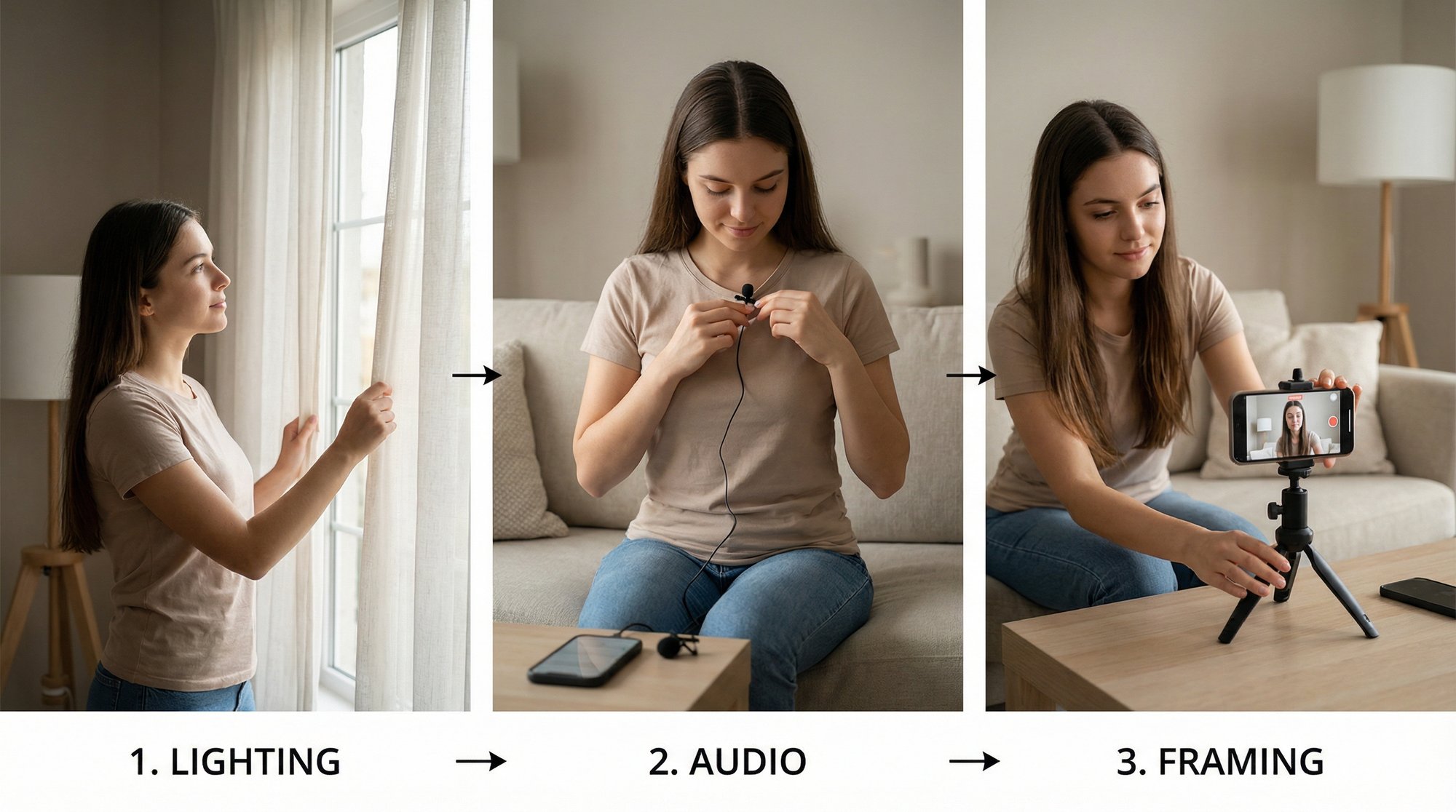
This flowchart really breaks down how a little bit of prep work on your end pays huge dividends in the AI editing stage.

A three-step flowchart illustrating footage preparation for AI: audio, stability, and delivery process.

As you can see, clear audio, steady footage, and a well-structured delivery give the AI the high-quality data it needs to spit out a fantastic first draft.

This new way of working is completely changing the game for creators. The global video editing market, which was valued at USD 3.75 billion in 2026, is on track to hit USD 4.99 billion by 2031. A huge driver of that growth? Small and medium-sized businesses adopting smart AI tools at a 7.88% annual clip to create pro-level content without needing a full-time editor.

You Are the Creative Director

The end result of this process is a fully edited video draft, delivered for your review in a fraction of the time it would take a human. Your job is no longer to do the edit, but to approve it. We dive deeper into what this looks like in our guide on how to auto-edit videos with AI.

Your role is to provide the vision and the raw authenticity; the AI provides the technical execution. It’s a partnership that makes a consistent stream of high-quality content not just possible, but incredibly efficient.

Even with AI doing the heavy lifting, the core principles of good storytelling don't change. It’s still worth brushing up on the fundamentals. Exploring these video production best practices will only make your AI-assisted edits stronger.

Ultimately, this shift lets you focus on your message and strategy, turning your expertise into a reliable content engine that actually builds your brand.

That Final 10%: Adding the Human Touch to Your AI Edit

Let’s be honest: relying on AI to edit your videos gets you about 90% of the way there. It’s an incredible time-saver. But that last 10%? That’s where the real magic happens. This is the human touch—your final pass to make sure the video isn't just technically correct, but that it actually feels like you.

An AI draft is a fantastic starting point, but it's still a machine's best guess. It doesn't know the inside jokes, the specific nuances of your brand's voice, or the emotional weight behind a particular story you're telling. Your job is to step in and elevate the edit from "AI-generated" to "expertly crafted."

This isn't about starting over. Not at all. Think of it as a quick, focused quality check to spot the small things that make a huge difference. You're the final inspector on the assembly line, adding that essential stamp of approval before it goes out into the world.

Your Final Polish Checklist

Before you even think about hitting publish, you need to do a quick review. This final check is what turns a decent automated draft into content that truly represents your brand. To avoid getting bogged down, just focus your attention on these three key areas.

Here's what I always look for:

  • Caption Sanity Check: AI transcription is a game-changer, but it's not perfect. Scan the captions for any obvious errors, especially with industry jargon, company names, or muffled words. A quick read-through can save you from an embarrassing or confusing mistake.

  • B-Roll Relevance: Does the B-roll the AI chose actually fit what you're saying? I've seen AI take things way too literally, picking a clip that misses the emotional point entirely. Swapping out just one awkward shot can completely change the vibe of a section.

  • Rhythm and Pacing: Now, watch the whole thing one last time with the sound on. How does it flow? Does a cut feel too abrupt? Does a transition hang for a split-second too long? These tiny timing adjustments are what separate a choppy, jarring edit from one that feels smooth and professional.

This final review is your secret weapon. It’s the step that ensures every video with your name on it perfectly captures your expertise and personality, keeping that human connection your audience is there for.

Why This Step Is Non-Negotiable

Skipping this final human check is one of the most common mistakes I see, and it can seriously undermine your content efforts. When you let small AI errors slip through, you risk looking careless or, even worse, having your message completely misunderstood. An ai videos edit workflow is meant to make you more efficient, but never at the expense of quality.

At the end of the day, AI is a tool to amplify your voice, not replace it. By adding this last layer of human oversight, you're creating a powerful partnership. The AI does the heavy lifting, freeing you up to provide the creative insight and brand authenticity that no algorithm can replicate.

Distributing Your Videos for Maximum Impact

A smartphone displaying a social media feed on a white desk with office items, illustrating max reach.

You’ve done the hard part. Your AI-powered edit is polished, sharp, and ready to go. But a fantastic video that no one ever sees is just a file on your hard drive. Now comes the moment that actually matters: getting your content in front of the right eyeballs.

This is where the time you saved on editing becomes your secret weapon. Instead of being burnt out from production, you can pour that energy into a smart, strategic distribution plan. The goal isn't just to post something; it's to turn your video into an asset that builds your brand and connects with your audience.

The world of short-form video—think TikTok, Instagram Reels, and YouTube Shorts—is its own universe with its own rules. To win, your AI-edited video needs to look and feel like it belongs there.

Tailoring Your Video for Each Platform

While your core message stays the same, how you package it needs to change for each platform. Think of it like wearing the right outfit for the right occasion. You wouldn't wear a tuxedo to a beach party, and you shouldn't post a wide-screen, 10-minute video to TikTok.

Getting these details right is your entry ticket. It signals to the platform’s algorithm—and to viewers scrolling at lightning speed—that your content is a natural fit.

Here are the non-negotiables:

  • Go Vertical: A 9:16 aspect ratio is king. Full-screen, mobile-first video is what people expect, and it’s how you command attention.

  • Be Brief: Keep it snappy. Your goal should be to land your point in under 60 seconds. People’s attention is the most valuable currency, so don't waste it.

  • Write a Great Caption: Start with a hook. A provocative question or a bold statement can be the difference between a scroll and a comment. Sparking conversation is pure algorithmic fuel.

Ignoring these fundamentals is like showing up to a race with a flat tire. All your effort on the ai videos edit will be for nothing if platforms sideline your content for not fitting the native experience.

The explosive growth in AI video editing is directly tied to this need for platform-specific content. The market is projected to swell from USD 7.50 billion in 2025 to USD 12.40 billion by 2030, driven by creators needing to efficiently produce high-quality, formatted videos for platforms like Instagram. You can explore more data on how AI is fueling this market expansion.

Platform-Specific Formatting for Short-Form Video

To make this even easier, here’s a quick reference guide for optimizing your videos across the top short-form platforms. Each has subtle differences, and knowing them can give you a real edge.

Platform

Optimal Length

Aspect Ratio

Key Consideration

TikTok

15-60 seconds

9:16

Using trending audio (even at low volume) can dramatically increase your visibility.

Instagram Reels

30-90 seconds

9:16

Visuals and aesthetics matter. A strong opening hook in the first 3 seconds is critical.

YouTube Shorts

Under 60 seconds

9:16

Titles are very important for searchability. Your Short can have a much longer life if it ranks.

This table is your cheat sheet. Refer to it before you post to make sure you're giving every video the best possible chance to succeed.

Going Deeper With Platform Tactics

Beyond the technical specs, each platform has its own personality. On TikTok and Instagram Reels, for instance, you can get a huge algorithmic boost by layering trending audio behind your voiceover, even at 1% volume. It’s a simple trick that works wonders.

For YouTube Shorts, think more about search. Your title isn't just a label; it's a discovery tool. A curious, keyword-rich title can help your video get found for weeks or months, giving it a much longer shelf life than a clip that just flashes through the feed.

By thinking this way, you move from just creating content to building a reliable growth engine. Your AI-powered workflow gets the videos made, and your smart distribution strategy ensures they actually work for you.

Diving into AI video editing for the first time can feel a bit like stepping into the unknown. As a founder or creator, you're right to ask if this tech will actually save you time or just add another layer of complexity. Let's tackle some of the biggest questions I hear all the time to help you see what's really possible.

The market for these tools is absolutely exploding. The AI video generation space alone hit $1.5 billion in 2023, with the editing side of things projected to reach $1.1 billion in 2024. While North America currently holds the lion's share at 42% of the market, the real story is the massive growth in the Asia-Pacific region, all thanks to the insatiable appetite for short-form content on platforms like Reels and TikTok.

What does this mean for you? It means the days of slogging through tedious edits are numbered. You can now get your authentic ideas out there and build your brand without getting bogged down in the manual labor. This growth isn't just happening for its own sake; it's driven by tools solving real-world problems for busy people.

Will an AI Edit Make My Videos Look Fake?

This is the number one concern, and for good reason. No one wants to look like a robot. The key thing to understand is the difference between AI-assisted editing and fully synthetic, AI-generated video.

When you ai videos edit with a service like Unfloppable, the process is built around your authentic footage. You are still the face and voice of your brand. The AI’s job isn’t to replace you, but to enhance what you've already created with smart cuts, dynamic captions, and relevant visuals that drive your point home. It’s not about creating a deepfake; it’s about polishing your genuine personality so it shines. The final video feels human because, at its core, it is.

How Much Creative Control Do I Really Have?

Far more than you'd probably expect. While the AI takes on the grunt work—like sifting through footage to find the best takes or adding captions—you're still the director. You provide the raw material, and more importantly, you have the final say on everything.

Think of it as a partnership. The technology does the heavy lifting, but your creative vision guides the final output. You're not handing over the keys; you're just getting a much faster car.

Modern AI editing platforms are designed for this kind of collaboration. You can easily review the AI's suggestions, swap out a piece of B-roll you don't love, or tweak the wording in a caption. It strikes the perfect balance between powerful automation and essential human oversight.

Do I Need to Be a Tech Expert to Use This?

Not at all. In fact, that's the whole point. These tools were created specifically for people who have zero interest in learning the labyrinthine menus of traditional software like Premiere Pro or Final Cut. The entire workflow is boiled down to the absolute essentials.

Your process becomes incredibly simple:

  • Record: Just film yourself talking. That's it.

  • Upload: Drop your video file into the platform.

  • Review: Check the polished draft the AI sends back.

The interface is built for busy founders, marketers, and leaders—people who need to focus on their message, not on mastering frame rates and audio compression. If you can send an email, you've got all the technical skills you need.

Is This Better Than Hiring a Freelance Editor?

This really depends on your goals. For creating a high volume of consistent, short-form content to post on social media, an AI-powered service gives you speed and cost-efficiency that’s hard to beat. If your strategy relies on publishing several videos a week to build an audience, this is the most scalable way to do it.

A great freelance editor provides a bespoke, artisanal touch, which is perfect for a big, one-off launch video or a key brand film. But that hands-on approach is naturally slower and more expensive, making it tough to maintain a steady content rhythm. When it comes to building a brand presence through consistent video, an ai videos edit workflow is almost always the more sustainable and strategic choice.

If you're tired of the editing grind and ready to turn your ideas into a steady stream of polished videos, Unfloppable was built for you. Stop wrestling with software and start building your brand. Try it for free and get your first three videos on us.

Let’s be honest: editing video is a soul-crushing time suck. Using AI to edit videos means you can swap those endless hours of tedious, manual work for a few minutes of smart, automated polish. It’s a genuine game-changer for founders and creators.

This tech is now smart enough to find the best parts of your footage, slap on perfect captions, and even source visuals for you. The result? Professional-quality content without the steep learning curve or the high price tag of traditional editing.

Why AI Is a Founder's Secret Weapon for Video Editing

A smiling man works on video editing with two laptops and a camera, showcasing faster editing.

For any busy founder or creator, the story is always the same. You know you need to create video content, but you're constantly blocked by a lack of time, zero technical skills, and a budget that’s already stretched thin. Traditional video editing is a massive bottleneck. It’s hours spent staring at a timeline, marking timestamps, and fighting with software that feels like it was designed by engineers for other engineers.

This is exactly where AI-assisted editing completely changes the game.

Instead of you manually hunting for the best takes, an AI can chew through an hour of footage in seconds and pinpoint the most compelling moments. Think of it as your personal assistant editor, one that intelligently stitches together a narrative based on the actual words you spoke.

Shift from Technician to Creative Director

The fundamental shift here is moving you from a hands-on technician to a creative director. Your energy is no longer wasted on the mechanics of how to cut a clip, but on the story you want to tell. The AI handles the grunt work, which hands you back your most valuable asset: time.

Just think about the old, painful process:

  • Manually scrubbing through a 30-minute recording just to find 60 seconds of gold.

  • Painstakingly typing out and timing every single caption for people watching on silent.

  • Endlessly scrolling through stock footage sites for a B-roll clip that only sort of fits the vibe.

Now, picture the AI-powered workflow. You upload your raw video, and the system almost instantly suggests a tight, engaging edit with perfectly synced captions. This is precisely why so many are scrambling to ai videos edit their content.

Amplify Your Authenticity, Don't Fake It

A common fear I hear is that AI will make content feel robotic or inauthentic. But here's the thing: the best tools don't create soulless, synthetic videos from scratch. They use your genuine footage—your face, your voice, your unique expertise—as the raw material. It's a critical distinction, and we've written a whole guide on the risks of creating what's now called AI slop.

The goal isn't to replace you; it's to amplify you. AI takes over the repetitive, boring tasks so you can focus on being the authentic, relatable expert your audience actually wants to see.

This approach is what makes professional-grade video suddenly accessible to everyone, not just those with deep pockets or a film degree. The tech is even powerful enough to create content from a simple script. For example, you can see how an AI video generator from text can turn written ideas into full video productions.

These tools are tearing down the walls that once kept brilliant ideas from being shared through video.

2. Give Your AI the Right Ingredients to Work With

Your final video’s quality is baked in long before you hit the "edit" button. The old saying "garbage in, garbage out" is especially true for AI editing tools. A few simple tweaks to how you record will make a world of difference, saving you hours of headaches and manual fixes down the line.

Think of it this way: you're setting your AI partner up for success.

The single biggest lever you can pull is your audio quality. AI tools rely on clean audio to transcribe your speech, identify key moments, and generate those all-important captions. If the AI can't understand what you're saying because of echo or background noise, its entire workflow falls apart. You don't need a pro studio—a simple lavalier mic clipped to your shirt is a game-changer and will give you crisp, clear sound that AI can process with incredible accuracy.

Shaky, handheld footage is another common mistake. It’s not just distracting for your audience; it's confusing for the AI. A basic tripod for your phone or camera provides the stability you need for a professional feel. This simple step keeps you framed correctly and cuts out the jittery movements that can throw off the editing algorithm, letting it focus squarely on your message.

Speak in a Way the AI Understands

Once your tech is sorted, it's time to think about how you deliver your content. AI editors thrive on structure. They work best when you present your ideas as complete, distinct thoughts.

Make an effort to speak in clear, well-paced sentences. More importantly, leave a tiny, natural pause between each point you make. This deliberate pacing acts like a signal, helping the AI accurately pinpoint where one idea ends and another begins. This makes its job of selecting the most powerful clips almost effortless.

If you tend to ramble or jump between topics without a break, the AI will get lost. It won't know what the core message of a segment is, and you’ll end up with bizarre or irrelevant clip selections.

Here's a little trick I use: Pretend you're leaving a series of short, clear voicemail messages. State one key point, pause for a beat, then move on to the next one. This mental model is fantastic for creating AI-friendly content without sounding stiff or robotic.

This structured approach has another major benefit. When the AI has a crystal-clear understanding of your spoken content, it can do a much better job finding relevant B-roll to layer over your video. To see just how powerful this is, check out our deep dive on sourcing AI B-roll for your videos.

Tidy Up Your Background and Lighting

Finally, let's talk about your environment. No, you don't need a custom-built studio. Just a clean, uncluttered background is enough to keep the focus where it should be: on you. A messy or busy background is a distraction for viewers and can even confuse the AI’s visual analysis.

Lighting is just as vital. The best light is often free—just face a window. Good, natural light illuminates your face and creates a high-quality image for the AI to work with. Shadowy, poorly lit footage instantly cheapens your video and makes everything harder.

These small preparations are what truly separate amateur-hour videos from content that looks polished and professional.

2. Navigating the AI-Assisted Editing Workflow

Okay, your raw footage is prepped and ready to go. You’ve given the AI the best possible ingredients to work with. Now for the fun part: seeing how it whips those ingredients into a polished, engaging video ready for social media.

This is where your job changes. You're no longer a technician bogged down in tedious cuts and timeline scrubbing. Instead, you get to be the creative director, guiding the process from a high level.

When you drop your video into a tool like Unfloppable, the AI immediately gets to work trying to understand what you’ve created. First, it transcribes every single word, building a text-based map of your entire video. This transcript becomes the foundation for everything that follows.

From there, the AI starts analyzing that text. It's looking for the core ideas, the most powerful statements, and those perfect, punchy soundbites. It's not just hunting for keywords; it’s identifying complete thoughts and compelling arguments. This is how it automatically surfaces the gold from your longer recording, saving you hours of manual searching.

From Raw Takes to a Cohesive Story

Once the AI has pinpointed the best clips, its work is just getting started. It then begins to intelligently stitch them together into a compelling narrative, layering in dynamic elements to hold a viewer's attention. This is where the real magic of AI editing comes to life.

Here’s what the AI is doing behind the scenes:

  • Auto-Captions: It generates perfectly synced, stylish captions. This is an absolute must-have for silent viewing on platforms like Instagram and TikTok, where a huge chunk of your audience will have their sound off.

  • B-Roll Sourcing: The AI scours the web—or your own media library, if you provide one—for relevant images and video clips that visually match what you're saying. This adds crucial context and breaks up the monotony of a single talking head.

  • AI Visuals: What happens when the perfect stock clip doesn't exist? Some of the more advanced tools can generate custom AI visuals on the fly, filling in any gaps to keep the visual story flowing smoothly.

This flowchart really breaks down how a little bit of prep work on your end pays huge dividends in the AI editing stage.

A three-step flowchart illustrating footage preparation for AI: audio, stability, and delivery process.

As you can see, clear audio, steady footage, and a well-structured delivery give the AI the high-quality data it needs to spit out a fantastic first draft.

This new way of working is completely changing the game for creators. The global video editing market, which was valued at USD 3.75 billion in 2026, is on track to hit USD 4.99 billion by 2031. A huge driver of that growth? Small and medium-sized businesses adopting smart AI tools at a 7.88% annual clip to create pro-level content without needing a full-time editor.

You Are the Creative Director

The end result of this process is a fully edited video draft, delivered for your review in a fraction of the time it would take a human. Your job is no longer to do the edit, but to approve it. We dive deeper into what this looks like in our guide on how to auto-edit videos with AI.

Your role is to provide the vision and the raw authenticity; the AI provides the technical execution. It’s a partnership that makes a consistent stream of high-quality content not just possible, but incredibly efficient.

Even with AI doing the heavy lifting, the core principles of good storytelling don't change. It’s still worth brushing up on the fundamentals. Exploring these video production best practices will only make your AI-assisted edits stronger.

Ultimately, this shift lets you focus on your message and strategy, turning your expertise into a reliable content engine that actually builds your brand.

That Final 10%: Adding the Human Touch to Your AI Edit

Let’s be honest: relying on AI to edit your videos gets you about 90% of the way there. It’s an incredible time-saver. But that last 10%? That’s where the real magic happens. This is the human touch—your final pass to make sure the video isn't just technically correct, but that it actually feels like you.

An AI draft is a fantastic starting point, but it's still a machine's best guess. It doesn't know the inside jokes, the specific nuances of your brand's voice, or the emotional weight behind a particular story you're telling. Your job is to step in and elevate the edit from "AI-generated" to "expertly crafted."

This isn't about starting over. Not at all. Think of it as a quick, focused quality check to spot the small things that make a huge difference. You're the final inspector on the assembly line, adding that essential stamp of approval before it goes out into the world.

Your Final Polish Checklist

Before you even think about hitting publish, you need to do a quick review. This final check is what turns a decent automated draft into content that truly represents your brand. To avoid getting bogged down, just focus your attention on these three key areas.

Here's what I always look for:

  • Caption Sanity Check: AI transcription is a game-changer, but it's not perfect. Scan the captions for any obvious errors, especially with industry jargon, company names, or muffled words. A quick read-through can save you from an embarrassing or confusing mistake.

  • B-Roll Relevance: Does the B-roll the AI chose actually fit what you're saying? I've seen AI take things way too literally, picking a clip that misses the emotional point entirely. Swapping out just one awkward shot can completely change the vibe of a section.

  • Rhythm and Pacing: Now, watch the whole thing one last time with the sound on. How does it flow? Does a cut feel too abrupt? Does a transition hang for a split-second too long? These tiny timing adjustments are what separate a choppy, jarring edit from one that feels smooth and professional.

This final review is your secret weapon. It’s the step that ensures every video with your name on it perfectly captures your expertise and personality, keeping that human connection your audience is there for.

Why This Step Is Non-Negotiable

Skipping this final human check is one of the most common mistakes I see, and it can seriously undermine your content efforts. When you let small AI errors slip through, you risk looking careless or, even worse, having your message completely misunderstood. An ai videos edit workflow is meant to make you more efficient, but never at the expense of quality.

At the end of the day, AI is a tool to amplify your voice, not replace it. By adding this last layer of human oversight, you're creating a powerful partnership. The AI does the heavy lifting, freeing you up to provide the creative insight and brand authenticity that no algorithm can replicate.

Distributing Your Videos for Maximum Impact

A smartphone displaying a social media feed on a white desk with office items, illustrating max reach.

You’ve done the hard part. Your AI-powered edit is polished, sharp, and ready to go. But a fantastic video that no one ever sees is just a file on your hard drive. Now comes the moment that actually matters: getting your content in front of the right eyeballs.

This is where the time you saved on editing becomes your secret weapon. Instead of being burnt out from production, you can pour that energy into a smart, strategic distribution plan. The goal isn't just to post something; it's to turn your video into an asset that builds your brand and connects with your audience.

The world of short-form video—think TikTok, Instagram Reels, and YouTube Shorts—is its own universe with its own rules. To win, your AI-edited video needs to look and feel like it belongs there.

Tailoring Your Video for Each Platform

While your core message stays the same, how you package it needs to change for each platform. Think of it like wearing the right outfit for the right occasion. You wouldn't wear a tuxedo to a beach party, and you shouldn't post a wide-screen, 10-minute video to TikTok.

Getting these details right is your entry ticket. It signals to the platform’s algorithm—and to viewers scrolling at lightning speed—that your content is a natural fit.

Here are the non-negotiables:

  • Go Vertical: A 9:16 aspect ratio is king. Full-screen, mobile-first video is what people expect, and it’s how you command attention.

  • Be Brief: Keep it snappy. Your goal should be to land your point in under 60 seconds. People’s attention is the most valuable currency, so don't waste it.

  • Write a Great Caption: Start with a hook. A provocative question or a bold statement can be the difference between a scroll and a comment. Sparking conversation is pure algorithmic fuel.

Ignoring these fundamentals is like showing up to a race with a flat tire. All your effort on the ai videos edit will be for nothing if platforms sideline your content for not fitting the native experience.

The explosive growth in AI video editing is directly tied to this need for platform-specific content. The market is projected to swell from USD 7.50 billion in 2025 to USD 12.40 billion by 2030, driven by creators needing to efficiently produce high-quality, formatted videos for platforms like Instagram. You can explore more data on how AI is fueling this market expansion.

Platform-Specific Formatting for Short-Form Video

To make this even easier, here’s a quick reference guide for optimizing your videos across the top short-form platforms. Each has subtle differences, and knowing them can give you a real edge.

Platform

Optimal Length

Aspect Ratio

Key Consideration

TikTok

15-60 seconds

9:16

Using trending audio (even at low volume) can dramatically increase your visibility.

Instagram Reels

30-90 seconds

9:16

Visuals and aesthetics matter. A strong opening hook in the first 3 seconds is critical.

YouTube Shorts

Under 60 seconds

9:16

Titles are very important for searchability. Your Short can have a much longer life if it ranks.

This table is your cheat sheet. Refer to it before you post to make sure you're giving every video the best possible chance to succeed.

Going Deeper With Platform Tactics

Beyond the technical specs, each platform has its own personality. On TikTok and Instagram Reels, for instance, you can get a huge algorithmic boost by layering trending audio behind your voiceover, even at 1% volume. It’s a simple trick that works wonders.

For YouTube Shorts, think more about search. Your title isn't just a label; it's a discovery tool. A curious, keyword-rich title can help your video get found for weeks or months, giving it a much longer shelf life than a clip that just flashes through the feed.

By thinking this way, you move from just creating content to building a reliable growth engine. Your AI-powered workflow gets the videos made, and your smart distribution strategy ensures they actually work for you.

Diving into AI video editing for the first time can feel a bit like stepping into the unknown. As a founder or creator, you're right to ask if this tech will actually save you time or just add another layer of complexity. Let's tackle some of the biggest questions I hear all the time to help you see what's really possible.

The market for these tools is absolutely exploding. The AI video generation space alone hit $1.5 billion in 2023, with the editing side of things projected to reach $1.1 billion in 2024. While North America currently holds the lion's share at 42% of the market, the real story is the massive growth in the Asia-Pacific region, all thanks to the insatiable appetite for short-form content on platforms like Reels and TikTok.

What does this mean for you? It means the days of slogging through tedious edits are numbered. You can now get your authentic ideas out there and build your brand without getting bogged down in the manual labor. This growth isn't just happening for its own sake; it's driven by tools solving real-world problems for busy people.

Will an AI Edit Make My Videos Look Fake?

This is the number one concern, and for good reason. No one wants to look like a robot. The key thing to understand is the difference between AI-assisted editing and fully synthetic, AI-generated video.

When you ai videos edit with a service like Unfloppable, the process is built around your authentic footage. You are still the face and voice of your brand. The AI’s job isn’t to replace you, but to enhance what you've already created with smart cuts, dynamic captions, and relevant visuals that drive your point home. It’s not about creating a deepfake; it’s about polishing your genuine personality so it shines. The final video feels human because, at its core, it is.

How Much Creative Control Do I Really Have?

Far more than you'd probably expect. While the AI takes on the grunt work—like sifting through footage to find the best takes or adding captions—you're still the director. You provide the raw material, and more importantly, you have the final say on everything.

Think of it as a partnership. The technology does the heavy lifting, but your creative vision guides the final output. You're not handing over the keys; you're just getting a much faster car.

Modern AI editing platforms are designed for this kind of collaboration. You can easily review the AI's suggestions, swap out a piece of B-roll you don't love, or tweak the wording in a caption. It strikes the perfect balance between powerful automation and essential human oversight.

Do I Need to Be a Tech Expert to Use This?

Not at all. In fact, that's the whole point. These tools were created specifically for people who have zero interest in learning the labyrinthine menus of traditional software like Premiere Pro or Final Cut. The entire workflow is boiled down to the absolute essentials.

Your process becomes incredibly simple:

  • Record: Just film yourself talking. That's it.

  • Upload: Drop your video file into the platform.

  • Review: Check the polished draft the AI sends back.

The interface is built for busy founders, marketers, and leaders—people who need to focus on their message, not on mastering frame rates and audio compression. If you can send an email, you've got all the technical skills you need.

Is This Better Than Hiring a Freelance Editor?

This really depends on your goals. For creating a high volume of consistent, short-form content to post on social media, an AI-powered service gives you speed and cost-efficiency that’s hard to beat. If your strategy relies on publishing several videos a week to build an audience, this is the most scalable way to do it.

A great freelance editor provides a bespoke, artisanal touch, which is perfect for a big, one-off launch video or a key brand film. But that hands-on approach is naturally slower and more expensive, making it tough to maintain a steady content rhythm. When it comes to building a brand presence through consistent video, an ai videos edit workflow is almost always the more sustainable and strategic choice.

If you're tired of the editing grind and ready to turn your ideas into a steady stream of polished videos, Unfloppable was built for you. Stop wrestling with software and start building your brand. Try it for free and get your first three videos on us.